


If you have seen personalized wood signs, acrylic displays, engraved gifts, leather products, or detailed decorative pieces and wondered how they are made, a CO2 laser engraver is often part of the answer. But what is a CO2 laser engraver, exactly, and what makes it different from other laser machines?
In simple terms, a CO2 laser engraver uses a focused laser beam produced from a gas-filled laser tube to engrave, mark, and cut suitable materials. A 70w co2 laser engraver offers considerably more cutting and production capability than many lower-power desktop machines, making it interesting for serious hobbyists, makers, and small businesses.
This guide explains how the technology works, what materials it handles, what the wattage means, and what beginners should look for before choosing a machine.


What Is a CO2 Laser Engraver?
So, what is a CO2 laser engraver in practical terms? It is a computer-controlled machine that directs a concentrated CO2 laser beam onto a material to remove or alter a very small amount of its surface.
The beam is produced inside a tube containing a gas mixture and is directed through mirrors and a focusing lens. When the focused beam reaches the material, its energy creates enough heat to engrave the surface or cut through it, depending on the power, speed, focus, and material.
The important thing to understand is that a CO2 laser is not simply an engraving tool. Many machines can both engrave and cut, so the same equipment can create a detailed logo on a wooden box and then cut the box's individual pieces.
How Does a CO2 Laser Engraver Work?
Understanding what is a CO2 laser engraver becomes much easier when you break the process into a few basic steps.
1. The laser is generated
The machine uses an electrically excited gas-filled tube to produce an infrared laser beam, commonly around 10.6 micrometers in wavelength.
2. Mirrors direct the beam
The beam travels through the machine using carefully positioned mirrors. These guide the laser toward the engraving head.
3. A lens focuses the beam
The focusing lens concentrates the beam into a very small spot. The smaller and more controlled that spot is, the more precisely the machine can work.
4. The machine follows your design
Software converts your digital artwork into movement and laser instructions. The laser head then moves across the material, engraving an image, text, pattern, or cutting path.
For engraving, the machine generally uses settings that mark the surface rather than completely cutting through it. Cutting requires a different combination of power, speed, focus, and passes.
What Can a CO2 Laser Engraver Cut and Engrave?

CO2 lasers are particularly useful for non-metal materials because these materials absorb the laser's wavelength effectively. Common applications include:
-
Wood and plywood
-
Acrylic
-
Leather
-
Paper and cardboard
-
Fabric
-
Cork
-
Rubber
-
Glass engraving
-
Certain coated or painted materials
For example, a small business could use one machine to engrave customer names onto wooden gifts, cut acrylic signs, and create leather tags.
However, material compatibility should never be assumed. Some plastics and treated materials can produce dangerous fumes when heated, so always check the material manufacturer's safety information and the laser manufacturer's approved-material guidance before processing anything unfamiliar.
Bare metal is another important limitation. A standard CO2 laser is generally not the first choice for directly engraving untreated metal; fiber lasers are typically better suited to direct metal marking.
What Does 70W Mean on a CO2 Laser Engraver?
A 70w co2 laser engraver refers to the laser's rated power output. In general, higher wattage gives the machine more energy available for cutting and can make it more suitable for thicker materials or production work.
That does not mean a 70W machine automatically produces better engraving. Engraving quality also depends on focus, optics, motion control, software settings, material quality, and the machine's overall construction.
For someone producing larger signs, thicker acrylic pieces, wooden products, or repeated batches, a 70w co2 laser engraver can offer a useful balance between detailed engraving and stronger cutting capability.
Monport MEGAS: A 70W CO2 Machine for Larger Projects

For beginners who have moved beyond small desktop projects, the Monport MEGAS Mega Series is one example of a 70w co2 laser engraver designed around both engraving and cutting.
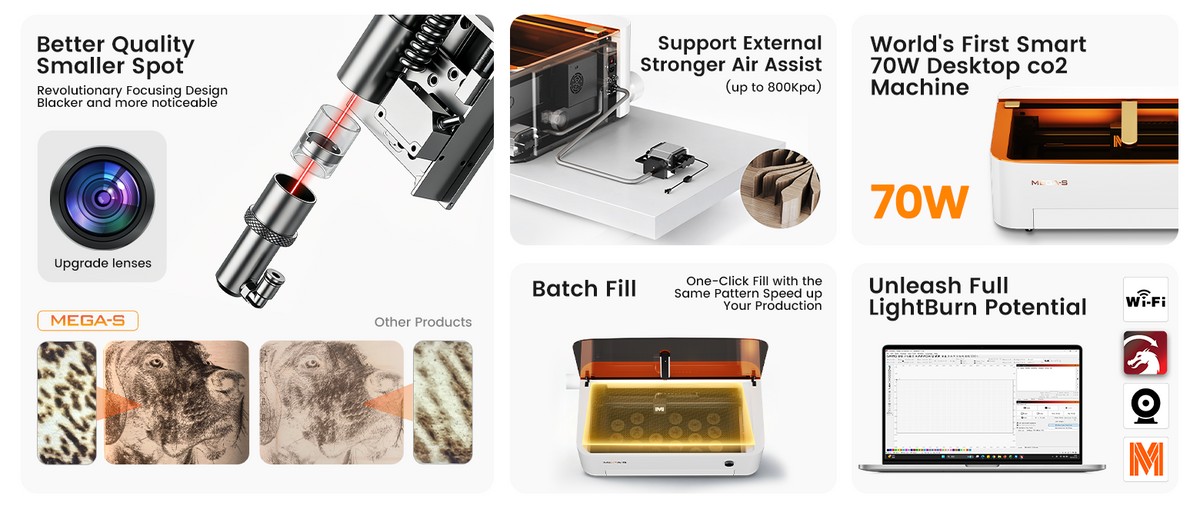
Its MEGA-S model has a 30.71 × 17.32-inch (780 × 440mm) bed and a 27.56 × 13.78-inch (700 × 350mm) working area. That gives users room for larger individual projects or multiple smaller pieces in one job.
The machine uses a 70W CO2 laser, with a stated spot size of 0.03–0.08mm. Its recommended engraving accuracy is 300 DPI, while it supports resolutions up to 1000 DPI.
Speed is another major consideration. MEGA-S reaches a maximum working speed of 600mm/s, with LightBurn support for speeds above 600mm/s. It also provides an external LightBurn connection, allowing users to connect through the dedicated cable and work within a familiar design workflow.
Autofocus and visual alignment
One feature that can make a difference for beginners is autofocus. MEGA uses LiDAR-based ranging technology for automatic focusing, reducing the amount of manual adjustment required before a job.
Its visual laser path alignment system is designed to simplify setup, with the manufacturer stating that alignment can be completed in about five minutes.
That matters when you're moving between different materials or running several jobs during the day. Less setup time means more time actually spent making products.
Large projects and batch production
The 700 × 350mm working area is useful when a project is too large for a small desktop engraver. It can also accommodate multiple smaller pieces at once.
MEGA includes a panoramic camera with 8 MP image resolution for intelligent batch filling. The system can recognize multiple objects and arrange engraving layouts to make better use of the available workspace.
For businesses producing personalized products, that kind of workflow can be more valuable than simply having a higher laser wattage.
Cutting capability
The MEGA is designed for stronger cutting performance as well. Its stated capabilities include cutting acrylic up to 20mm and basswood up to 18mm, depending on material and processing conditions.
The machine also uses a long-focus lens and external air pump, with Monport stating that cutting performance can improve by up to 25%.
Actual results can vary with material type, thickness, composition, focus, speed, power settings, and the number of passes, so these figures should be treated as machine capabilities rather than guaranteed results for every material.
Exhaust and Safety Features Matter

A laser machine should not be judged by engraving speed alone. Smoke, dust, heat, and material byproducts are part of laser processing, which makes proper ventilation and extraction important.
The MEGA has an exhaust system with nine fans and an exhaust capacity of more than 500 CFM. Its airflow design creates negative pressure inside the enclosure to help reduce the escape of fumes.
It also includes six door detection sensors and a laser leakage prevention design. The enclosed guide rail system helps protect the rails from dust contamination and supports smoother long-term operation.
The touchscreen control system supports touch, rotation, and press functions, giving beginners a more straightforward way to interact with the machine.
If you are considering a CO2 laser for regular production, prioritize proper enclosure, extraction, interlocks, ventilation, and manufacturer safety instructions—not just wattage or speed.

Is a 70W CO2 Laser Engraver Good for Beginners?
A 70w co2 laser engraver can be suitable for a beginner, but it is not necessarily the simplest starting point.
The bigger machine size, stronger laser, ventilation requirements, material testing, focusing, maintenance, and software setup all require a learning period. Someone who only wants to engrave occasional small wooden gifts may not need this level of equipment.
On the other hand, a beginner planning to build a serious product business may appreciate having more working space and cutting capability from the start.
The key is to choose the machine based on the work you actually expect to do, rather than buying the highest wattage available.
What Should You Look For in a CO2 Laser Engraver?
When comparing machines, look beyond the laser power.
Consider the working area first. If you frequently make large signs or multiple products at once, a larger bed can save considerable setup time.
Next, look at focus accuracy, motion speed, software compatibility, exhaust capacity, cooling, safety sensors, and maintenance requirements.
For business use, features such as autofocus, camera positioning, batch processing, and passthrough functionality can become especially useful because they affect the entire workflow rather than just the engraving itself.
A 70w co2 laser engraver with a large work area and production-focused features may therefore be more useful than a higher-powered machine with a smaller or less convenient workspace.
Key Takeaways
-
A CO2 laser engraver uses a focused CO2 laser beam to engrave and cut suitable materials.
-
CO2 machines are particularly effective for wood, acrylic, leather, paper, fabric, cork, rubber, and glass engraving.
-
Laser power affects cutting capability, but power alone does not determine engraving quality.
-
A 70w co2 laser engraver can provide a useful balance between detailed engraving and stronger cutting.
-
The Monport MEGA-S provides a 700 × 350mm working area, 70W CO2 laser power, up to 600mm/s working speed, autofocus, camera-assisted batch filling, and a nine-fan exhaust system.
-
Beginners should pay close attention to safety, ventilation, material compatibility, software, and maintenance before purchasing.
Conclusion
Knowing what is a CO2 laser engraver makes it easier to understand why these machines are so widely used for personalized products, signs, crafts, and small-scale manufacturing. They combine a focused laser beam with computer-controlled movement to turn digital designs into physical engravings and cuts.
For users who need more workspace and cutting power, a 70w co2 laser engraver can be a practical step beyond smaller machines. The Monport MEGA-S adds a 700 × 350mm working area, 70W CO2 laser, up to 1000 DPI resolution, 600mm/s maximum working speed, LiDAR-based autofocus, visual alignment, batch processing, AutoPassthrough, and a 500+ CFM nine-fan exhaust system.
If your goal is to create cleaner, more consistent projects and spend less time fighting with setup, choose a machine based on your actual materials, project sizes, production volume, and workflow—not simply the biggest wattage number.
Frequently Asked Questions
What is a CO2 laser engraver used for?
A CO2 laser engraver is mainly used to engrave and cut materials such as wood, acrylic, leather, paper, fabric, cork, rubber, and glass. It is widely used for personalized products, signs, decorations, packaging, and small-batch production. (Boss Support Hub)
How does a CO2 laser engraver work?
A CO2 laser engraver electrically excites gas inside a laser tube to create an infrared beam. Mirrors direct the beam to a focusing lens, which concentrates it onto the material while computer-controlled movement follows the digital design.
Can a CO2 laser engrave metal?
A standard CO2 laser is generally not the best choice for engraving bare metal because its wavelength is poorly suited to direct processing of many untreated metals. CO2 systems can work with certain coated or treated surfaces, while fiber lasers are generally preferred for direct metal marking.
What can a 70W CO2 laser cut?
A 70W CO2 laser can cut a range of non-metal materials, with the actual thickness depending on the specific material and machine settings. The Monport MEGA-S is specified to cut acrylic up to 20mm and basswood up to 18mm under appropriate conditions.
Is a 70W CO2 laser engraver good for beginners?
Yes, a 70w co2 laser engraver can be a good choice for beginners who plan to work on larger projects or build a small production business. However, beginners should be prepared to learn proper focusing, software operation, material testing, ventilation, and safe machine operation.





