


Monport VS Competitors

Monport vs BOSS vs OMTech Laser: Choosing the Right 40w CO2 Laser Engraver for Your Small Business
Choosing a 40W CO2 laser? Compare OMTech vs Monport vs BOSS CO2 laser for precision, features, and price. Learn which machine suits beginners, small businesses, or industrial users. Find the right laser for your engraving needs.
Read moreMonport VS Competitors

Monport vs OMTech: Choosing the Right 40W CO2 Laser Engraver for Wood - Which one is better?
This guide compares OMTech vs Monport to help buyers choose the right laser engraver. Learn key differences in performance, usability, safety, and value, plus how Monport vs xTool fits into modern engraving needs.

Monport 40W vs Omtech 40W: A Comparison of Customer Service Excellence
This Monport vs Omtech comparison highlights 40W CO2 laser engravers for beginners. Monport offers superior cooling, connectivity, software, and customer support, making it the better choice for hobbyists and small businesses.

Cutting Through Choices: Glowforge Plus vs. Monport 40W Pro – Exposing the Differences
In this blog post, we compare the Glowforge Plus and Monport 40W Pro laser engravers to help you decide which machine fits your creative needs. While both offer similar power and capabilities, the Monport 40W Pro excels in portability, precision, and user-friendly software. Additionally, it boasts better customer support and transparency compared to Glowforge. Join us as we explore their features and help you make an informed choice for your projects.

Is The Monport GP30 Pushing The Omtech 30W Fiber Laser Cutter Out Of The Market?
The Monport GP30W Fiber Laser Engraver outshines the Omtech 30W Fiber Laser in multiple aspects, including speed, design, and user-friendly features. With a sleek, compact design, electric lifting mechanism, and faster engraving speed, the Monport GP30 offers a more efficient and affordable option, pushing Omtech out of the competition.

10 Crucial Things To Consider Before Buying An OMTech 60W Laser
What is a galvo laser and why is it so fast? This guide explains laser galvo technology, how galvo lasers work, and where uv galvo laser systems are used for precise and efficient marking applications.

Monport 55W VS OMTech Polar 50W Desktop Laser Cutter, Who Leads the Race?
Explore Monport ONYX 55W vs OMTech Polar 50W laser cutters. Discover Monport laser reviews, power, autofocus, safety, and customer service for smarter buying decisions.

Diode Lasers Vs Monport K40 Lightburn Lasers
The movable worktable of Monport K40 laser is equipped with a stable clamp for fixing irregular shaped objects and a ventilation horizontal plate for fixing regular shaped products. The engraving of cylinder and other irregular shaped materials can be realized by taking down the movable workbench, while the diode engraving machine usually needs to use a lifting device to expand the engraving space.

Monport Laser Cutter VS Cricut : Should You Buy a Laser Engraver?
Explore the differences between the Cricut Maker and laser cutting machines like the Monport 40W Pro. While Cricut excels in cutting paper, vinyl, and fabric with a blade, laser cutters offer precision and versatility, capable of handling thicker materials like wood and acrylic. Laser engraving machines provide greater accuracy and a wider range of applications, making them ideal for detailed designs and professional projects. Discover which machine best suits your crafting needs!

Laser Safety Window Material: Polycarbonate Vs Acrylic
This guide explains laser protection window materials, including laser safe acrylic, laser safety acrylic sheet, and laser safe glass. Learn how laser safety windows work, compare materials, and choose the right laser protective window for safe operation.
What Cricut Can't Do But Monport Can
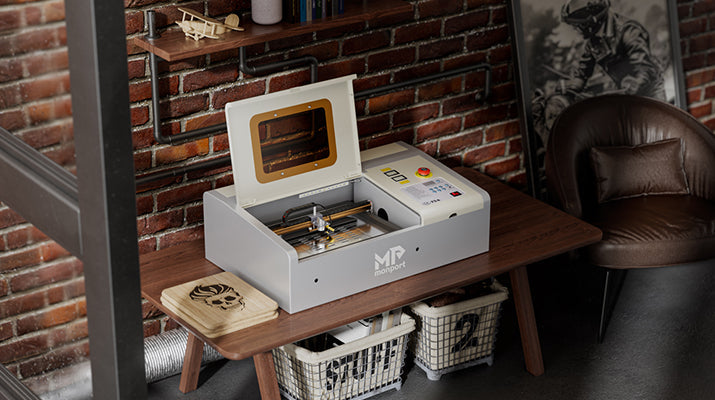
This blog aims at comparing the difference between Cricut machine and Monport K40 laser engraver. In this article we focus on the similarities and differences between Cricut and Monport. If you are a craft lover and really like Cricut machines, then Monport's laser engraving mode will greatly increase your productivity and working scope. 1. What is Cricut Cricut is a brand of cutting machines that working with rotary blades or knife blades for cutting virtually any fabric or thicker materials up to 2.4 mm. Cricut products make it easy to create just for fun, for friends & family, or even for a small business. make happiness in minute. 2. Cricut vs Monport K40 Cricut and Monport are totally different kinds of cutting machines. The biggest difference between them is the cutting method. A Cricut machine uses a computer-controlled blade, while a Monport machine emits laser from a laser beam to cut and engrave. A Cricut machine is more likely a printer, which is portable and small, but just for fun and hobby. Monport K40 is not only for hobby but also for professional needs. 3. Why K40 is more expensive Laser engraving machines are far more expensive than your typical desktop craft cutters like Cricut. Not only do they use costly laser, but when parts need to be replaced or when their brakes broken down, the replacement parts are more expensive as well. The other features also cost more: User-friendly Control Board Equipped with two LCD displays including laser power supply and cooling water temperature, it keeps you updated when the machine is working. High Precision Professional laser system brings stability and reliability. Dual Workbed A stabilizer clamp to hold irregular-shaped objects in place and a vented level board for regular-shaped products, giving you more options. Built-in Ventilation Integrated fan to boost laser performance, improve ventilation, and reduce noise. A exhaust port creates a safe work environment. Water Cooling System Fast and easy set-up cooling system including compact water pump and built-in hoses can help make the machine work smoothly and consistantly. 4. Who perfers Monport K40 Anyone who are interested in engraving even some new beginners. Small business owners Craft makers 5. About Materials Maximize the magic of Cricut Maker capabilities with genuine leather, heavy chipboard, balsa wood and others. Keep in mind that with Cricut machines not every model from this manufacture is capable of engraving. The Cricut Maker can cut basswood, balsa wood, as well as wood veneer. But not totally cut through the wood, if the thickness is more than 1/8 inch, the result should be very terrible. Wood is more suitable for CO2 machines. 6. Why use laser The laser light source is the core component of laser engraving machine. The characteristics of the light source determine the material effect of the laser machine to achieve engraving, and the energy level has a significant impact on the depth and speed of the engraving. That light is focused in the tube through the laser output window, through three mirrors and finally through a lens. The beam directly out of the tube is powerful enough to burn organic materials. This process creates heat, lots of heat. This is why all Co2 Laser use water cooling to maintain a reasonable operating temperature in the tube to prolong the life of the tube. Typical power outputs for Co2 Lasers range from 30w to 150w for home use. Monport 40w laser engraving machine is a best choice for new beginners. 7. About software Monport use LaserDRW, which is very easy to use. It works on Windows 7,8,10,11 (64/32 bit),XP, 2000 and Vista and compatible with Shenzhouyike. It also supported with BMP, GIF, JPG, DXF, AI and other formats. 8. What else can I do by K40 Laser engraving machine is a very professional machine, it can be used not only for hobbies, but also for business use. You can carve your own design works or creative patterns on the raw materials and then sell and start a business. The Monport website provides many ready-made diy files that can be downloaded and used directly. The 40w machine takes up little space and can be used in school education or maker space.

Monport:The Great Glowforge Alternative
Glowforge machines are great for hobbyists, but Monport laser engraving machines excel in industrial and professional applications. With better affordability, higher power, faster speeds, and larger working areas, Monport offers cost-effective solutions for businesses seeking advanced laser engraving capabilities.