


Starting a small woodworking business can be exciting, but choosing the right equipment is often where things get complicated. If you plan to make wooden signs, ornaments, boxes, wall décor, personalized gifts, or small-batch products, laser wood cutting can give you the speed and consistency that hand tools alone may struggle to provide.
The challenge is finding a machine that fits your actual workload. The best desktop laser cutter is not necessarily the most powerful or most expensive model. It is the one that gives you enough cutting power, working space, speed, precision, and software flexibility for the products you actually plan to sell.
For a small business, that distinction matters. Buying too little can limit your product range, while buying far more machine than you need can unnecessarily increase your initial investment.
What Is Laser Wood Cutting?
Laser wood cutting uses a focused laser beam to heat and remove material along a programmed path. Instead of manually sawing every shape, you can create a digital design and let the machine follow the same path repeatedly.
This makes laser cutting particularly useful for businesses that produce personalized or repeatable products. For example, a seller making 50 identical wooden ornaments can use the same digital file for every piece while maintaining consistent shapes and dimensions.
Laser cutters can also engrave wood rather than cutting completely through it. This opens up additional products such as engraved signs, nameplates, wooden invitations, coasters, packaging, and decorative panels.
Why Small Businesses Use Laser Cutting for Wood

One of the biggest advantages of laser wood cutting is repeatability. Once you have tested the appropriate settings for a particular material, you can reproduce the design without manually measuring and cutting every piece.
Speed is another important factor. A business producing only a few personalized items may not need a high-speed machine, but production becomes very different when orders increase. A larger working area and faster processing can allow multiple pieces to be produced in one job.
There is also less physical cutting work involved. The operator spends more time preparing designs, selecting materials, checking results, and handling finished products instead of manually cutting every individual shape.
What Should You Look for in a Desktop Laser Cutter?
Choosing the best desktop laser cutter starts with your products rather than the machine itself. Think about what you want to sell, how thick your materials will be, how many pieces you expect to make each week, and how much workspace you have.
Laser Power
Laser power affects the machine's cutting capability and production speed. A lower-powered machine can be suitable for engraving and thinner materials, while higher-powered CO₂ systems are better suited to businesses that need stronger cutting performance.
However, more power is not automatically better. If your business mainly produces thin wooden ornaments and engraved signs, paying for significantly more power may not provide much practical benefit.
Working Area
The working area determines how large your projects can be and how many smaller pieces you can process in one setup.
For example, a business making 100 small wooden tags may benefit from a larger bed because several pieces can be arranged together. A larger working area can therefore improve workflow even when individual products are small.
Cutting Speed
Speed becomes increasingly important as order volume grows. A machine that works well for occasional projects may become frustrating when you need to produce dozens of products every day.
Still, maximum advertised speed should not be the only deciding factor. Cutting performance depends on the material, thickness, design, power settings, focus, and other factors.
Focusing System
Proper focus is essential for consistent results. If the laser is not correctly focused on the material, cuts may become less clean and engraving details may suffer.
For beginners, a convenient focusing system can make setup easier and reduce one more thing to worry about before starting a job.
Air Assist and Cooling
Air assist helps move smoke and debris away from the cutting area and can support cleaner cutting results. An adjustable system is especially useful because different cutting and engraving jobs may require different airflow.
Cooling is equally important for CO₂ laser systems. A water-cooled system helps manage the heat generated during operation, particularly when the machine is being used for longer production sessions.
Choosing the Best Desktop Laser Cutter for Your Business
The best desktop laser cutter depends heavily on your business model.
If you are starting with small personalized products, prioritize ease of use, reasonable workspace, software compatibility, and dependable cutting performance. If you already have regular orders, production speed and working area become much more important.
Software should not be overlooked either. A machine that works with familiar design and laser-control software can make the transition into production considerably easier.
For small businesses, connectivity can also matter. USB, Wi-Fi, and other data-transfer options give you more flexibility when moving designs from your computer or other devices to the machine.
A Practical Option: Monport Reno65 Pro
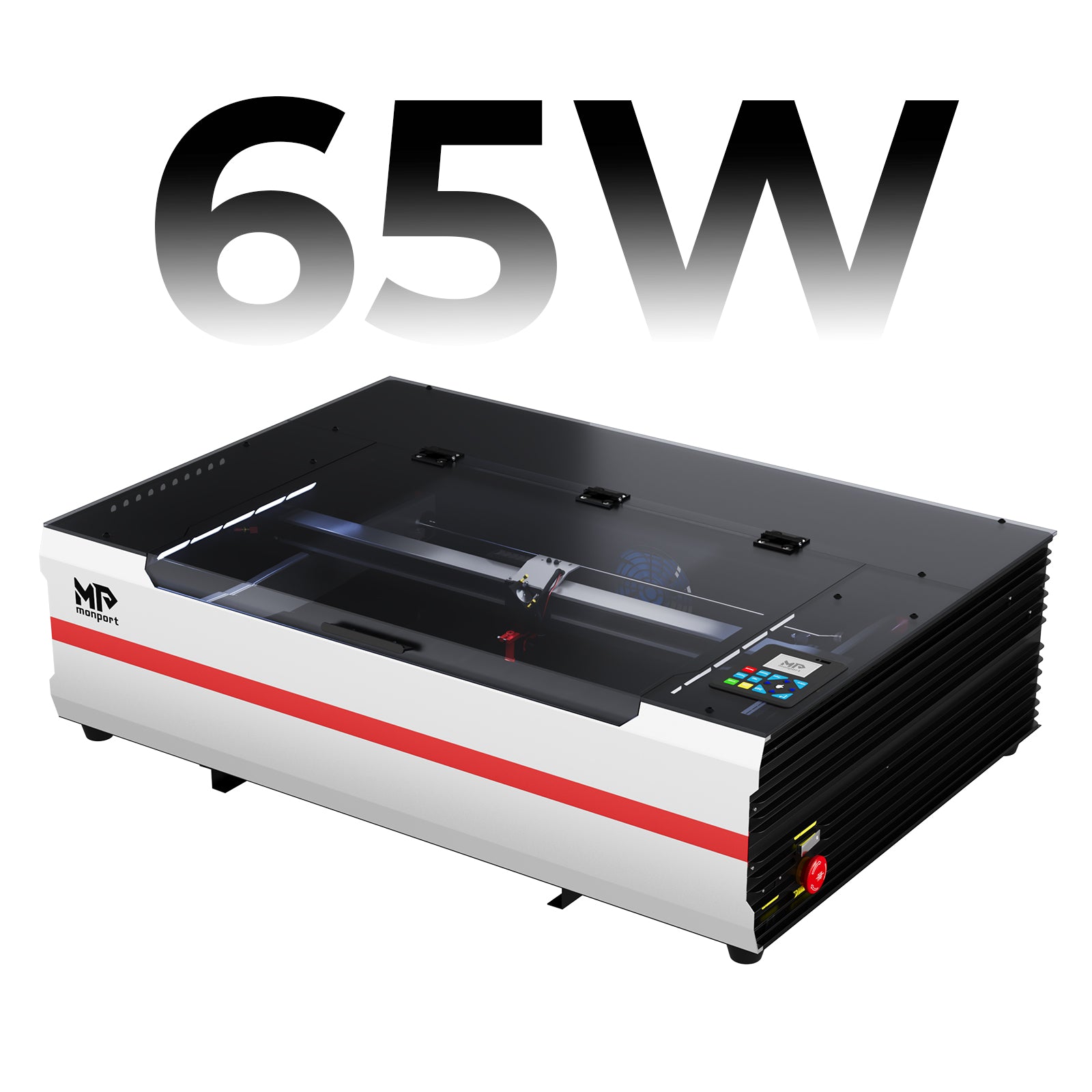
For businesses that want a stronger CO₂ system without moving into a much larger industrial setup, the Monport Reno65 Pro is worth considering.
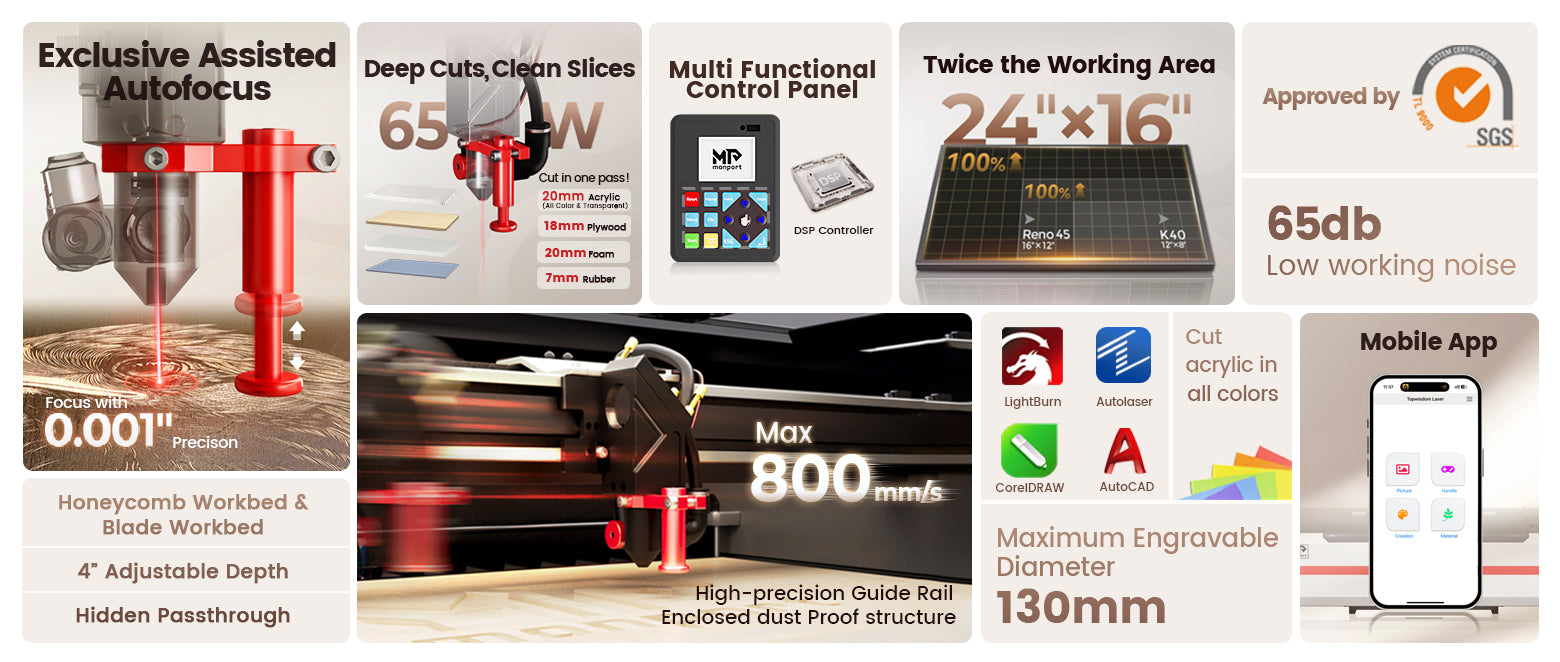
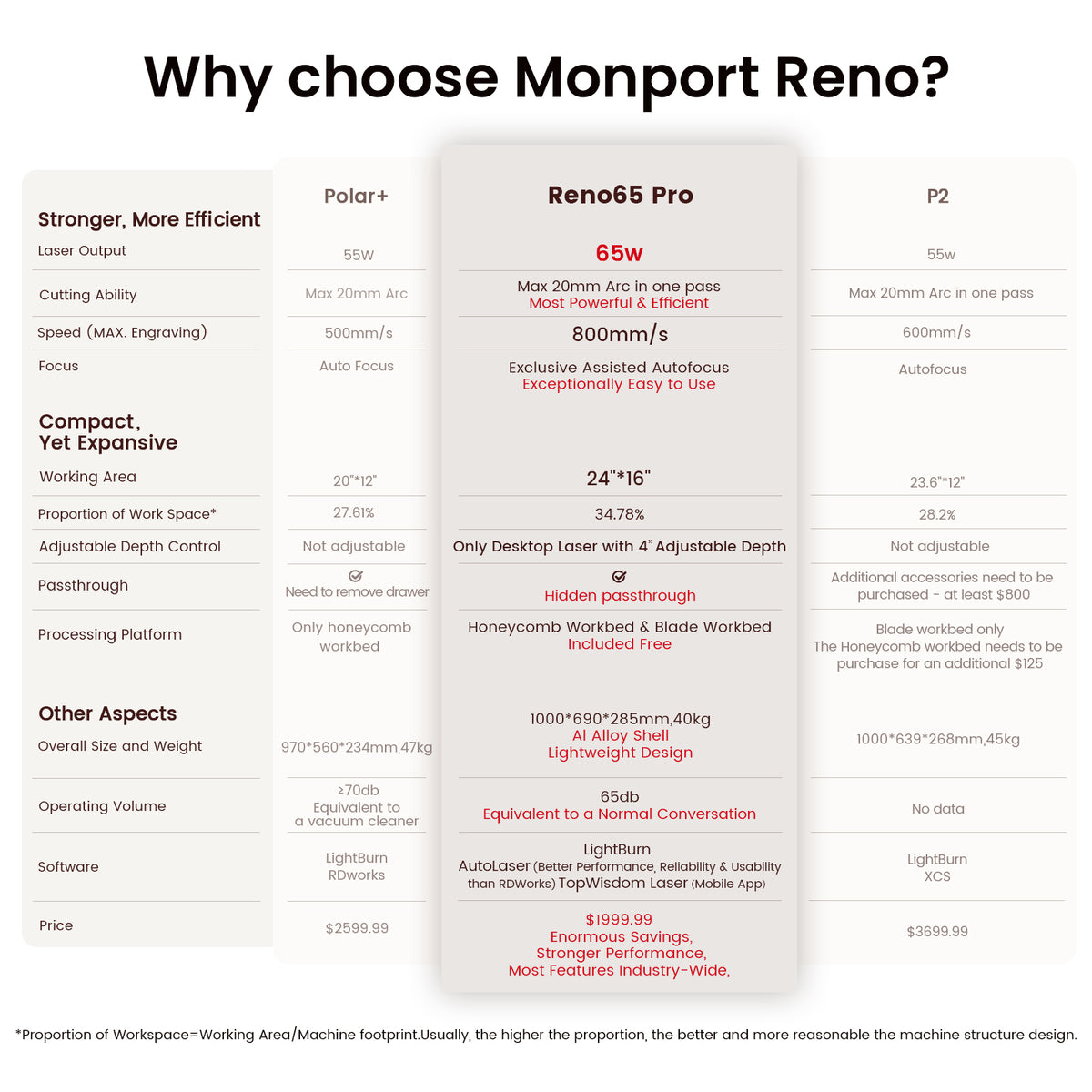
The Reno65 Pro has a 65W rated power and a 600 × 400 mm (24 × 16 in.) engraving area. Its maximum engraving speed is 800 mm/s (23.6 ips), giving small businesses considerably more room for batch production than a very compact entry-level machine.
Its 100 mm (4 in.) Z-axis movement is another useful feature when working with materials or projects that require additional height adjustment. The machine also includes a 640 × 7 mm front pass-through, which provides another way to handle longer workpieces.
Designed for Practical Small-Business Production
The Reno65 Pro uses magnetic-assisted focus, allowing users to complete focusing in a relatively quick process. That can be helpful when switching between materials or preparing multiple jobs throughout the day.
It also includes two working surfaces: a 640 × 440 mm honeycomb workbed and a 13-piece blade workbed. Having different work surfaces gives users more flexibility depending on the project.
The machine's adjustable air assist is rated at 18 L/min, while its cooling system uses an external water pump with a Q-MAX of 3000 L/H. These features are particularly relevant when cutting rather than simply engraving.
For businesses concerned about long production sessions, Monport lists an estimated laser service life of 4,500 hours. The maximum resolution is 1000 dpi, while the laser wavelength is 10600 nm.
Software and Connectivity
The Reno65 Pro is compatible with LightBurn, AutoLaser, and TopwisdomLaser, giving users several software options depending on their workflow.
It supports Windows, macOS, Linux, Android, and iOS, and data can be transferred through USB cable, Wi-Fi, or U-DISK.
The machine also features a 2.4-inch LCD display with a 320 × 240 resolution. From the control panel, users can handle functions such as movement, positioning, previewing, starting, pausing, and parameter adjustments.
For a small business owner who does not want every operation to depend on a computer, these controls can make everyday production more convenient.
Size and Workspace Requirements
Despite its desktop-oriented design, the Reno65 Pro is not a lightweight machine. It measures 1000 × 690 × 285 mm and has a net weight of 40 kg (88 lb.).
The package measures 110 × 80 × 44 cm and has a gross weight of 64 kg (142 lb.). Businesses should therefore plan a sturdy, dedicated workspace rather than treating it like a small desktop printer.
The recommended operating ambient temperature is 5–30°C (41–86°F).
Business Project Ideas
Personalized Wooden Signs are one of the most practical products for a small laser-cutting business. You can create house signs, room signs, business nameplates, wedding signs, and customized name plaques. A larger working area makes it easier to arrange several smaller signs in one batch.

Wooden Keychains and Bag Tags are another simple product to start with. These items use relatively small pieces of wood, making them suitable for personalized orders. Names, initials, logos, short messages, and simple shapes can be engraved or cut into the material.

Custom Wedding and Event Décor can also become a profitable niche. Businesses can produce table numbers, wedding invitations, cake toppers, place cards, centerpiece decorations, and welcome signs. Since many of these products are personalized, customers may be willing to pay more for custom designs.

Wooden Ornaments and Seasonal Decorations are especially useful for businesses that sell products during holidays. Christmas ornaments, Easter decorations, Valentine's Day gifts, and other seasonal pieces can be produced in batches using the same digital designs.

Personalized Gift Boxes and Packaging offer another opportunity. A small business can cut wooden boxes for jewelry, keepsakes, corporate gifts, or specialty products and add names, logos, or decorative patterns through engraving. This can also help a business create a more premium-looking product line.

Educational and Hobby Products are worth considering too. Wooden puzzles, alphabet pieces, model kits, geometric shapes, and craft components can be produced from digital designs. These products can appeal to parents, teachers, hobbyists, and other craft buyers.

For businesses that expect larger orders, the Monport Reno65 Pro's 600 × 400 mm (24 × 16 in.) engraving area can be useful for arranging multiple smaller pieces in a single job. Its 65W rated power and 800 mm/s maximum engraving speed also provide room for businesses that want to move beyond occasional custom orders and into more consistent small-batch production.
The key is to start with products that are simple to design, easy to package, and realistic to produce at your expected order volume. Once you understand which products sell consistently, you can gradually expand your catalog and experiment with more detailed designs.
Key Takeaways
-
Laser wood cutting can help small businesses produce customized and repeatable wooden products efficiently.
-
The best desktop laser cutter should match your products, material thickness, production volume, available workspace, and software preferences.
-
Laser power, working area, speed, focusing, air assist, cooling, and connectivity are all important when comparing machines.
-
The Monport Reno65 Pro provides 65W power, a 600 × 400 mm work area, 800 mm/s maximum engraving speed, 100 mm Z-axis movement, adjustable 18 L/min air assist, and multiple software and connectivity options.
-
A larger and more powerful machine only makes sense when its capabilities match your actual business needs.
-
Always test your chosen wood and follow appropriate operating, ventilation, and safety procedures.
Conclusion
Choosing equipment for a growing workshop does not have to mean buying the biggest machine available. The goal is to find equipment that can comfortably handle today's products while leaving enough room for your business to grow.
For entrepreneurs who need reliable cutting performance, a larger work area, and faster production, the Monport Reno65 Pro offers a combination of features designed around more demanding desktop workflows.
Ultimately, the best desktop laser cutter is the machine that fits your materials, products, workspace, and expected order volume. If you are planning to expand from occasional custom projects into consistent small-batch production, laser wood cutting can become a practical part of that workflow when the machine is chosen carefully.
Whether you are producing signs, ornaments, personalized gifts, boxes, or decorative pieces, focus on the machine's real capabilities rather than marketing claims. When your equipment matches your business, laser wood cutting becomes less about experimenting with a new tool and more about building a repeatable production process.
Ready to take your woodworking business further? Choose a laser cutter that gives you the workspace, cutting power, speed, and flexibility your growing orders actually require.
Frequently Asked Questions
What is the best laser cutter for cutting wood?
The best desktop laser cutter depends on the wood thickness, product size, production volume, and available workspace. CO₂ laser cutters are commonly considered when a business needs stronger cutting performance and flexibility across different materials.
What laser power is best for cutting wood?
The appropriate power depends on the type and thickness of wood you plan to cut. Higher-power CO₂ systems generally provide greater cutting capability, but businesses should choose power based on their actual materials and workload rather than simply selecting the highest wattage.
Can a desktop laser cutter cut thick wood?
Yes, but the practical thickness depends on the laser's power, wood type, density, moisture, design, focus, and cutting settings. Always test the specific material before producing customer orders because different types of wood can behave differently.
Is a CO₂ laser better for wood cutting?
CO₂ lasers are a strong option for businesses that need to cut and engrave wood while also working with materials such as acrylic. The right choice still depends on the products, materials, workspace, and production requirements of the business.
What should I look for when buying a desktop laser cutter for a small business?
Look at laser power, working area, cutting speed, focusing system, air assist, cooling, software compatibility, connectivity, physical size, and the machine's suitability for your expected workload. The best desktop laser cutter is the one that balances these factors for your specific business rather than simply having the highest specifications.





