


Starting a laser engraving business can begin with a surprisingly small idea: a personalized name sign, a wooden wedding gift, a set of engraved coasters. But once orders start coming in, the machine that was perfect for weekend projects may suddenly feel much less capable.
If you are comparing the best hobby laser cutter for a growing small business, the biggest question is not simply how much the machine costs. It is whether it can handle the materials, project sizes, production volume, and turnaround times your business is likely to need. For many makers, moving to a laser engraver co2 can be a practical next step because CO₂ systems are well suited to cutting and engraving many common non-metal materials, including wood and acrylic.


What Makes a Laser Cutter Good for a Small Business?
A good small-business laser cutter should do more than produce attractive engraving. It should help you make products consistently without turning every order into a long sequence of manual adjustments.
Think about your typical customer. If you sell personalized gifts, you might need to engrave ten names on wooden ornaments today and cut acrylic wedding signs tomorrow. If you make home décor, you may need larger workpieces or several smaller pieces in one batch.
That is where choosing the best hobby laser cutter becomes different from choosing a machine purely for hobby use.
A hobbyist might only make one sign at a time. A business owner needs to consider production time, material usage, repeatability, work area, exhaust, focusing, software compatibility, and how easily another order can be started after the previous one finishes.
Why Consider a CO₂ Laser?
Diode lasers can be an excellent starting point for engraving wood and other compatible materials, particularly when the business is small and the product range is limited. However, CO₂ systems become increasingly attractive when cutting, acrylic, larger projects, and repeated production are important.
A laser engraver co2 uses a CO₂ laser source that is particularly useful for many non-metal materials. Depending on the machine and material, this can include wood, acrylic, leather, rubber, paper, and glass engraving.
Clear acrylic is one particularly important consideration. Typical diode wavelengths do not interact with clear acrylic as effectively as CO₂ lasers, making CO₂ a more practical choice when clear acrylic products are part of your planned product range.
That can open up products such as acrylic signs, personalized displays, wedding décor, ornaments, lamps, awards, and decorative panels.
What Should You Look for Before Buying?
Working Area
Working area matters more than many first-time buyers realize.
A small bed may be completely adequate for keychains and coasters, but it becomes frustrating when a customer asks for a larger sign or when you want to arrange several products in one batch.
For business use, look at both the largest product you expect to make and the number of smaller products you want to process at once. More usable space can mean fewer reloads and better material utilization.
Cutting Capability
Engraving and cutting are not the same workload.
A machine may produce beautiful engraving while taking considerably longer to cut thicker materials. If your business depends on wooden signs, layered décor, acrylic products, boxes, lamps, or other cut-and-assemble projects, cutting performance deserves serious attention.
Speed
A machine's maximum engraving speed is useful, but don't judge production speed from that number alone.
Actual output also depends on acceleration, focusing, material thickness, the number of passes, loading and unloading, and how efficiently you can arrange multiple products on the bed. For a small business, finished pieces per hour are often more meaningful than a headline speed figure.
Software and Connectivity
Your workflow should not fight your software.
If you already design with tools such as LightBurn, check whether the laser supports your preferred workflow. Compatibility with common file formats such as SVG, DXF, JPG, JPEG, PNG, and BMP can also make moving from design to production easier.
Why the Monport MEGAS Is Worth Considering

For a small business that has outgrown a basic hobby setup, the Monport MEGAS takes a more production-focused approach while retaining features that make everyday operation easier.
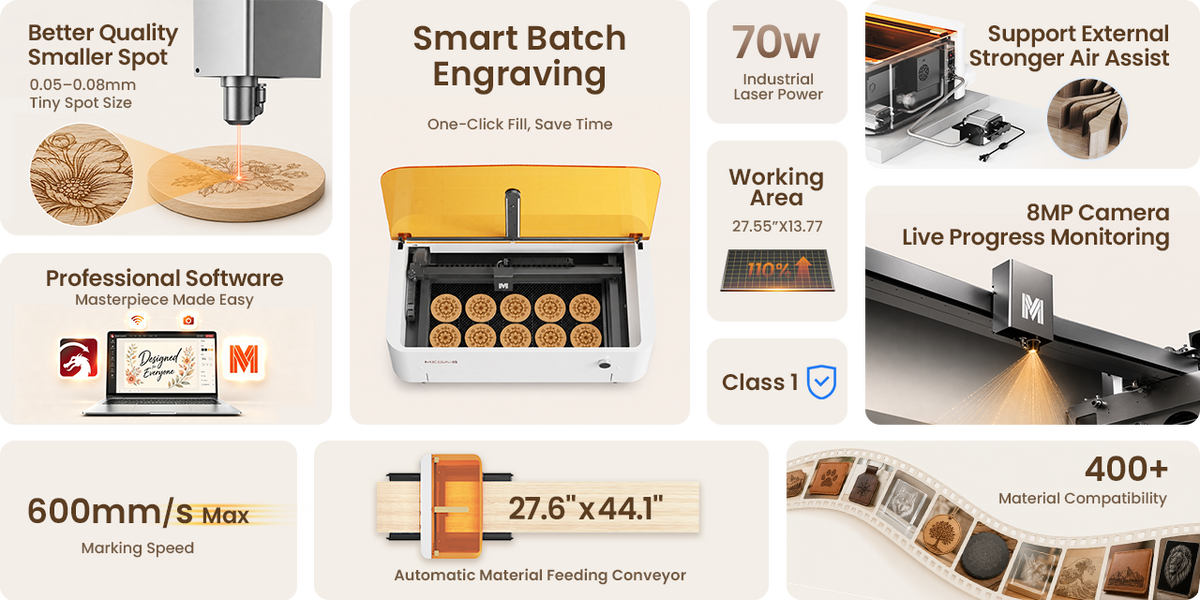
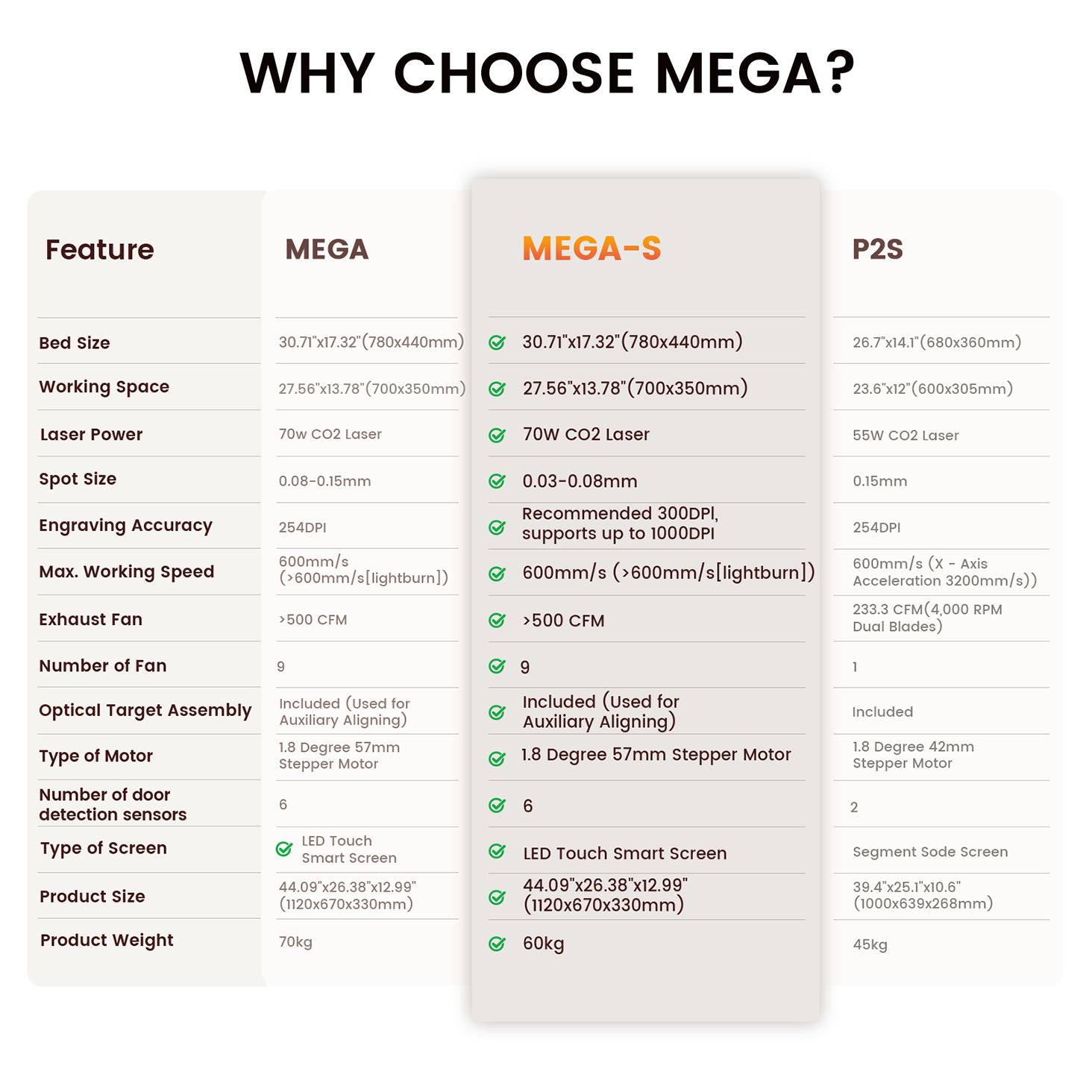
It uses a 70W CO₂ laser and has a 700 × 350 mm processing area, while the overall work area is 780 × 440 mm. That gives a maker considerably more room for larger projects or arranging multiple smaller products in one job.
The machine reaches a maximum engraving speed of 600 mm/s, with maximum X-axis acceleration of 1000 mm/s². For someone filling repeated orders, that combination can make a meaningful difference in workflow.
Autofocus Makes Setup Easier
One of the more practical features is its LiDAR distance measurement system.
The MEGAS uses LiDAR-based ranging for autofocus, automatically detecting the material position and thickness. Instead of repeatedly adjusting the focus manually, the system is designed to make setup quicker and more consistent.
For a small shop handling different materials throughout the day, that matters. Less time spent preparing the machine means more time available for actual production.
A Large Bed for Batch Production
The 700 × 350 mm processing area can be useful when making personalized products in batches.
For example, rather than engraving one set of wedding favors, you can arrange multiple pieces within the same job. The built-in panoramic camera has 8MP effective pixels and 8 MP image resolution, while its intelligent batch-filling function can recognize multiple objects and help arrange engraving layouts.
That is a feature that makes more sense when viewed through a business workflow rather than a specification sheet: fewer manual positioning steps can make repeated orders easier to manage.
AutoPassthrough for Longer Production
The MEGAS also includes AutoPassthrough, which is designed to transport stacked engraving materials for continuous processing.
This can be useful for businesses that move beyond one-off projects and begin receiving repeat orders. Instead of treating every piece as an entirely separate job, the workflow can be organized around continuous production.
Strong Cutting Performance
The MEGAS is specified to cut acrylic up to 20 mm and basswood up to 18 mm, depending on appropriate operating conditions and material setup.
Its long-focus lens and external air pump are designed to improve cutting performance by up to 25%. The included air assist operates with an air pump pressure of 50 kPa.
That combination can be useful for businesses selling products where cutting is just as important as engraving.
Fine Engraving Detail
The MEGAS uses a 1.5-inch focusing lens and is specified with a minimum laser spot diameter of up to 0.03 mm and resolution of up to 1000 DPI.
For detailed artwork, lettering, logos, and decorative patterns, fine focusing can help produce cleaner results. The machine also uses a linear guide rail system with enclosed guide rails, helping protect the rails from dust contamination during regular operation.
Exhaust and Workspace Considerations
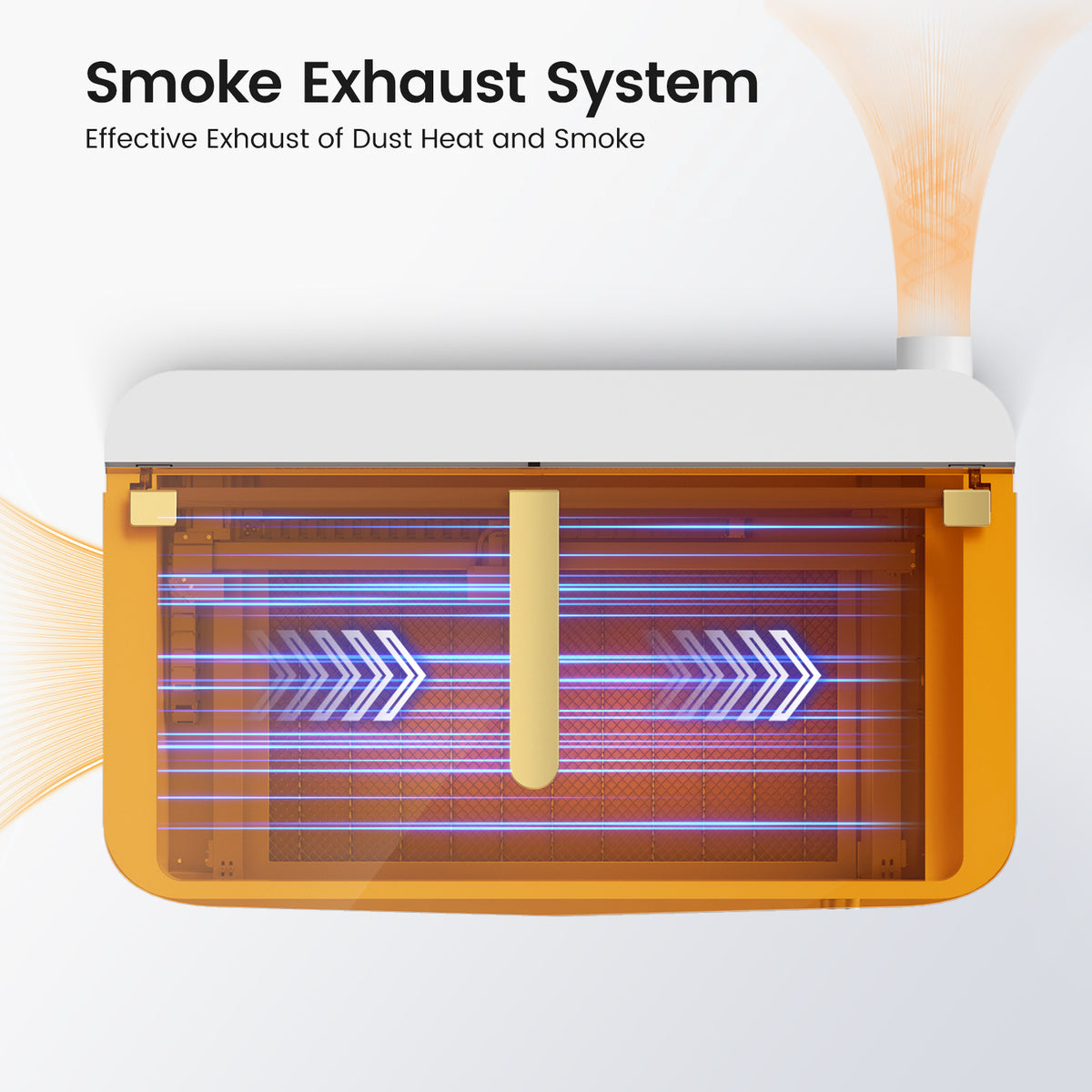
Laser cutting and engraving can produce smoke, dust, and fumes, so ventilation should be part of the buying decision from the beginning.
The MEGAS has an exhaust system with nine fans and an exhaust capacity greater than 500 CFM. Its airflow design creates negative pressure inside the machine to help minimize the escape of fumes.
The machine's listed operating noise is below 65 dB in a 50 dB environment.
It also includes a laser leakage prevention design, six door sensors, a built-in drawer for residue cleanup, and a smart touchscreen that supports touch, rotation, and press controls.
The listed laser safety information states compliance with IEC 60825 Class 1 safety standards and certification for Class 4. Users should still follow the manufacturer's operating instructions and appropriate laser-safety practices.
Turning a Laser Into a Small-Business Product Line
The machine itself does not create a profitable business. The product idea does.
A simple personalized gift business could offer engraved birthday signs, wedding gifts, holiday ornaments, name plaques, and wooden keepsakes.
A home décor business could focus on wall art, table decorations, lamps, decorative panels, and layered designs.
The advantage of a more capable CO₂ machine is that you can test several related products without immediately being restricted by a small working area or limited cutting capability.
If your current machine is slowing down orders or preventing you from accepting certain materials, consider upgrading before those limitations start affecting customer satisfaction.
MEGAS Specifications at a Glance
| Feature | Monport MEGAS |
|---|---|
| Laser type | 70W CO₂ |
| Overall work area | 780 × 440 mm (30.71 × 17.32 in) |
| Processing area | 700 × 350 mm (27.56 × 13.78 in) |
| Maximum engraving speed | 600 mm/s |
| Maximum X-axis acceleration | 1000 mm/s² |
| Maximum material height | 0–90 mm |
| Rotary engraving diameter | 0–60 mm |
| Z-axis travel | 30 mm |
| Air assist | Included |
| Air pump pressure | 50 kPa |
| Exhaust | >500 CFM |
| Exhaust fans | 9 |
| Focusing | LiDAR autofocus |
| Camera | Panoramic, 8MP × 1 |
| Image resolution | 8 MP |
| Software | M-Design Hub / LightBurn |
| Connectivity | Wi-Fi & USB |
| Supported systems | Windows / Mac |
| Supported files | SVG, DXF, JPG, JPEG, PNG, BMP, etc. |
| Cooling capacity | 1.2 L |
| Guide rail | Enclosed linear guide rail |
| Door sensors | 6 |
| Screen | LED smart touchscreen |
| Operating temperature | 10–30°C |
| Storage temperature | 10–45°C |
| Voltage/current | 220V / 10A or 220V / 5A |
Is a CO₂ Laser the Right Upgrade for You?
There is no single best hobby laser cutter for every business.
If you mainly engrave small wooden products and are still testing whether customers will buy them, a smaller diode machine may be enough. But if your plans include acrylic, thicker materials, larger designs, batch orders, and faster production, a laser engraver co2 is worth serious consideration.
The Monport MEGAS is particularly suited to makers who want to move from occasional projects toward a more organized production workflow. Its 70W CO₂ laser, 700 × 350 mm processing area, 600 mm/s maximum engraving speed, LiDAR autofocus, panoramic camera, AutoPassthrough, and nine-fan exhaust system are designed around that kind of work.
Most importantly, choose based on what you actually plan to sell. A machine that matches your materials, product sizes, order volume, and workflow will usually be more valuable than simply buying the machine with the biggest power rating.
Key Takeaways
-
The best hobby laser cutter for a small business should be judged by workflow, not just purchase price or laser wattage.
-
A CO₂ system can be a stronger choice when your business needs cutting, acrylic processing, larger projects, and repeat production.
-
The Monport MEGAS uses a 70W CO₂ laser with a 700 × 350 mm processing area and maximum engraving speed of 600 mm/s.
-
LiDAR autofocus, a panoramic camera, intelligent batch filling, and AutoPassthrough are designed to reduce repetitive production steps.
-
The machine is specified to cut acrylic up to 20 mm and basswood up to 18 mm, with air assist included.
-
Proper exhaust, enclosure use, material selection, and operating procedures remain important when using any laser system.
-
A CO₂ upgrade makes the most sense when your existing machine has become a bottleneck rather than simply because you want a more powerful machine.
Ready to take your laser business beyond one-off hobby projects? Choose equipment that gives you room to produce larger designs, handle repeat orders, and expand your product range with confidence.
Frequently Asked Questions
What is the best hobby laser cutter for a small business?
The best hobby laser cutter depends on your materials, product sizes, order volume, and budget. For businesses that need stronger cutting, acrylic processing, larger batches, and a broader non-metal material range, a CO₂ laser can be a better fit than a basic diode machine.
Is a CO₂ laser better than a diode laser for a small business?
A laser engraver co2 is generally better suited to small businesses that need regular cutting, acrylic work, larger production areas, and faster repeat production. A diode laser can still be the better choice for beginners working mainly with smaller engraved products.
What can a CO₂ laser engraver make for a small business?
A laser engraver co2 can be used for products such as personalized wooden gifts, acrylic signs, wedding décor, wall art, ornaments, lamps, decorative pieces, packaging components, and other compatible non-metal products.
Is 70W enough for a small-business CO₂ laser?
A 70W CO₂ laser can provide substantial cutting and engraving capability for many small-business applications. The Monport MEGAS is specified to cut acrylic up to 20 mm and basswood up to 18 mm, although actual results depend on the specific material, settings, and operating conditions.
Is a CO₂ laser worth it for a hobby business?
A laser engraver co2 can be worth the investment when the business is receiving enough orders to benefit from faster production, larger batches, broader material compatibility, and stronger cutting capability. If your work remains occasional and limited to small engravings, a less expensive machine may be sufficient.
Conclusion
Choosing the best hobby laser cutter is really about choosing the right production workflow for the business you want to build. If you only need occasional engraving, a smaller diode system can make sense. If you are starting to take larger orders, work with acrylic, cut thicker materials, or produce batches, a laser engraver co2 can give you much more room to grow.
The Monport MEGAS stands out as a business-oriented option with its 70W CO₂ laser, 700 × 350 mm processing area, 600 mm/s maximum engraving speed, LiDAR autofocus, 8 MP camera resolution, AutoPassthrough, intelligent batch filling, and nine-fan exhaust system.
A laser engraver co2 should not be chosen simply because it sounds more powerful. Choose it because its capabilities solve the problems your current workflow is already creating.
If your orders are growing, your products are getting larger, or your current laser is becoming the bottleneck, upgrading to a capable CO₂ system could be the next practical step for your small business.





