Makerspaces are collaborative environments where people can explore creativity, learn new skills, and turn ideas into practical projects. Equipped with tools for crafting, designing, and manufacturing, these spaces help beginners and experienced makers experiment with different materials and technologies.
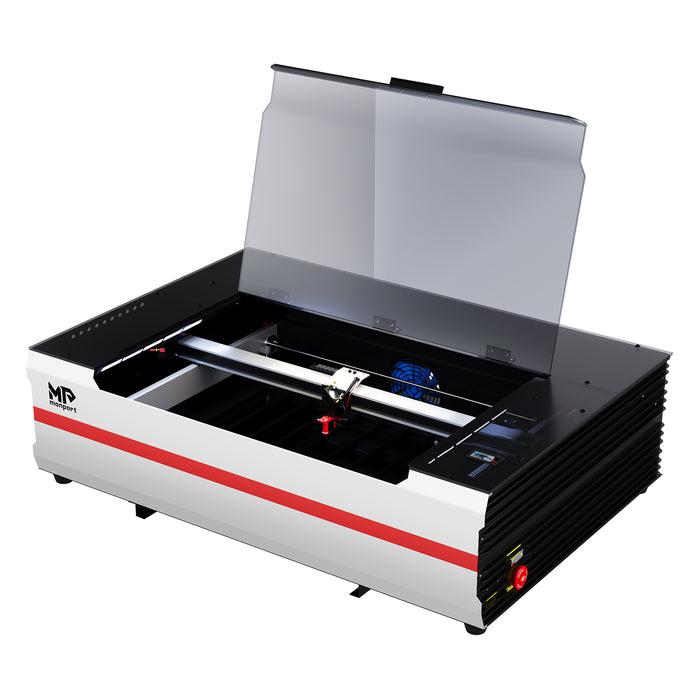
One popular technology is laser engraving, which allows users to personalize products, create detailed designs, and produce customized gifts. From decorative glass projects to laser engraved hip flasks, laser technology opens up creative possibilities for makerspaces, hobbyists, and small businesses. With suitable equipment, such as the Monport Reno65 65W Desktop CO2 Laser Engraver & Cutter, makers can explore a range of compatible materials while learning how to prepare designs and produce consistent results.

Understanding Laser Cut Glass and Glass Engraving
Laser cut glass is a keyword often used to describe glass projects involving laser technology. However, conventional CO2 laser machines generally mark or etch glass rather than cut it into separate pieces. Glass cutting requires an appropriate process and equipment designed for that purpose.
For makerspaces, laser engraving glass can be a way to personalize glassware, decorative panels, and ornaments. Depending on the glass and processing method, surface marking can create frosted-looking patterns, text, and decorative details.

Applications of Laser Cut Glass and Glass Engraving
Glass engraving offers several possibilities for creative projects:
-
Personalized glassware: Add names, messages, or decorative patterns to suitable glass items.
-
Decorative glass panels: Create custom designs for interior décor and artistic displays.
-
Glass ornaments: Produce personalized keepsakes for celebrations and special occasions.
-
Custom signage: Explore decorative lettering and designs on compatible glass surfaces.
Benefits of Glass Laser Engraving
Laser engraving can help makers reproduce designs consistently and personalize multiple items. Digital artwork makes it possible to experiment with lettering, patterns, and layouts without manually drawing each design.
However, glass can crack or break when exposed to unsuitable laser conditions. Before using the Monport Reno65 for a glass project, verify the appropriate marking method and material compatibility. The machine is a 65W CO2 laser engraver and cutter, and its suitability depends on the intended application and processing technique.
Creating Laser Engraved Hip Flasks

Laser engraved hip flasks are popular personalized gifts for weddings, anniversaries, birthdays, and corporate events. Adding a name, date, monogram, or meaningful message can transform a plain metal flask into a distinctive keepsake.
For makerspaces, engraving hip flasks also provides an opportunity to learn about artwork preparation, material compatibility, and positioning curved objects.
How to Personalize Laser Engraved Hip Flasks
Start by selecting a flask with a surface suitable for the intended marking method. Stainless steel is commonly used for personalized flask products, but the correct engraving process depends on the metal, surface finish, and laser system.
Clean the exterior according to the manufacturer's recommendations and prepare your design using compatible software. Keep text readable and position the artwork within the available engraving area.
Secure the flask so it cannot move during processing. Curved surfaces may require a compatible rotary attachment or another approved positioning method, depending on the flask and machine setup.
Before engraving the finished product, test the process on a suitable sample. A CO2 laser does not directly mark every bare metal surface in the same way, so verify whether a compatible marking compound or another approved process is required. After processing, inspect the markings and clean the surface according to the material and equipment instructions.
Uses for Laser Engraved Hip Flasks
Personalized hip flasks can be created for several occasions:
-
Wedding gifts: Add names, initials, or wedding dates to gifts for the wedding party.
-
Anniversary presents: Personalize a flask with a memorable date or short message.
-
Corporate gifts: Add approved logos or event details for branded merchandise.
-
Special occasions: Create customized keepsakes for birthdays and other celebrations.
These projects can also help makerspaces introduce participants to customized product design and small-scale production.
How to Start Laser Engraving With the Monport Reno65 65W CO2 Laser
Starting laser engraving in a makerspace involves learning the equipment, preparing suitable materials, and following a consistent workflow. The Monport Reno65 65W Desktop CO2 Laser Engraver & Cutter (24" × 16") with Magnetic Assisted Autofocus is designed for desktop engraving and cutting projects that benefit from a larger work area and adjustable material positioning.
Key Features of the Monport Reno65
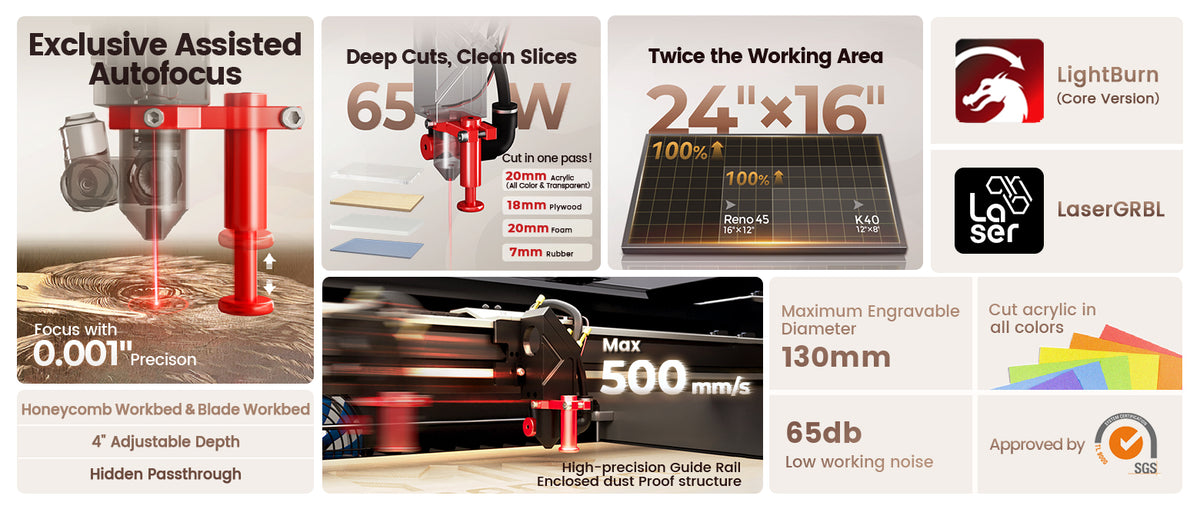
The Reno65 combines a 65W CO2 laser with a 24 × 16-inch (600 × 400 mm) engraving area, providing space for larger designs and multiple smaller items.
Its key specifications include:
-
Rated laser power: 65W
-
Maximum engraving speed: 500 mm/s
-
Maximum resolution: 1000 dpi
-
Z-axis movement: 100 mm
-
Focus mode: Magnetic-assisted focus
-
Work platforms: Honeycomb and blade workbeds
-
Air assist: Adjustable airflow, rated at 18 L/min
-
Connectivity: USB cable, Wi-Fi, and USB drive
-
Compatible software: LightBurn and LaserGRBL, according to the supplied specifications
-
Compatible operating systems: Windows, macOS, and Linux
The magnetic-assisted focusing system is designed to simplify focusing, while the adjustable air assist allows airflow to be adapted to suitable engraving and cutting applications. The machine also includes a front pass-through for compatible projects that extend beyond the standard work area. Always confirm the dimensions and operating requirements before using this feature.
Step 1: Familiarize Yourself With the Equipment
Read the machine manual and learn how its controls, work area, focusing system, and safety features operate. The Reno65 includes magnetic-assisted focusing to help users establish the correct focus efficiently.
If you are using a shared makerspace, follow its training and operating procedures before beginning a project.
Step 2: Learn the Design Software
The Reno65 specifications list LightBurn and LaserGRBL as compatible software options. Confirm the appropriate software version, controller configuration, and operating system requirements before setting up your workflow.
Practice importing artwork, adjusting text, arranging objects, and setting the engraving area. Begin with simple designs before moving on to detailed photographs or complex patterns.
Step 3: Prepare Your Materials
Choose materials specifically approved for your machine. Clean the surface and check for coatings, adhesives, or other treatments that may affect processing.
CO2 laser engravers are commonly used for suitable wood, acrylic, and other compatible non-metallic materials. Glass and metal require additional consideration because the result depends on the material and marking method. Verify compatibility before attempting to engrave glassware or metal hip flasks.
Step 4: Create Your Design
Prepare your artwork at the correct size for the object. Use readable lettering and suitable contrast, especially when engraving small items such as hip flasks.
The Reno65's 600 × 400 mm work area provides flexibility for arranging larger designs or multiple items, provided they fit securely and remain within the machine's operating limits.
Step 5: Configure and Test the Laser
Position the material securely and follow the manufacturer's focusing and setup instructions. Select the appropriate parameters based on the machine, material, and project.
Run a test on a suitable sample whenever possible. Testing helps identify problems with contrast, detail, cutting depth, and positioning before processing the final item.
Step 6: Complete the Engraving
Operate the machine according to its safety instructions and monitor the process. Use the required enclosure, exhaust ventilation, and other protective measures. Never leave a running laser unattended.
Once the job is complete and the material is safe to handle, inspect the finished design and clean the surface using an appropriate method.
Step 7: Inspect and Finish Your Project
Check the engraved design for consistency, clarity, and alignment. For glass projects, inspect for cracks or damage. For metal flasks, ensure the marking process is appropriate for the material and the exterior is suitable for its intended use.
Careful inspection helps makerspaces maintain quality while developing repeatable production methods.
Tips for Successful Makerspace Laser Projects
Whether you are exploring laser cut glass, creating laser engraved hip flasks, or experimenting with other DIY laser projects, these practices can improve your workflow:
-
Choose compatible materials: Verify the material and machine specifications before processing.
-
Prepare artwork carefully: Check the size, contrast, and alignment of each design.
-
Use the right settings: Adjust suitable parameters for the material and desired result.
-
Test before production: Use appropriate samples to evaluate settings and results.
-
Secure your workpiece: Prevent movement that could affect engraving accuracy.
-
Follow laser safety procedures: Use appropriate ventilation, machine safeguards, and approved operating practices.
-
Keep records: Document successful settings and material combinations for future projects.
Key Takeaways
-
Makerspaces help people learn and experiment with laser engraving technology.
-
Glass engraving can create decorative and personalized designs, but ordinary CO2 laser machines should not automatically be described as glass-cutting machines.
-
Laser engraved hip flasks are useful projects for personalized gifts and promotional products, but bare-metal compatibility must be verified.
-
The Monport Reno65 offers a 65W CO2 laser, a 600 × 400 mm work area, magnetic-assisted focusing, and adjustable air assist.
-
Testing, correct software setup, and laser safety are essential for reliable results.
Conclusion
Makerspaces provide an excellent environment for exploring creativity, developing practical skills, and experimenting with laser technology. Projects involving laser cut glass and laser engraved hip flasks demonstrate how digital designs can be used to create personalized gifts, decorative products, and customized merchandise.
The Monport Reno65 65W Desktop CO2 Laser Engraver & Cutter (24" × 16") with Magnetic Assisted Autofocus offers a spacious work area, adjustable air assist, and convenient focusing features for compatible engraving and cutting projects. By selecting appropriate materials, preparing designs carefully, and testing settings before production, makers can develop their skills and explore new creative possibilities.