




Laser Engraving & Cutting Materials

Engraving the Best Phone Cases: Why Monport 55W Onyx Is Better Than xTool CO2 Laser
When it comes to creating the best phone cases, the Monport 55W Onyx Desktop CO2 Laser outperforms the xTool CO2 laser in terms of precision, power, and ease of use. Whether you are engraving leather, plastic, or wood phone cases, the Monport laser ensures professional-quality results that make your custom designs stand out. With its advanced features and affordable price, the Monport 55W Onyx is the clear choice for anyone looking to produce high-quality engravings on phone cases.
Read moreLaser Engraving & Cutting Materials

Best CO2 Laser for Engraving: Creating the Perfect Wallet Phone Case
Engraving a wallet phone case is a fantastic way to add a personal touch to a functional accessory. With the Monport 55W Onyx Desktop CO2 Laser, you can achieve professional-quality results that make your designs stand out. As the best CO2 laser for engraving wallet phone cases, the Monport 55W Onyx offers precision, versatility, and value for money, making it a top choice for both beginners and professionals alike. Whether you’re engraving for personal use or looking to start a business, the Monport 55W Onyx delivers the power and accuracy you need to create stunning custom designs.

Desktop CO2 Laser an Essential Tool for Laser Engraving Waterproof Phone Cases
Enhance your waterproof phone case business with the Monport ONYX 55W desktop CO2 laser. Achieve precise, custom engravings that are both durable and stylish. With one-touch autofocus and multi-material compatibility, create unique designs that stand out while ensuring longevity and quality.

Fiber Laser vs CO2 Laser: Which is Better for Engraving Clear Phone Cases?
Wondering whether a fiber laser vs CO2 laser is better for engraving clear phone cases? Learn the differences between fiber and CO2 lasers, and why the Monport 80W CO2 Laser Engraver is the top choice for engraving precise, detailed designs on clear plastic cases with high resolution and durability.
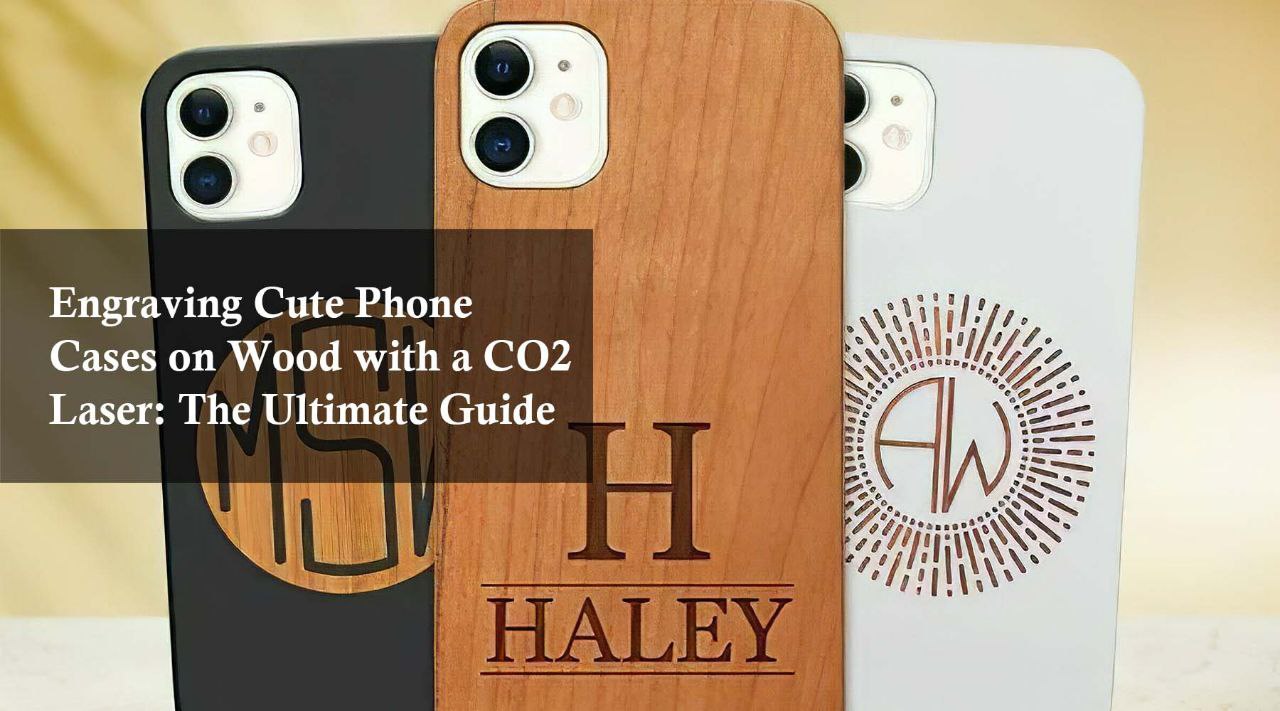
Engraving Cute Phone Cases on Wood with a Láser CO2: The Ultimate Guide
Discover how the Monport 40W laser CO2 engraver creates stunning custom designs on wooden phone cases. Perfect for engraving intricate, cute phone case patterns with high precision and speed. Learn why CO2 lasers are the best choice for crafting detailed, clean, and personalized wooden phone cases.

Why Monport CO2 Laser is the Better Choice over OmTech CO2 Laser for Leather Phone Cases
Looking to engrave leather phone cases? Learn why the Monport CO2 laser outperforms the OMTech CO2 laser in precision, speed, and safety. With superior engraving accuracy, advanced air assist, and LightBurn compatibility, Monport delivers higher-quality results for your leather projects at a better value.

How Much is a CO2 Laser Price for Creating Custom iPhone 16 Phone Cases?
When considering the CO2 laser price, the MONPORT ONYX 55W offers unbeatable value for both hobbyists and professionals looking to create custom phone cases. Its versatility, precision, and user-friendly features ensure that you can produce durable, unique cases that stand out from the rest. Whether you’re crafting cases for yourself or starting a business, the MONPORT ONYX 55W is a worthwhile investment for any creative endeavor.

The Art of Customizing iPhone 16 Phone Cases with a Laser Cutter CO2
Customizing an iPhone 16 phone case has never been easier with the help of a laser cutter CO2. The precision, versatility, and durability offered by the MONPORT ONYX 55W Desktop CO2 Laser Engraver make it the ideal tool for creating intricate, professional designs on phone cases made from a variety of materials. Whether you’re crafting unique cases for yourself or producing them for others, a laser cutter CO2 ensures that your designs will last and stand out.

The Beauty of Engraving Phone Cases for iPhone 16: Fiber Laser vs CO2 Laser
When it comes to engraving phone cases for iPhone 16, both fiber laser vs CO2 lasers offer their own advantages. The MONPORT ONYX 55W Desktop CO2 Laser is perfect for detailed engravings on wood, leather, and acrylic cases, making it ideal for those looking to create unique, custom designs. On the other hand, the Monport GI60 Fiber Laser Engraver excels at engraving metal and plastic phone cases with superior precision.

16 Phone Case Ideas and the CO2 vs Diode Laser Debate
When deciding between CO2 vs diode laser for your next project, especially if you’re working on 16 phone case ideas, the MONPORT ONYX 55W Desktop CO2 Laser Engraver is the superior choice. Its advanced features like autofocus, rotary axis compatibility, and high precision make it the perfect tool for creating intricate, high-quality designs on various phone case materials. Whether you're a DIY hobbyist or running a small business, the MONPORT ONYX 55W ensures you’ll produce professional-grade results every time.

A Guide to the iPhone 16 Pro Phone Case and CO2 Laser for Sale
In today’s fast-paced tech world, creating personalized items has never been easier or more accessible. Whether it's customizing a product like an iPhone 16 Pro phone case or starting a business with a CO2 laser for sale, there are limitless opportunities to stand out. This blog will guide you through the world of laser engraving and cutting materials, focusing on how tools like the Monport 90W Built-in Chiller CO2 Laser Engraver & Cutter can transform your creative ideas into reality. Monport 90W Built-in Chiller CO2 Laser Engraver & Cutter (36" x 24") Introduction to Laser Engraving Laser engraving has revolutionized the customization industry by allowing users to personalize items with precision. A CO2 laser engraver can cut and engrave on various materials, making it perfect for creating custom iPhone 16 Pro phone cases. These machines use a laser beam to etch, cut, or engrave materials such as wood, acrylic, plastic, leather, and more. Why Choose a CO2 Laser for Sale? Precision: A CO2 laser, like the Monport 90W CO2 Laser Engraver & Cutter, ensures clean cuts and intricate designs. Efficiency: High-speed processing reduces time spent on manual cutting and engraving tasks. Versatility: CO2 lasers are ideal for working on different materials, giving you a wide range of creative possibilities. The Monport 90W Built-in Chiller CO2 Laser Engraver & Cutter The Monport 90W CO2 laser cutter is an all-in-one machine designed to make engraving and cutting tasks easier. This machine comes with a built-in chiller, ensuring the laser tube is adequately cooled during prolonged use. With a cutting area of 36" x 24", it offers plenty of space to work on large items. Key Features of the Monport 90W CO2 Laser: Feature Description Power 90W CO2 laser for fast and precise engraving Built-in Chiller Ensures laser tube longevity and prevents overheating Cutting Area 36" x 24", providing enough room for larger materials Supported Materials Wood, acrylic, leather, fabric, plastic, and more Software Compatibility Compatible with common design software like CorelDRAW This CO2 laser engraver is perfect for creating customized iPhone 16 Pro phone cases or starting a small business selling personalized products. Materials for Laser Engraving Understanding the types of materials you can engrave and cut is crucial when working with a CO2 laser. Below are some of the most common materials and their characteristics: Wood: A popular material for engraving due to its natural grain and finish. Engraving Depth: Varies based on the type of wood. Common Uses: Custom signs, phone cases, wooden gifts. Acrylic: Known for its glass-like clarity, acrylic is ideal for precise cuts and engravings. Engraving Depth: Shallow but clear cuts. Common Uses: Displays, decorations, and phone cases. Leather: Offers a unique texture for engraving, often used for luxury items. Engraving Depth: Varies based on the thickness of the leather. Common Uses: Wallets, phone cases, and fashion accessories. Plastics: Ideal for engraving lightweight, durable items. Engraving Depth: Can range from shallow to deep depending on the plastic. Common Uses: Gadgets, phone cases, signage. These materials are perfect for creating personalized iPhone 16 Pro phone cases, allowing you to experiment with different textures and designs. Benefits of Laser Engraving and Cutting Laser engraving offers several advantages over traditional cutting and engraving methods, especially when using a powerful CO2 laser like the Monport 90W. High Precision: Achieve detailed designs with minimal effort. Fast Production: Automated engraving speeds up production time. Minimal Waste: Lasers produce less waste than traditional cutting methods. Wide Application: Use on various materials like acrylic, leather, and wood. FAQs About CO2 Laser and Custom iPhone Cases Q1: Can the Monport 90W CO2 Laser engrave on phone cases? Yes, the Monport 90W CO2 Laser can engrave on a variety of materials, including those used in iPhone 16 Pro phone cases, such as plastic, leather, and wood. Q2: Is the Monport 90W laser safe for beginners? Yes, with its user-friendly interface, built-in chiller, and comprehensive user manual, the Monport 90W laser is safe for both beginners and professionals. Q3: What is the lifespan of the Monport 90W laser tube? The laser tube has a lifespan of around 8,000-10,000 hours, depending on the frequency of use and maintenance. Q4: Can I create a business using this laser machine? Absolutely! With the right marketing, you can start a business offering custom phone cases, gifts, and more. Important Details to Remember When purchasing a CO2 laser for sale, it’s essential to consider: Power: Higher power (like 90W) provides better cutting and engraving capabilities. Cooling System: A built-in chiller prevents the laser from overheating and extends its life. Material Compatibility: Ensure the laser can handle the materials you intend to work with, such as plastics, leather, and wood. Software: Check the compatibility of the machine with popular design software like CorelDRAW and AutoCAD. Takeaways A CO2 laser for sale, like the Monport 90W, offers immense versatility and precision, making it perfect for personalizing items such as an iPhone 16 Pro phone case. The Monport 90W has key features like a built-in chiller and a large cutting area, making it a reliable choice for both beginners and professionals. Understanding the types of materials you can work with—wood, acrylic, leather, and plastics—helps you maximize the machine's potential. Effortless Laser Marking with Monport Black Laser Marking Spray Looking to elevate your laser engraving projects? Monport Black Laser Marking Spray is the solution you’ve been waiting for. This high-performance aerosol spray is designed for use with CO2 laser engraving machines, ensuring easy and precise results with every application. Whether you're personalizing jewelry, customizing glassware, or serializing tools, this spray provides you with high-contrast, permanent marks that stand out. The Benefits of Using Black Laser Marking Spray Compatible with CO2 Laser Engraving Machines Designed for use with CO2 laser engraving machines of 25 watts and above, Monport Black Laser Marking Spray is the ideal companion for your engraving needs. It transforms your metal surfaces into highly legible, permanent black marks after laser engraving, making it perfect for a wide range of applications from metalwork to custom art pieces. Permanent, High-Contrast Marks When you apply Monport Black Laser Marking Spray, the result is a high-contrast, dark black mark on your metal surface that is permanent and durable. This spray works on various metals, including aluminum, stainless steel, and brass. The fine-grained formula ensures deep penetration into the metal, producing heat-resistant markings that will last for years, even under challenging conditions. Even and Powerful Application With the advanced spray technology in Monport Black Laser Marking Spray, you can achieve a smooth, even application every time. The 14 oz can features an anti-clog nozzle that guarantees no blockages, making the spray process both easy and efficient. The nanoparticle formula delivers more coverage with a thinner coating, which results in a professional-quality finish for all your metal marking projects. Easy to Use and Quick Drying Using Monport Black Laser Marking Spray couldn’t be simpler. Just shake the can for 2 minutes, spray from a distance of 6 to 8 inches, and let the surface dry for 5 minutes. Once it’s dry, you’re ready to engrave, saving you valuable time. After engraving, rinse and wipe away the residue to reveal your crisp, dark black markings without any fuss. Effortless Cleanup and Maintenance After marking your metal pieces, simply rinse and wipe the surface to reveal your high-contrast engraving. The black laser marking spray ensures there is no residue left behind, so your workpieces remain clean and ready for immediate use. The easy cleanup means that you can maintain a smooth and efficient workflow, whether you’re working on a small DIY project or a larger-scale production. Why Choose Monport Black Laser Marking Spray? Monport’s Black Laser Marking Spray is a game-changer for anyone looking to create durable, precise, and high-quality laser marks on metal surfaces. Its compatibility with CO2 lasers, combined with its easy application and cleanup, makes it an indispensable tool for professionals and hobbyists alike. With Monport Black Laser Marking Spray, you can be confident that your metal engraving projects will have permanent, high-contrast results every time. Add this versatile spray to your toolkit today and experience effortless laser marking like never before! Conclusion Investing in a CO2 laser like the Monport 90W Built-in Chiller CO2 Laser Engraver & Cutter opens up a world of creative opportunities. Whether you want to create custom iPhone 16 Pro phone cases or embark on a business venture, the precision, speed, and versatility of a CO2 laser will help you achieve high-quality results every time. Now is the perfect time to explore the endless possibilities of laser engraving and cutting materials!

The Exciting World of Laser Engraving: Unlocking the Potential of Customization
In today's fast-paced world of technology and customization, personalizing items like an iPhone 16 Plus phone case has become increasingly popular. One of the most efficient and precise methods for this is through laser engraving. But before diving into your next creative project, it’s important to understand the tools involved. What is CO2 laser technology, and why is it such a versatile option for engraving and cutting? With the help of the Monport 100W CO2 Laser Engraver & Cutter, we’ll explore how CO2 lasers are used to transform everyday items like phone cases into works of art. Monport 100W CO2 Laser Engraver & Cutter (28" x 20") with Autofocus Introduction to Laser Engraving and Cutting Laser engraving and cutting have become essential tools in modern manufacturing, art, and even personal DIY projects. These technologies allow you to carve out intricate patterns, engrave designs, and cut materials with a level of precision that is unmatched by traditional methods. Key Points: Laser engraving refers to the process of using laser technology to etch or carve designs into the surface of a material. Laser cutting is the process of slicing through materials using a high-powered laser beam. One of the most versatile tools available for these purposes is the Monport 100W CO2 Laser Engraver & Cutter. This powerful machine can handle a variety of materials, including wood, acrylic, and leather, making it perfect for both professionals and hobbyists. What is CO2 Laser Technology? A CO2 laser is a type of gas laser that uses carbon dioxide as the lasing medium. The laser beam produced is highly concentrated and can cut through a wide range of materials with extreme precision. This makes CO2 lasers ideal for applications like engraving intricate designs on an iPhone 16 Plus phone case or creating custom woodwork. Key Features of CO2 Lasers: Wavelength: CO2 lasers typically operate at a wavelength of 10.6 micrometers, which is excellent for cutting and engraving non-metal materials. Versatility: These lasers can cut or engrave wood, plastic, leather, rubber, glass, and even some metals with the right setup. Precision: CO2 lasers can achieve a fine focus, allowing for detailed engraving on even the smallest surfaces, such as phone cases. Choosing the Right iPhone 16 Plus Phone Case for Laser Engraving When it comes to customizing an iPhone 16 Plus phone case with laser engraving, the choice of material is crucial. Not all cases are made from materials that are ideal for laser engraving, so selecting the right one can ensure a high-quality finish. Best Materials for Laser Engraving iPhone Cases: Silicone: A flexible and durable option, but may not always give the best engraving results due to its softness. Leather: Offers a classy and vintage look when engraved. Perfect for premium custom designs. Wood: Provides a natural and earthy aesthetic. Wood cases are popular for their unique grain patterns, which add character to the engraving. Pro Tip: Always test a small area of the phone case before starting a full engraving project to ensure the material responds well to the laser. Monport 100W CO2 Laser Engraver & Cutter: Your Best Friend in DIY Projects For anyone looking to personalize items or create custom designs, the Monport 100W CO2 Laser Engraver & Cutter is an excellent choice. This machine has advanced features, such as an autofocus system, that make it easy to achieve professional results even if you're just starting out. Key Features: Autofocus: Ensures that the laser stays properly aligned for the best possible results, even on uneven surfaces. Large Work Area: With a bed size of 28” x 20”, you have ample space to work on larger projects, from phone cases to intricate art pieces. Powerful Cutting Ability: At 100W, this machine can cut through thick materials like wood and acrylic with ease. FAQs: Frequently Asked Questions About CO2 Laser Engraving 1. What is a CO2 laser used for? A. CO2 lasers are used for cutting, engraving, and marking various materials, including wood, leather, acrylic, and glass. 2. Can I engrave my iPhone 16 Plus phone case with a CO2 laser? A. Yes, as long as the case is made from a material that is safe to engrave, like wood, leather, or certain types of plastic. 3. How do I maintain my Monport 100W CO2 Laser Engraver? A. Regular cleaning of the lens and mirrors, as well as proper ventilation, are crucial for maintaining the performance of your laser engraver. Important Details to Remember Safety First: Always wear protective goggles when working with lasers, and ensure your workspace is well-ventilated. Test Before Engraving: Always test a small area of the material to check how it reacts to the laser. Monitor the Process: Never leave your laser engraver unattended during operation to prevent accidents. Takeaways CO2 laser technology is incredibly versatile and can be used to create detailed engravings on a variety of materials. If you're looking to personalize your iPhone 16 Plus phone case, choose materials like leather or wood for the best engraving results. The Monport 100W CO2 Laser Engraver & Cutter is a powerful tool for both professionals and hobbyists, offering high precision, large work areas, and an autofocus feature for ease of use. Conclusion Laser engraving and cutting open up a world of possibilities for customization and creative projects. Whether you're looking to personalize an iPhone 16 Plus phone case or delve into professional-grade material cutting, understanding the power of CO2 lasers is key. With tools like the Monport 100W CO2 Laser Engraver & Cutter, you can unlock your creativity and achieve professional-quality results. Whether you're a seasoned professional or a DIY enthusiast, this powerful laser machine will make your projects stand out.

The Power of Laser Engraving for Custom Phone Cases
Laser engraving and cutting have become popular in creating personalized and professional designs for various materials. Whether you’re a hobbyist or a business owner, using the right equipment and understanding the differences between diode vs CO2 laser is essential, especially when customizing accessories like an iPhone 16 Pro Max phone case. In this article, we'll explore the benefits of laser engraving, compare diode vs CO2 lasers, and discuss how to choose the right materials for creating a unique phone case. Additionally, we'll introduce you to the Monport 150W CO2 Laser Engraver & Cutter (64" x 40"), which is an ideal machine for your engraving and cutting projects. Monport 150W CO2 Laser Engraver & Cutter (64" x 40") What is Laser Engraving and Cutting? Laser CO2 engraving is the process of using a laser to etch designs onto surfaces like wood, metal, glass, or plastic. Laser cutting, on the other hand, is when a laser beam cuts through materials to create specific shapes and designs. Both techniques are widely used in customizing products such as phone cases, signs, and jewelry. Diode vs CO2 Laser: What’s the Difference? When considering laser machines, two primary types of lasers dominate the market: diode lasers and CO2 lasers. Each type has its strengths and weaknesses, making it essential to understand their differences before starting your project. Feature Diode Laser CO2 Laser Wavelength 445–450 nm 10.6 µm Power Output 1–10W (common for engravers) 40–150W or more Materials Best for soft materials (wood, leather, plastic) Cuts and engraves a wider range (metal, acrylic, glass, wood) Cost More affordable Generally more expensive Precision Suitable for light engraving Ideal for cutting and deep engraving A diode laser is often suitable for small-scale projects like wood engraving or creating logos on soft materials. In contrast, a laser CO2 is more powerful, offering deeper engraving and cutting capabilities for various materials such as wood, acrylic, and metals. Why Use CO2 Laser for iPhone 16 Pro Max Phone Case? When it comes to customizing an iPhone 16 Pro Max phone case, a CO2 laser provides a more versatile range of options due to its ability to work with a variety of materials. Whether you are engraving a pattern onto a leather phone case or cutting a precise shape from acrylic, the CO2 laser gives you the best results. Some of the most popular materials for customizing phone cases include: Leather: CO2 lasers work well for engraving logos or personalized designs on leather cases. Acrylic: Create clear, crisp designs with precise cuts for acrylic phone cases. Wood: Wood phone cases can be engraved with deep and detailed patterns. The Monport 150W CO2 Laser Engraver & Cutter (64" x 40") is a perfect machine for these tasks. Its powerful 150W laser allows for deeper engravings and more accurate cuts, making it a great choice for phone case customization. How to Choose the Right Material for Laser Engraving Choosing the right material for your phone case is essential for getting the desired result. Here are a few tips: Acrylic: Best for clear, modern designs that pop. It’s durable and allows for precise cutting with a CO2 laser. Wood: Great for more natural and rustic designs. The grain of the wood adds character to the engraved patterns. Leather: Adds a touch of luxury to the phone case, and the CO2 laser ensures that the engraving is crisp and clean. Silicone or Rubber: While these materials can be engraved, they require careful handling due to their soft nature. FAQs About Laser Engraving and Cutting Q: Can I use a diode laser for an iPhone 16 Pro Max phone case?A: While you can use a diode laser for engraving certain soft materials like wood or leather, a CO2 laser is better suited for more versatile and detailed work. Q: Which laser is faster for engraving?A: CO2 lasers are typically faster and more powerful than diode lasers, allowing for quicker engraving and cutting of thicker materials. Q: Can I engrave metal phone cases?A: A CO2 laser can engrave certain coated metals, but for solid metals, fiber lasers are recommended. Important Details About Monport 150W CO2 Laser Engraver Here are the top features of the Monport 150W CO2 Laser Engraver & Cutter that make it ideal for engraving and cutting: Power: 150W laser strength allows for deep engraving and precise cutting. Large Working Area: The 64" x 40" size provides ample space for larger projects. Versatility: Cuts and engraves various materials including wood, acrylic, leather, and glass. Takeaways A CO2 laser offers better versatility and deeper engraving options compared to a diode laser. Materials like wood, acrylic, and leather are best for creating custom iPhone 16 Pro Max phone cases. The Monport 150W CO2 Laser Engraver & Cutter is ideal for both hobbyists and businesses, with its powerful capabilities and large workspace. Conclusion Choosing the right laser machine and material is essential for creating high-quality, custom iPhone 16 Pro Max phone cases. The Monport 150W CO2 Laser Engraver & Cutter offers powerful cutting and engraving options, making it the go-to solution for professional and hobbyist engravers alike. Whether you’re working with wood, acrylic, or leather, this machine ensures precise and detailed results every time. By understanding the differences between diode vs CO2 laser, you can make informed decisions and create stunning, custom phone cases that stand out in the market.