


Engraved headstones have long been a meaningful way to commemorate loved ones, offering a lasting tribute through personalized laser etching headstones and inscriptions. With advancements in technology, the process of creating these memorials has become more precise and efficient, thanks to the introduction of the headstone engraving machine. Many people today ask how are headstones engraved in a modern setting, and the answer often involves laser-based solutions. In this article, we will explore how to start engraving headstones using Monport laser engravers, particularly the Monport Onyx 55W Desktop CO2 Laser Cutter. Laser etching designs for headstones are becoming increasingly popular as laser engraved headstone results are cleaner and more consistent. Whether you are a beginner or looking to upgrade your equipment, understanding engraving for headstones is essential.
In this article, we will explore how to engrave a headstone using Monport laser engravers, particularly the Monport Onyx 55W Desktop CO2 Laser Cutter. We will also clearly explain how are gravestones engraved using modern laser technology. Whether you are a beginner or looking to upgrade your equipment, this guide will provide valuable insights into the world of laser etched headstones and the equipment required for such timeless creations, including headstone laser etching methods used by professionals.
Understanding Headstone Engraving

What Are Engraved Headstones?
Laser etched headstones are memorial markers that have been inscribed with names, dates, messages, and sometimes intricate designs. A common question is how are headstones engraved in a way that lasts for decades. Today, laser engraved headstone processes use controlled laser beams to permanently mark stone surfaces. How are gravestones engraved properly involves more than just creativity—it requires choosing the right tools and techniques. Materials like granite, marble, and limestone each require specific laser settings and approaches to achieve long-lasting, beautiful results through professional engraving for headstones.
Choosing the Right Headstone Engraving Machine

 Read More : Creative Headstone Etching Designs with Laser Logo Engraving
When learning how are gravestones engraved, selecting the right equipment is essential. The Monport Onyx 55W Desktop CO2 Laser Cutter is an excellent choice due to its precision, versatility, and beginner-friendly design. This headstone engraving machine can handle a variety of materials and produce high-detail, durable engravings. It is especially suitable for laser etching headstones where accuracy and depth consistency matter.
Getting Started with Monport Laser Engravers
Monport Onyx 55W Desktop CO2 Laser Engraver with Autofocus
Read More: Creative Headstone Etching Designs with Laser Logo Engraving
Introducing the Monport Onyx 55W Laser Engraver
The Monport Onyx 55W Desktop CO2 Laser Cutter is designed for a variety of engraving projects, including headstones. Its upgraded rotary axis allows for both flat and cylindrical engravings, making it perfect for intricate memorials. Understanding how are headstones engraved becomes much easier with a tool that balances precision and simplicity. This machine supports professional headstone laser etching and delivers consistent laser etched headstones results.
Unboxing and Setting Up
When you receive your Monport Onyx 55W laser engraver, carefully unbox all components and check for any damages. The package typically includes the laser cutter, rotary axis, cooling system, and necessary cables. Follow the detailed instruction manual for assembly, ensuring all parts are securely connected. Proper setup is a key step in successful engraving for headstones.
Software Installation
The Monport Onyx 55W laser engraver comes with proprietary software that needs to be installed on your computer. This software allows you to design and control the engraving process. Many beginners ask how are headstones engraved using software. The answer lies in converting designs into laser paths. Ensure your computer meets the system requirements and follow the installation steps provided. Familiarize yourself with the software’s features and interface to make the most of your laser engraved headstone projects.
Preparing for Headstone Engraving
Calibrating Your Headstone Engraving Machine
Calibration is essential for accurate headstone engraving. Start by setting the focal length of the laser, which is the distance between the laser lens and the headstone surface. The Monport Onyx 55W laser engraver typically includes a focusing tool to help with this process. Conduct a test engraving on a scrap piece of material to check the alignment and adjust the settings as needed. Proper calibration directly affects the quality of laser etched headstones.
Designing Your Engraving
Creating a design for engraved headstones requires both creativity and technical know-how. How are gravestones engraved with complex designs? Most professionals use vector graphics software like Adobe Illustrator or CorelDRAW to create detailed layouts. Ensure your design is compatible with the Monport Onyx 55W software. Consider the properties of the material when planning your project, as some designs may need adjustments to achieve the best results on laser engraved headstone surfaces.
Choosing the Right Settings
The success of laser etching headstones heavily relies on selecting the correct settings for your laser engraver. The Monport Onyx 55W allows you to adjust parameters such as power, speed, and frequency. Typically, stone materials require higher power settings to achieve clean and deep laser etching headstones. Start with recommended settings and tweak them based on your specific material type and design complexity to ensure precise laser etched headstones results and reliable engraving for headstones.
Tips for Successful Headstone Engraving Projects
Material Handling and Preparation
Proper preparation of the headstone material ensures optimal results. Clean the surface to remove any dust or debris that could affect the engraving quality. Secure the headstone firmly on the engraving bed to prevent movement during the process. For best results, use a sacrificial layer underneath the headstone to protect the engraving bed from potential damage during headstone laser etching.
Engraving Techniques
Experimenting with different engraving techniques can help you achieve various textures and depths on headstones. You can create shallow engravings for subtle designs or deeper cuts for a more pronounced effect. The Monport Onyx 55W’s precision allows you to experiment with these techniques and find the perfect balance for your laser engraved headstone projects.
Post-Engraving Finishing
After engraving, headstones may require some finishing touches. Clean any residue or debris from the engraved area using a soft brush or cloth. Depending on the project, you might want to apply a sealant to enhance the appearance and longevity of the engraving. Proper finishing ensures laser etched headstones remain readable and visually appealing over time.
Key Takeaways
Engraving headstones is a meaningful craft that offers endless possibilities for personalization and creativity. How are headstones engraved today? Modern methods rely on laser technology for accuracy and durability. The Monport Onyx 55W Desktop CO2 Laser Cutter is an excellent tool for anyone looking to explore or expand their headstone laser etching capabilities. By understanding the basics of material selection, machine setup, and engraving techniques, you can create stunning laser etched headstones that stand the test of time.
FAQs About Headstone Engraving
What Is the Most Common Method Used Today for Engraving Headstones?
The most common modern method is laser engraving. Many professionals prefer laser engraved headstone techniques because they offer precision, consistency, and long-lasting results.
How Are Headstones Engraved Using Laser Technology?
How are headstones engraved with lasers involves directing a focused laser beam onto the stone surface, removing material layer by layer to create permanent text or images.
Is Laser Etching Suitable for All Types of Headstones?
Laser etching headstones works best on granite and certain types of marble. Softer stones may require adjusted settings to avoid surface damage.
How Long Does a Laser Etched Headstone Last?
Laser etched headstones can last for decades. When done properly, the engraving resists weathering better than many traditional methods of engraving for headstones.
Can Beginners Learn Headstone Laser Etching Easily?
Yes, with user-friendly machines like the Monport Onyx 55W, beginners can quickly learn how are gravestones engraved and produce professional-quality results.
Q&A About Headstone Engraving and Monport Onyx 55W Laser Engraver
What Materials Can the Monport Onyx 55W Laser Engraver Handle for Headstone Engraving?
The Monport Onyx 55W laser engraver can handle a wide range of materials, including granite, marble, limestone, and other stone types commonly used for headstones. It’s important to adjust the settings based on the material to achieve the best results.
How Does the Monport Onyx 55W Handle Detailed Engravings on Headstones?
The Monport Onyx 55W is well-suited for detailed headstone engravings. Its high precision and adjustable settings allow for clean and intricate designs, making it ideal for creating personalized laser engraved headstone memorials.
Is the Monport Onyx 55W Suitable for Beginners?
How are headstones engraved? Yes, the Monport Onyx 55W is suitable for beginners. It comes with user-friendly software and detailed instructions, making it easy to set up and use. Additionally, Monport provides support to address any questions or issues related to engraving for headstones.
Can the Monport Onyx 55W Engrave Fine Details on Headstones?
Absolutely. The Monport Onyx 55W is capable of engraving very fine details, making it ideal for intricate designs and personalization on laser etched headstones.
What Safety Features Does the Monport Onyx 55W Include?
How are gravestones engraved safely? The Monport Onyx 55W includes several safety features, such as an emergency stop button, protective eyewear, and proper ventilation systems. It is important to follow all recommended safety practices when using the laser engraver.
Enhance Your Metal Engraving with Monport Black Laser Marking Spray
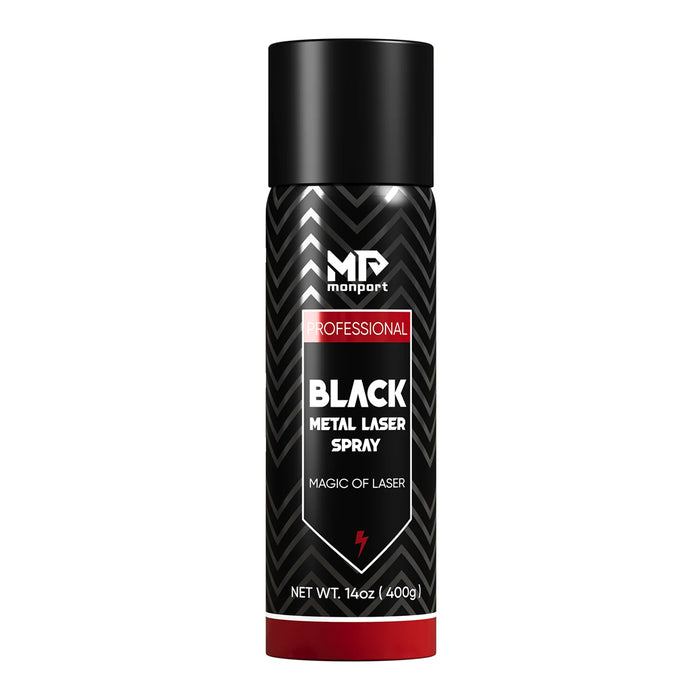
Monport black laser marking spray offers a reliable and easy-to-use solution for creating high-contrast, permanent marks on various metals. Compatible with CO2 laser engraving machines, this black laser marking spray provides an excellent finish on materials like aluminum, stainless steel, and brass. With its advanced formula, the spray ensures even coverage and deep penetration into the surface, producing durable marks that are resistant to heat and wear. The black laser marking spray dries quickly, allowing you to complete your projects efficiently. After engraving, simply rinse off the spray to reveal sharp, crisp markings. Monport’s black laser marking spray is the perfect tool for personalizing products, customizing metal items, and creating high-quality industrial markings with ease.
Conclusion
Knowing how to engrave a headstone opens the door to creating deeply personal and meaningful tributes. Understanding how are headstones engraved using laser technology helps ensure quality and durability. The Monport Onyx 55W Desktop CO2 Laser Cutter offers the precision and capabilities needed to create detailed and durable laser etching headstones. For more information and to explore the full range of Monport laser engravers, visit Monportlaser.com. Embrace the potential of headstone laser etching and elevate your skills to create meaningful memorials that honor loved ones for generations.
Don’t wait — use code BESTMP10 for 8% off at checkout and click here to shop now!





