


Mastering the art of engraving stone requires precision, patience, and the right tools. As a stone engraver, you wield the power to transform ordinary stones into exquisite works of art or functional pieces with intricate designs. At Monport Laser, we understand the significance of honing your craft with the best equipment available—especially if you’re exploring stone engraving effectively. Whether you're working with granite, marble, or other types of stone, using a high-quality laser stone etching machine can unlock new possibilities for detailed, professional results. Many creators want to learn how to engrave stones properly so their work lasts for years without fading or cracking.
With the right tools, like the Monport 130W CO2 laser, you can create stunning designs that will last a lifetime. Let us help you master how to engrave stone and elevate your craft to new heights. With our low-cost laser engraver machines designed specifically for engraving on stone, you can unleash your creativity and bring your visions to life on the solid canvas of stone. In this blog post, we'll guide you through the process of how to engrave rock, exploring techniques, tips, and the endless possibilities that stone etching laser offers. For beginners especially, understanding how do you engrave stone safely and accurately makes a huge difference in final results.
Learn the full process of engraving a stone—from preparation to post-cleaning—and unleash your creativity with reliable tools that ensure accuracy and durability. Whether you are engraving stones for art, business, or personal use, having the right workflow is essential.

Read More : Mastering Laser Engraving on Slate: A Comprehensive Guide
Understanding the Process of How to Engrave a Stone
Working principle of stone laser engraving:
When learning how to engrave a stone, it’s crucial to understand that a high-powered CO2 laser precisely removes material from the stone’s surface. The laser beam heats the surface, creating crisp and detailed engravings through controlled vaporization. This process is ideal for consistent engraving on stone, especially when using a reliable engraver for stone designed for long production runs.
Step-by-Step Guide: How to Engrave a Stone

Monport 60W CO2 Laser Engraver & Cutter (24" x 16") with Autofocus

Follow these simple steps to start engraving like a pro and gain confidence in engraving stones of different types:
-
Prepare the Stone – Clean your stone thoroughly to remove dust or debris. Secure it properly on the laser bed. Proper prep is a key step in how to etch stone successfully.
-
Create Your Design – Use design software like LightBurn or CorelDRAW to prepare your artwork for engraving on stone surfaces.
-
Setup the Laser Machine – Adjust the laser focus to match the stone’s surface thickness for optimal precision. A good engraver for stone allows fine focus control.
-
Test Engraving – Always test your design on a small stone area before full engraving. This helps you learn how to etch stone without damaging the piece.
-
Engrave the Stone – Start the engraving process and monitor carefully for consistent depth and clarity. This is the core step of engraving a stone professionally.
-
Post-Processing – Clean the finished piece with a soft brush or compressed air for a polished result and long-lasting engraving on stone.
Why Use a CO₂ Laser to Engrave Stones
A CO₂ laser engraver is one of the most efficient solutions for anyone learning how to engrave stones at a professional level.
Monport 60W CO2 Laser Engraver & Cutter (24" x 16") with Autofocus
A CO₂ laser engraver like the Monport 60W CO2 Laser (24" x 16") with Autofocus provides exceptional precision, speed, and versatility for engraving stones consistently.
-
A wide range of engraving materials: in addition to stone, materials such as wood, acrylic, glass, fabric, leather, paper, cardboard, rubber, and anodized aluminum can also be engraved.
-
Built-in air assist: Increase accuracy with built-in air assist system during engraving on stone.
-
High speed and resolution: The engraving speed is up to 800 mm/second, allowing you to quickly complete your stone carving works.
-
LED Lighting: Benefit from the precise illumination of LED lights.
-
0" Focal Length: Enables high resolution and small font engraving.
-
Autofocus: Simplify focus adjustment with the autofocus feature, especially helpful when engraving a stone with uneven surfaces.
Common Challenges in Stone Engraving
-
Chipping or cracking: Can occur due to excessive heat or pressure when learning how to engrave stone.
-
Dust buildup: May affect engraving quality during engraving stones.
-
Alignment errors: Misplaced stones can result in skewed designs.
-
Residue staining: Debris from engraving may discolor the stone.
-
Heat damage: Overheating can damage or discolor the stone surface.
Safety Tips When Engraving Stones
-
Wear PPE (safety glasses, gloves, hearing protection).
-
Ensure proper ventilation to remove dust and fumes created while engraving on stone.
-
Secure the stone on the worktable to prevent movement.
-
Avoid contact with moving parts and the laser beam.
Learning how to etch stone or master engraving stones with a CO2 laser machine opens up a world of creative possibilities. At Monport Laser, we provide industry-leading tools to help you bring your stone etching visions to life. Whether you’re creating art, customizing décor, or offering engraving services, mastering how to etch stone will give you the skills to turn any stone into a permanent masterpiece. Over time, many professionals refine their workflow and fully understand how do you engrave stone efficiently without sacrificing quality.
Applications of Stone Engraving
Discover endless ways to use your knowledge of how to engrave stones:
-
Memorial Plaques – Engrave names, dates, or tributes.
-
Decorative Art – Create intricate patterns or inspirational quotes.
-
Custom Gifts – Personalized stones for weddings or anniversaries.
-
Business Signage – Durable and professional branding materials.
FAQs: How to Engrave a Stone
-
What type of stone is best for engraving?
Granite, marble, and slate are the most popular choices because of their density and smooth texture. -
Can I use a CO₂ laser for all stone types?
Yes. However, engraving results vary based on density and finish. Always run a test first. -
Do I need special software for stone engraving?
Programs like LightBurn or RDWorks work best for creating precise engraving designs. -
How do I prevent my stone from cracking?
Lower the laser power and avoid prolonged passes over one area. -
Is a laser engraver better than hand tools for engraving stones?
For most users, a laser engraver offers more consistency, speed, and detail than manual methods, especially when engraving stones in larger quantities.
Read More: The Art of Laser Stone Engraving: A Guide to Etching on Stone
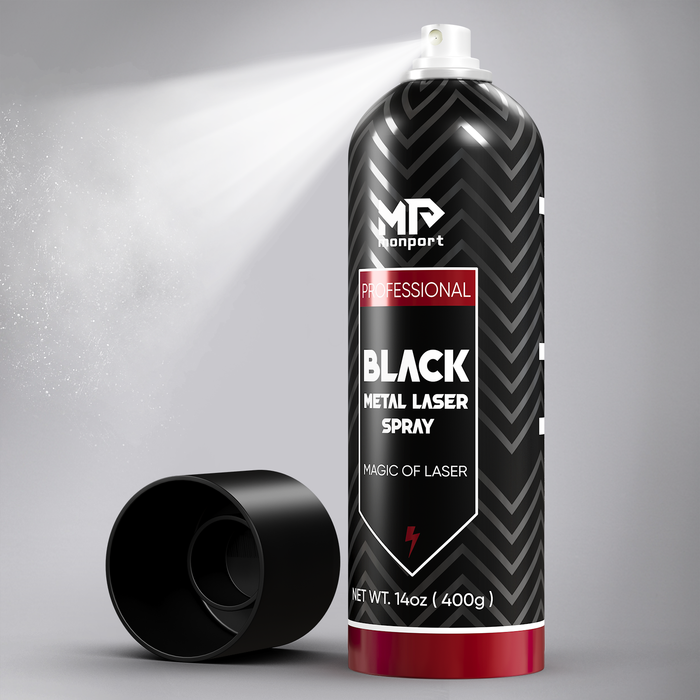
Effortless Laser Marking with Monport Black Laser Marking Spray
Learning how to engrave a stone is more than just a skill—it’s a craft that merges creativity with precision. With the right CO₂ laser engraving machine and a little practice, you can transform simple stones into timeless works of art. Start today with Monport Laser and carve your vision into reality.
Enjoy up to 30% OFF on our premium laser engraving machines and unlock incredible free gifts to elevate your projects. Buy a CO₂ laser and receive a FREE Water Chiller, Rotary Axis, and LightBurn software. Purchase a Fiber Laser and get a FREE Rotary Axis. Plus, score a special $130 OFF on bundle deals and 30% OFF laser engraving materials. Don’t wait — use code BESTMP10 at checkout and click here to shop now!
Unlock best deals today and apply blog code BESTMP10 at checkout to enjoy an extra 8% OFF on your new laser machine!





