


Are you interested in adding a personal touch to your metal items? Learning how to engrave on metal can create stunning designs and make your belongings more special. But how can I engrave metal from the comfort of your own home? In this article, we will guide you through the process of metal laser engraving and provide you with important details, FAQs, and takeaways. So let's jump right in!

Monport GPro 60W Split MOPA Fiber Laser Engraver & Marking Machine With Manual Focus

Unlock Big Savings at Monport Laser! Use code BESTMP10 at checkout for an exclusive discount – Click here to shop now!
The monport 60w fiber laser is also a popular choice for beginners who want professional results at home.
What Is Metal Engraving?
Metal engraving is the process of carving into metal to create text, images, or patterns. Today, engraving on metal is commonly done using laser technology, which offers clean lines and consistent depth.
Compared to manual methods, laser engraving:
-
Produces precise and repeatable results
-
Requires less physical effort
-
Works on many metal surfaces
-
Is suitable for home workshops
If you are wondering how to do engraving with modern tools, laser systems are a reliable option.

Can You Engrave Metal at Home?
Yes, engraving metal at home is possible with the right equipment. Many hobbyists start with compact laser systems designed for home use.
Common home engraving applications include:
-
Nameplates and tags
-
Jewelry personalization
-
Tool identification
-
Decorative metal items
For those asking how to engrave metal at home, proper ventilation, safety gear, and testing materials are essential.
Choosing the Right Tool to Engrave Metal
Selecting the correct machine is important when you engrave on metal. A fiber laser system is commonly used for metal engraving due to its power and accuracy.
The Monport GPro 60W Split MOPA Fiber Laser Engraver offers:
-
Manual focus for detailed control
-
Stable output for consistent metal engraving
-
Compatibility with common metals
Beginners who want to learn how to engrave metal can also start with a lower-power model for practice and small projects.

Step-by-Step: How to Engrave on Metal
1. Prepare the Metal Surface
Clean the metal to remove dust or oils. A clean surface helps ensure accurate engraving on metal.
2. Create Your Design
Use design software to prepare text or graphics. Simple designs are ideal when learning how to engrave metal by hand alternatives such as lasers.
3. Secure the Metal
Fix the metal piece in place to avoid movement. Stability is key when you engrave into metal.
4. Adjust Engraving Settings
Set power, speed, and frequency based on the metal type. Proper settings improve engraving on metal quality.
5. Start the Engraving Process
Begin engraving and monitor progress. The machine will carve into metal following your design.
6. Inspect the Result
Check depth and clarity. Adjust settings if needed for future metal engraving projects.

Hand Engraving vs. Laser Engraving
Some people ask how to engrave metal by hand instead of using a machine. Hand engraving uses manual tools and requires more skill and time.
Laser engraving advantages:
-
Faster production
-
Cleaner lines
-
Consistent depth
Hand engraving may suit artistic projects, but laser engraving is better for repeatable results.
FAQs: Metal Engraving at Home
How can I engrave metal safely at home?
Use protective eyewear, follow machine guidelines, and ensure proper ventilation.
What metals can I engrave?
You can engrave metal such as stainless steel, aluminum, brass, and copper.
Can I engrave curved metal surfaces?
Yes, with manual focus adjustment, engraving on metal with curves is possible.
Is engraving metal difficult for beginners?
No. With practice and proper setup, beginners can quickly learn how to engrave on metal.
Do I need special software to engrave metal?
Yes, engraving software is required to control the design and engraving process.

Important Tips for Better Metal Engraving
-
Practice on scrap pieces before final projects
-
Allow machines to cool between sessions
-
Adjust settings for different metals
-
Secure workpieces properly
These steps help improve engraving on metal consistency.

Key Takeaways
- Metal laser engraving is a precise and effective technique to personalize metal items at home.
- Choose a reliable laser engraving machine like the Monport GPro 60W for consistent and professional results.
- Proper safety precautions must be followed when operating a laser engraver.
- Experiment with different metal materials and designs to expand your engraving skills.

Unlock Professional Results with Monport Black Laser Marking Spray
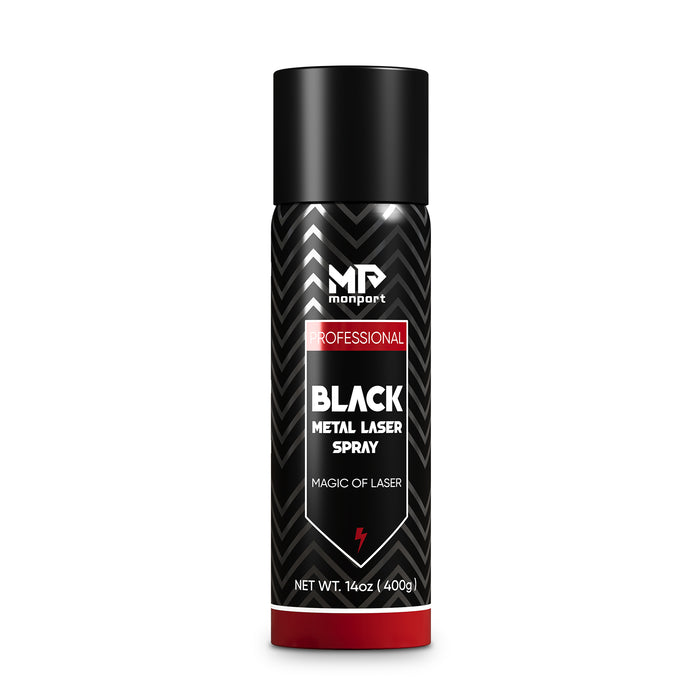
Experience effortless metal marking with Monport Black Laser Marking Spray, designed specifically for CO2 laser engraving machines of 25 watts and above. This 14 oz aluminum can delivers a fine, black agent that transforms into permanent, high-contrast marks on metals like aluminum, stainless steel, and brass. With a quick shake, spray, and five-minute dry time, it’s ideal for customizing jewelry, labeling tools, or personalizing glassware.
This black laser marking spray features an anti-clog nozzle for smooth, even application, and its advanced nanoparticle formula provides better coverage with less product. Once engraved, simply rinse to reveal sharp, durable marks that resist heat and wear. No alcohol is included in the package, ensuring safe and clean handling.
Whether you're a DIY enthusiast or a professional engraver, Monport Black Laser Marking Spray makes it easy to achieve high-quality results. Its ease of use, powerful performance, and effortless cleanup make it an essential tool for anyone working with metal engraving.
Read More: Mastering Metal Engraving: How to DIY Engrave Metal with a Metal Fiber Laser Cutting Machine
Conclusion
Engraving metal at home is no longer complicated. With the right approach and tools, you can engrave into metal with precision and confidence. Whether you are exploring how to engrave metal for personal projects or creative work, a reliable laser engraver allows you to turn simple metal items into detailed, lasting designs.
And if you’re just starting out, the Monport 20W Fiber Laser is the perfect entry point before upgrading to higher wattage.
Start engraving today and unlock your creative potential with Monport Laser!





