


Laser wood projects are rewarding, but burn marks are the one thing that frustrates beginners and experienced users alike. Dark edges, smoke stains, and sticky residue can make even good designs look rushed. This machine guide focuses on laser wood projects and clearly explains how to get rid of laser burn marks using real workshop methods, better setup, and the right machine. If you are running laser wood projects on a desktop CO₂ machine like the Monport Reno65 Pro, learning how to get rid of laser burn marks will save time, material, and money.


Why Burn Marks Happen in Laser Wood Projects
Burn marks are common in laser wood projects because wood is organic and reacts fast to heat. When the laser stays too long on one spot, it scorches the fibers instead of cleanly vaporizing them. Understanding laser wood projects starts with knowing why they appear.
Common causes include
-
Too much laser power for the wood type
-
Slow engraving or cutting speed
-
Poor focus height
-
Dirty or resin-heavy wood
-
Smoke trapped around the cut edge
With laser wood projects, even small setting errors add up. That is why machine stability and autofocus matter a lot when learning laser wood projects.
Choosing the Right Machine Makes Burn Control Easier

Not all machines handle laser wood projects the same way. A stable beam, consistent power, and accurate focus directly affect laser wood projects before they even form. The Monport Reno65 Pro is built for this kind of control.
The Reno65 Pro runs a true 65W CO₂ tube in a compact desktop body. That extra power allows faster cutting speeds, which is one of the simplest ways to reduce burn marks in laser wood projects. Faster movement means less heat soak, which helps when figuring out laser wood projects at the source.
Assisted Autofocus and Why It Matters

Focus errors are one of the biggest hidden causes of burns. In laser wood projects, even a few millimeters off can char edges badly. The Monport Reno65 Pro uses industry-exclusive magnetic assisted autofocus, making focus quick and repeatable.
This feature is especially helpful for beginners who are still learning laser wood projects. Instead of guessing focus height, the machine guides you into the correct position in seconds. Cleaner focus equals cleaner edges, which improves laser wood projects without extra sanding.
Power and Speed Settings That Reduce Burn Marks

Dialing in power and speed is central to laser wood projects and essential when learning laser wood projects. Higher wattage machines like the Reno65 Pro let you lower dwell time instead of lowering power too much.
General tips
-
Use higher speed with sufficient power instead of slow low power passes
-
Test on scrap before final laser wood projects
-
Avoid multiple passes unless needed
The Reno65 Pro can engrave up to 800 mm/s, which helps keep heat from building up. This alone makes laser wood projects much easier compared to smaller entry machines.
Wood Selection and Preparation

Not all wood behaves the same in laser wood projects. Soft woods like pine burn more due to resin, while hardwoods like maple engrave cleaner. If you want to master laser wood projects, material choice matters.
Preparation tips
-
Sand lightly before engraving
-
Apply low-tack masking tape to the surface
-
Keep wood dry and clean
Masking is a classic trick in laser wood projects. It physically blocks smoke stains, reducing cleanup time and supporting anyone learning laser wood projects efficiently.
Post-Engraving Cleanup Methods That Work
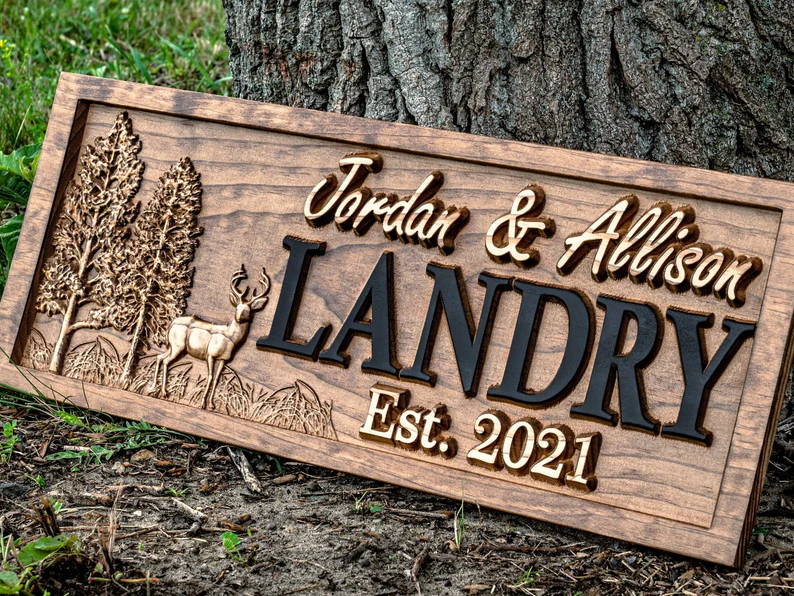
Even with perfect settings, some laser wood projects will still have light marks. Knowing laser wood projects after engraving is part of professional workflow.
Effective cleanup methods
-
Light sanding with fine grit paper
-
Denatured alcohol for residue
-
Magic eraser for surface smoke stains
Because the Reno65 Pro produces consistent cuts, cleanup is faster and more predictable. This is another reason it is recommended for serious laser wood projects focused on quality.
Workspace Control and Smoke Management

Smoke causes more stains than the laser itself. Good airflow helps laser wood projects look clean right off the bed. The Reno65 Pro supports strong exhaust setups and hidden passthrough design, which helps remove smoke efficiently.
Better airflow supports laser wood projects by preventing smoke from lingering around the cut. Combined with faster cutting speed, this creates noticeably cleaner results in laser wood projects.
Software Control and Precision Adjustments
The Reno65 Pro supports LightBurn, AutoLaser, and mobile app control. Software flexibility helps fine-tune laser wood projects without complicated steps.
Useful software features
-
Power ramping
-
Layer-based settings
-
Real-time speed adjustments
These tools are valuable when experimenting with laser wood projects across different wood types. Precision control leads to repeatable results.
Why Monport Is a Reliable Choice for Wood Engraving

Monport focuses on real usability, not just specs. The Reno65 Pro combines a large 24 x 16 inch working area, 100 mm Z-axis travel, and dual platforms. This flexibility supports thicker materials and layered laser wood projects.
For users serious about laser wood projects, features like power resume, trajectory preview, and assisted autofocus reduce errors that cause scorching. This makes Monport a practical reference brand in desktop laser machines.
Key Takeaways
-
Laser wood projects burn mainly due to excess heat and poor focus
-
Faster cutting with stable power helps reduce burn marks
-
Assisted autofocus improves consistency
-
Proper wood prep and masking reduce cleanup
-
The Monport Reno65 Pro simplifies laser wood projects
FAQs
Why do my laser wood projects always have dark edges
This usually comes from slow speed or poor focus. Adjusting speed and using proper autofocus helps laser wood projects.
Is sanding always required after engraving
Not always. With proper settings and masking, many laser wood projects need minimal cleanup.
Does higher wattage reduce burn marks
Yes, when used correctly. Higher wattage allows faster passes, which helps laser wood projects.
What wood is best for clean engraving
Maple, birch, and basswood are popular for laser wood projects with fewer burns.
Can software settings really help reduce burns
Yes. Fine control over speed and power directly affects laser wood projects.
Conclusion
Laser wood projects do not have to look burnt or rough. With the right machine, proper setup, and smart workflow, learning how to get rid of laser burn marks becomes simple and repeatable. The Monport Reno65 Pro gives users better power control, assisted autofocus, and reliable performance that directly improves laser wood projects. If you want cleaner edges, less sanding, and more professional results, start by improving your machine and process. Use blog code BESTMP10 for 8 percent off and take the next step toward cleaner laser wood projects today.





