Laser engraving has become a cornerstone in both artistic and industrial applications. The precision and versatility of portable laser engravers allow users to create intricate designs, personalized gifts, and detailed photos on various materials. However, achieving the best results depends not only on the quality of the laser engraver but also on the software used for designing and controlling the engraving process. Many users prefer laser engraving design software, laser programs, and design software for laser cutting to ensure high accuracy in their work. This article explores the best design software for laser engraving and delves into the specifics of laser engraving photos with LightBurn, a leading laser cutter program in the industry.
The Best Design Software for Laser Engraving

Choosing the right design tools is crucial for maximizing the potential of your laser engraver. Whether you need laser programs, laser engraver design software, or advanced design software for laser cutting, here are some top contenders:
LightBurn
LightBurn is known for its versatility and user-friendly interface. As a comprehensive laser cutter program, it allows users to design, lay out, and control laser cutters efficiently. It supports a wide range of file formats and offers powerful editing tools, making it ideal for both beginners and professionals looking for reliable laser engraving design software. LightBurn remains one of the most preferred platforms among those who work extensively with laser programs.
Adobe Illustrator
Adobe Illustrator is a favorite among designers due to its advanced vector graphic design capabilities. While it is not laser-specific, it integrates smoothly with design software for laser cutting and can export files compatible with many laser programs. This makes Illustrator a practical companion for users who rely on external laser cutter program tools.
CorelDRAW
CorelDRAW is widely used in the laser engraving community and pairs excellently with laser engraver design software. Its robust features, ease of use, and high compatibility with laser programs make it ideal for engraving professionals working on intricate projects requiring precise outputs.
Inkscape
Inkscape is an open-source vector graphic design tool and a cost-effective alternative for creators who need powerful capabilities without paying for commercial software. Inkscape integrates well with external laser cutter program options and works efficiently alongside laser engraving design software, providing users with excellent value.
Laser Engraving Photos with LightBurn

Laser engraving photos is a sophisticated process requiring precision and the right software. LightBurn stands out because it operates not only as a laser cutter program but also as a powerful image-processing tool. Its compatibility with various laser programs makes it ideal for users with diverse engraving systems.
Preparing Photos for Engraving
Image Adjustment: LightBurn allows users to adjust contrast, brightness, and other essential parameters to ensure the photo engraves clearly with high detail. This function enhances the performance of most laser engraving design software workflows.
Dithering Options: LightBurn provides several dithering options to convert photos into engravable formats—a vital feature in any premium laser engraver design software.
Preview and Edit: Users can preview engraving results and make adjustments before processing. LightBurn’s tight integration with design software for laser cutting ensures accuracy and consistency throughout the project.
Introducing Monport Laser Engravers
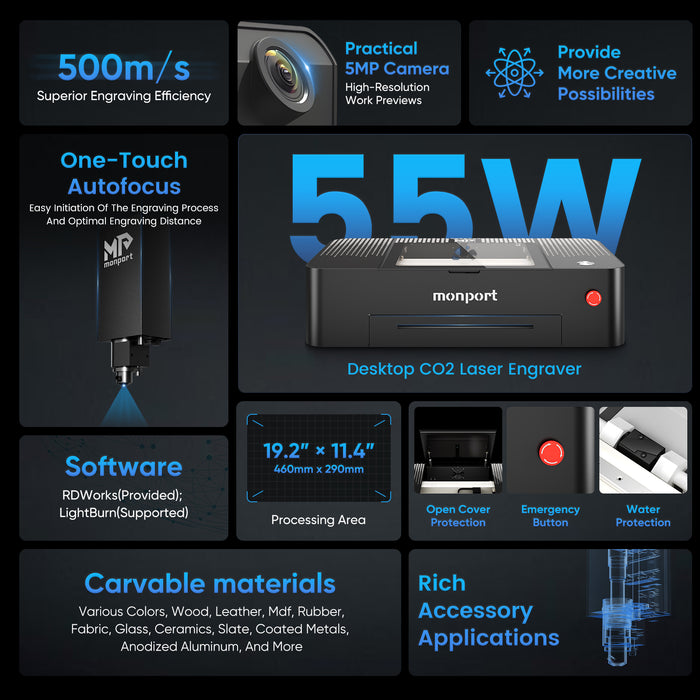
Monport fiber portable laser engravers are among the top choices for users seeking high-quality and reliable engraving equipment. These machines work perfectly with laser programs, laser cutter program tools, and industry-leading laser engraving design software like LightBurn.
Key Features of Monport Fiber Laser Engravers
High Precision: Monport engravers deliver exceptional accuracy, ensuring flawless engraving even for the most intricate designs created in laser engraver design software.
Versatility: These machines can engrave a variety of materials, including wood, metals, and plastics. Their compatibility with multiple laser programs enhances workflow flexibility.
User-Friendly: Monport engravers integrate seamlessly with LightBurn and other design software for laser cutting, allowing users to control projects easily and efficiently.
Frequently Asked Questions (FAQs)
What is the main advantage of using LightBurn for laser engraving?
LightBurn’s main advantage is its user-friendly interface combined with powerful features. It works efficiently as laser engraving design software and as a reliable laser cutter program, allowing users to design, edit, and control their projects with precision.
Can I engrave photos directly in LightBurn without extra software?
Yes. LightBurn includes built-in tools for adjusting brightness, contrast, and dithering effects, enabling users to engrave photos without needing additional laser programs or external image editors.
Can LightBurn be used with both CO2 and fiber laser engravers?
Absolutely. LightBurn supports both CO2 and fiber laser engravers, including Monport machines. This broad compatibility makes it ideal for people who regularly use design software for laser cutting and other laser engraver design software solutions.
Is LightBurn suitable for beginners?
Yes. LightBurn is intuitive and includes tutorials to guide new users. Beginners can easily learn basic operations, and advanced users can take advantage of more sophisticated features common in high-end laser programs.
What other software can I use with my laser engraver?
Programs like Adobe Illustrator, CorelDRAW, and Inkscape are also excellent choices. These can be paired with external laser cutter program tools or integrated into workflows involving laser engraving design software like LightBurn.
Key Takeaways
- Software Choice Matters: Choosing the right laser engraver design software, laser programs, and design software for laser cutting significantly affects output quality.
- LightBurn for Photos: LightBurn excels in photo engraving due to its advanced features and flexibility as a laser cutter program.
- Monport Laser Engravers: These machines offer precision, versatility, and strong compatibility with popular laser engraving design software.
Conclusion
Choosing the best laser engraver design software, laser programs, and design software for laser cutting will elevate your engraving projects to the next level. LightBurn stands out as one of the top-performing tools due to its robust features and compatibility with nearly any laser cutter program setup. When paired with high-quality Monport laser engravers, users gain a powerful combination of precision, efficiency, and creative potential. Investing in the right software and hardware ensures smooth workflow, consistent quality, and unlimited possibilities in the world of laser engraving.