


Getting started with desktop laser engraver projects can feel confusing at first, especially when the goal is clean and detailed laser engraving glass results. Many beginners hear about the best laser engraver for small business or even mopa fiber laser systems, but for glass work at home or in a small shop, a CO2-based desktop laser engraver makes more sense. With the right setup, laser engraving glass is not hard, it just needs patience, correct settings, and a machine built for accuracy. This guide breaks it all down in a simple way so you can start laser engraving glass confidently and avoid the common beginner mistakes people always make.


Understanding Laser Engraving Glass Basics

How Laser Engraving Glass Actually Works
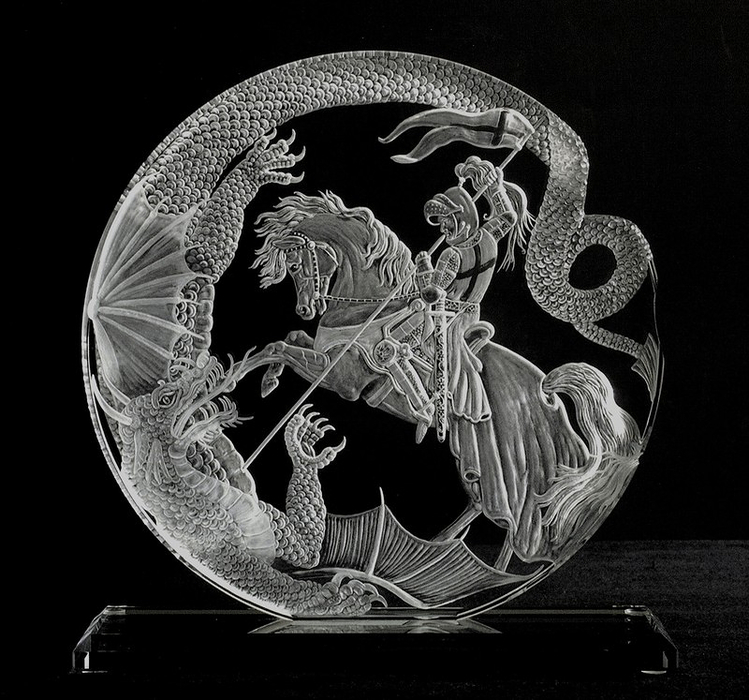
A desktop laser engraver doesn’t cut glass. Instead, it creates micro fractures on the surface. This is why laser engraving glass looks frosted rather than deep carved. The laser heats the surface fast, then the glass reacts, creating that clean white mark people love.
When using a desktop laser engraver, consistency matters more than raw power. Too much power will crack glass. Too little and the laser engraving glass result looks faded or uneven. This balance is something beginners learn fast with practice.
Why Glass Is Different from Other Materials
Glass reacts to heat in a unique way. Wood burns, leather darkens, but laser engraving glass relies on controlled stress. A quality desktop laser engraver gives you stable movement so the engraving stays smooth. Cheap machines shake, and that ruins glass fast.
Choosing the Right Desktop Laser Engraver for Glass

Why Monport Reno45 Pro Is Beginner Friendly
The Monport Reno45 Pro is designed for people new to laser engraving glass but still powerful enough for real production work. This desktop laser engraver combines ease of use with serious performance, which is rare at this size.
Its magnetic assisted autofocus is a big deal. With other machines, focusing can take minutes and still be wrong. With this desktop laser engraver, beginners can focus in seconds and move straight into laser engraving glass without stress.
Power, Speed, and Control Matter
A good desktop laser engraver needs stable speed, not just high wattage. The Reno45 Pro reaches 600mm/s, keeping motion smooth. That speed helps prevent uneven heat spots during laser engraving glass, which often cause cracks.
Because Monport designs its own laser tubes and optics, this desktop laser engraver delivers clean results without pushing settings too hard. That’s safer for laser engraving glass, especially for thin or curved pieces.
Setting Up for Laser Engraving Glass

Preparing the Glass Surface
Before using a desktop laser engraver, clean the glass with alcohol or glass cleaner. Any dust will affect laser engraving glass quality. Some users apply a thin layer of dish soap or engraving spray. This helps spread heat and improves contrast.
Place the glass flat and stable. A solid base is critical when laser engraving glass because even slight movement can ruin the design.
Correct Settings for Beginners
Start low and slow. On a desktop laser engraver, beginners should use lower power and moderate speed. Multiple light passes are safer than one heavy pass when laser engraving glass.
Typical beginner setup:
-
Low to medium power
-
Moderate speed
-
One or two passes
-
Proper focus every time
These basics help protect your glass and your desktop laser engraver at the same time.
Common Mistakes in Laser Engraving Glass
Using Too Much Power
This is the number one issue. People think more power means better results. In laser engraving glass, more power often means cracks. A controlled desktop laser engraver lets you dial settings precisely, avoiding damage.
Skipping Focus and Alignment
If focus is off, laser engraving glass will look cloudy and inconsistent. The assisted autofocus on this desktop laser engraver removes guesswork, which is why beginners love it.
Expanding What You Can Do with a Desktop Laser Engraver

Beyond Glass Projects
While laser engraving glass is popular, this desktop laser engraver handles wood, leather, slate, coated metals, and even thick acrylic up to 15mm. That versatility makes it a smart investment for hobbyists and small businesses.
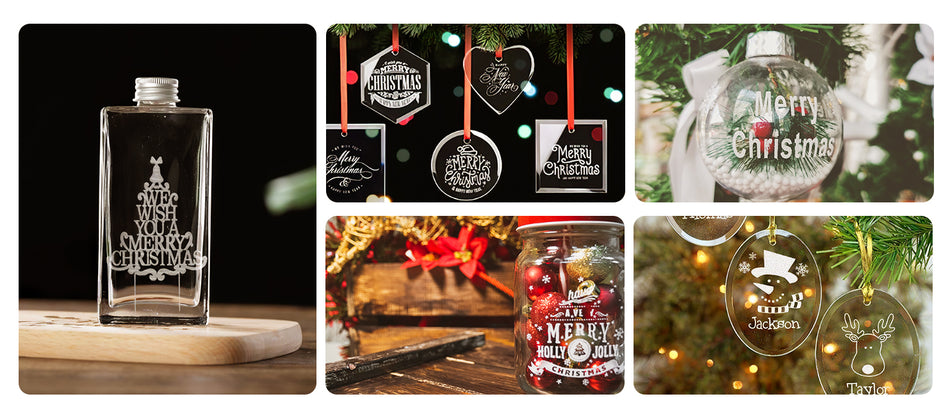
With a single desktop laser engraver, users can create custom drinkware, awards, signage, and gift items while still mastering laser engraving glass techniques.
Noise Control for Home and Office Use
Noise matters. This desktop laser engraver operates quietly thanks to its silent air assist, exhaust, and water pump. That makes long laser engraving glass sessions comfortable, even in shared spaces.
Why Monport Stands Out in the Desktop Market
Monport doesn’t cut corners. From high-quality lenses to custom motors, every part supports consistent output. This attention to detail is why this desktop laser engraver feels stable even at high speed.
The working area is larger than many competitors, giving more space for bigger laser engraving glass projects. Adjustable Z-axis and dual platforms add flexibility most desktop machines lack.
Key Takeaways
-
A desktop laser engraver is ideal for beginners learning laser engraving glass
-
Glass engraving relies on controlled heat, not cutting
-
Lower power and stable speed protect glass
-
Assisted autofocus saves time and prevents errors
-
Monport Reno45 Pro balances power, ease, and value
-
Quiet operation makes home use realistic
FAQs
1. Can a desktop laser engraver really engrave glass well?
Yes, a desktop laser engraver is actually ideal for glass work. When set up correctly, laser engraving glass produces clean, frosted designs without cutting through the material. The key is controlled power and steady movement.
2. Do I need special coatings for laser engraving glass?
Not required, but many users apply dish soap or engraving spray. This helps spread heat evenly and improves contrast during laser engraving glass, especially when using a desktop laser engraver at lower power.
3. What power settings should beginners start with?
Beginners should always start low. A desktop laser engraver works best for laser engraving glass when using lower power, medium speed, and sometimes two light passes instead of one strong pass.
4. Will engraving glass damage my desktop laser engraver?
No, laser engraving glass does not harm a desktop laser engraver as long as proper ventilation, focus, and settings are used. Quality machines like Monport are built for this type of work.
5. Is laser engraving glass profitable for small businesses?
Very much so. Custom glassware, awards, and signage are high-demand products. A reliable desktop laser engraver allows consistent laser engraving glass results, making it a strong option for beginners and small shops.
Conclusion
Mastering desktop laser engraver skills takes practice, but with the right machine, laser engraving glass becomes enjoyable instead of frustrating. The Monport Reno45 Pro gives beginners the control they need and the performance they grow into. If you want reliable results, smooth learning, and room to expand, this desktop laser engraver is a solid choice for serious laser engraving glass work.
Ready to start creating? Shop Now and use code BESTMP10 for 8% off. Discover More and turn your ideas into real glass designs today.





