


A 40W CO2 Laser can be a useful starting point for creating personalised gifts, decorative signs, and detailed engravings. However, its cutting ability depends on more than wattage alone. Material type, thickness, focus, air assist, and machine quality all affect the final result.
If you are considering a 40w co2 laser engraver, it is important to understand what it can cut, which materials work best, and where its limitations begin. This guide explains the practical differences between engraving and cutting, helping you choose the right setup for your projects without spending money on features you may not need.
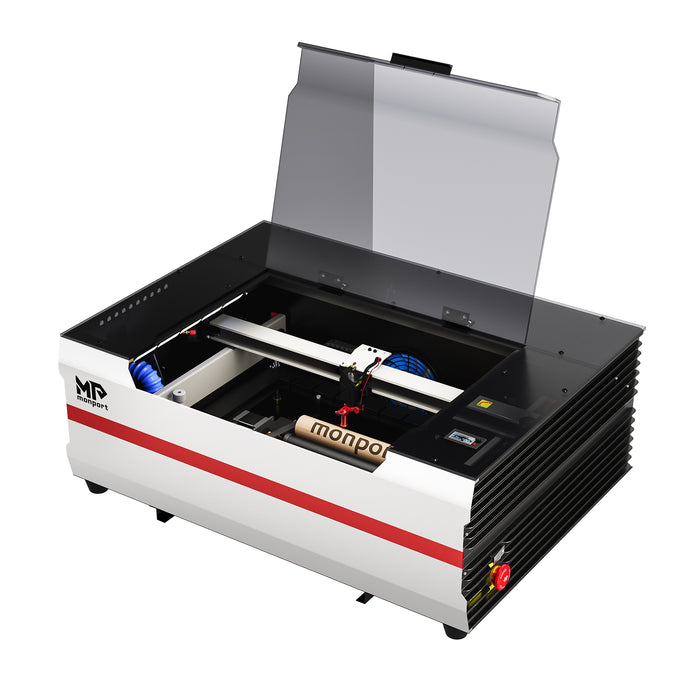

What Can a 40W CO2 Laser Cut?
A 40W CO2 laser uses a concentrated beam of infrared light to heat and process suitable materials. It is commonly used for non-metallic materials such as wood, acrylic, paper, and leather.
However, cutting performance varies between machines. A well-designed 40W CO2 Laser may handle certain materials more effectively than another machine with the same rated power.

Wood and Plywood
Thin wood and suitable plywood are common choices for laser projects. You can create ornaments, name signs, small boxes, and decorative shapes.
For example, a small business making personalised wooden keychains may use a 40w co2 laser engraver to engrave names and cut simple outlines. Thicker wood generally requires more careful testing and may need slower speeds or multiple passes.
Acrylic
A CO2 laser can process laser-compatible acrylic, making it useful for signs, display pieces, and personalised decorations. Cast and extruded acrylic can produce different engraving and cutting results.
Material thickness, colour, formulation, and the machine's actual output all matter. Always test a sample before committing to a full production run.
Leather, Paper, and Cardboard
Leather and paper-based materials are often suitable for engraving or cutting, depending on their composition and thickness. Common projects include labels, invitations, leather patches, and decorative packaging.
These materials can burn easily, so use appropriate settings, extraction, and supervision. Never leave a laser operating unattended.
How Thick Can a 40W CO2 Laser Cut?

There is no single cutting thickness that applies to every 40W CO2 Laser. The maximum depends on the material, laser tube condition, optical alignment, focus, air assist, and the machine's overall design.
Thin materials are generally easier to process cleanly. As thickness increases, cutting may become slower, edges may become more charred, and the beam may struggle to pass through consistently.
Why Wattage Is Not the Only Factor
A higher wattage rating does not automatically guarantee better cutting results. The quality of the laser tube, mirrors, focusing lens, motion system, and cooling setup also influences performance.
For example, two machines rated at 40W may produce different edges when cutting the same plywood. One may have better airflow and focus control, while the other may struggle with smoke and heat buildup.
How to Find the Right Cutting Settings
Start with the machine manufacturer's recommended settings for your material and thickness. Run small test cuts, check whether the material separates cleanly, and adjust one setting at a time.
Avoid increasing power or slowing the machine excessively without considering fire risk and material damage. A reliable test routine is more useful than relying on a universal settings chart.
Engraving vs Cutting: What Is the Difference?

Engraving removes or changes the surface of a material to create text, images, or patterns. Cutting passes through the material to separate a shape from the surrounding sheet.
A 40w co2 laser engraver can often engrave finer details than it can cut thick material. This makes it useful for businesses that focus on personalised products rather than heavy-duty fabrication.
For example, you could engrave a company logo onto a wooden plaque, then cut the plaque into a custom shape. The engraving and cutting stages may require different power and speed settings.
What Should You Consider Before Buying a 40W CO2 Laser?
Before choosing a 40W CO2 Laser, think about the materials you plan to use and the size of your typical projects.
Working Area
The working area determines the maximum size of the material you can process in one job. If you make large signs, a compact machine may become restrictive even if its cutting performance is suitable.
Cooling and Air Assist
CO2 laser tubes require appropriate cooling. Air assist helps direct airflow at the processing point, reducing smoke and debris around the cut and potentially improving edge quality.
These systems matter because consistent performance depends on more than the laser source itself.
Software and Focusing
Check whether the machine works with software that suits your workflow. Features such as easy focusing and compatible design software can make everyday jobs simpler, especially for beginners.
How Monport Reno45 Fits into Your Project Plans

If you need more working space or stronger cutting capability than a typical entry-level 40W machine offers, it may be worth comparing machines with different power ratings.
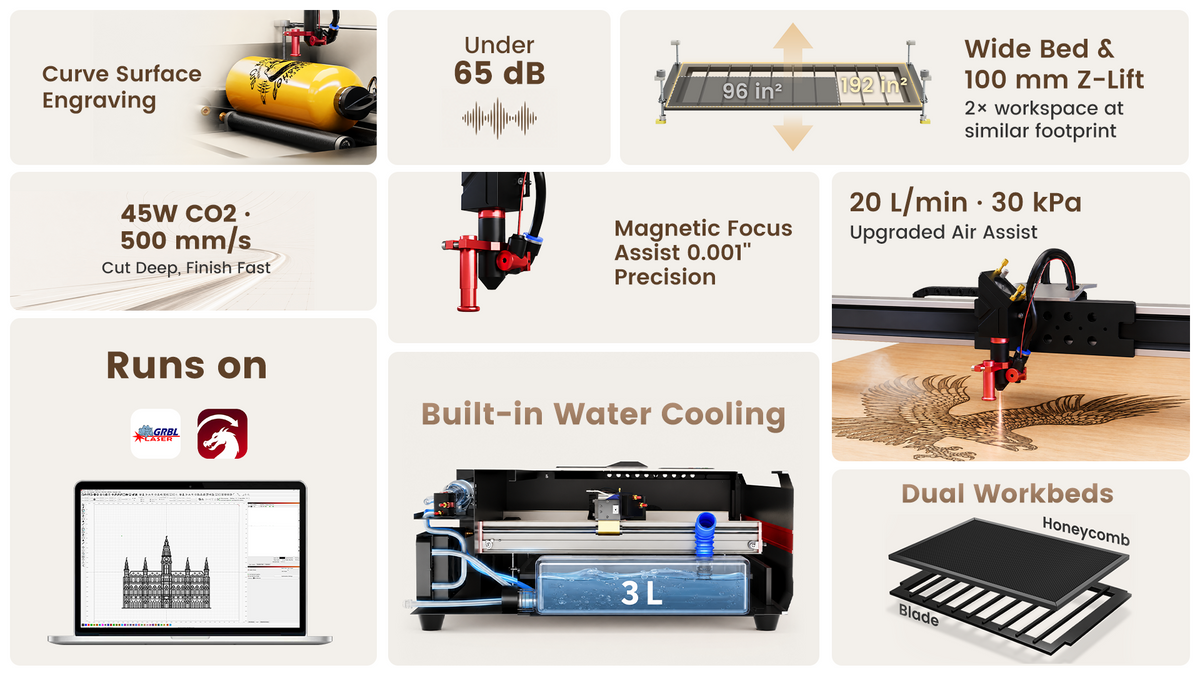
For example, the Monport Reno45 45W Desktop CO2 Laser Engraver & Cutter has a 16 × 12-inch (400 × 300 mm) working area, a maximum engraving speed of 500 mm/s, and 100 mm of Z-axis movement. It also includes magnetic-assisted focusing and a built-in 3L water-cooling system, so no external water tank is required.
Monport states that the Reno45 can cut acrylic up to 15 mm thick. Actual results depend on the material and working conditions, so treat this as a manufacturer-stated capability rather than a guarantee for every job.
The machine is compatible with LightBurn and LaserGRBL. Its 20 L/min, 30 kPa air-assist system operates on demand, and its dual work platforms include a blade platform and a honeycomb platform.
If you are comparing equipment for personalised products, signs, or small-batch production, these features may be worth considering alongside your budget and material requirements.
Explore Monport Laser to find equipment suited to your materials, workspace, and creative plans.
Key Takeaways
-
A 40W CO2 Laser is suitable for many engraving projects and selected thin-material cutting tasks.
-
Cutting thickness depends on material type, machine design, focus, and air assist.
-
A 40w co2 laser engraver can create signs, personalised gifts, labels, and decorative products.
-
Test settings on scrap material before starting a finished project.
-
Consider working area, cooling, software compatibility, and safety when comparing machines.
-
If you need greater cutting capacity, compare the complete specifications of machines such as the Monport Reno45 rather than judging by wattage alone.
Frequently Asked Questions
What materials can a 40W CO2 laser cut?
A 40W CO2 laser can process suitable wood, plywood, acrylic, paper, cardboard, and leather. The results depend on the material's composition and thickness. Never laser-cut PVC or other materials that may release hazardous gases.
How thick can a 40W CO2 laser cut?
There is no universal maximum thickness. It depends on the material, laser output, focus, air assist, and machine condition. Check the manufacturer's recommendations and test the material before production.
Can a 40W CO2 laser engrave acrylic?
Yes, a suitable CO2 laser can engrave compatible acrylic. The finish depends on the acrylic type and the selected settings, so testing a sample is recommended.
Is a 40W CO2 laser suitable for beginners?
Yes, it can be suitable for beginners who want to learn engraving and work with suitable thin materials. Choose a machine with clear instructions, appropriate safety features, and reliable focusing and cooling systems.
Is a 40W CO2 laser enough for a small business?
It may be enough for a small business producing personalised gifts, labels, and smaller decorative items. If you regularly need to cut thicker materials or larger sheets, compare machines with more cutting capacity and a larger working area.
Conclusion
Choosing the right 40W CO2 Laser starts with understanding your materials, project requirements, and cutting limits. A 40w co2 laser engraver can be a practical choice for creating personalised gifts, wooden signs, acrylic decorations, and other detailed designs, provided you use suitable materials and settings.
Before investing in a machine, consider its working area, focusing system, cooling, and air assist, as these features can affect both cutting quality and everyday use. If your projects require greater cutting capacity or more workspace, comparing options such as the Monport Reno45 45W Desktop CO2 Laser Engraver & Cutter can help you make a more informed decision.
Whether you're starting a creative business or expanding your existing workshop, Monport Laser offers equipment options to explore for your engraving and cutting projects. Choose a machine that matches your actual needs, test your materials carefully, and build your skills one project at a time.





