


Laser engraving on metal sheets has revolutionized the way we personalize and add value to products. From industrial marking to artistic creations, the precision and durability offered by metal cutting laser machine are unmatched. Among the various options available, fiber laser engraving has emerged as a top choice for its speed, efficiency, and ability to produce intricate designs. For woodworkers looking to enhance their craft, a metal laser cutter for wood offers a precise and versatile solution, allowing for the creation of detailed patterns, logos, and custom designs on wood surfaces. Whether you're making personalized gifts, signage, or decorative pieces, this technology enables clean, professional results that are sure to impress.
One profitable application of laser engraving on metal sheets are personalized and durable dog tags which has become increasingly important for pet owners. With the rise of dog tag engraver machines, customizing dog tags has never been easier. By understanding key design elements and material choices, you can create a laser engraved dog tag that not only looks great but also provides essential information for your pet's safety.

Monport GI 60W Integrated MOPA Fiber Laser Engraver & Marking Machine with Electric Lifting

Understanding Laser Engraving on Metal Sheets
A metal laser cutter for wood is an ideal tool for crafting precise, intricate designs on wood surfaces. This technology allows for high-quality engraving, perfect for creating personalized wooden items, custom signage, or decorative pieces. With the right settings, a metal laser cutter for wood can achieve detailed patterns, text, or logos with ease, giving wood projects a professional and polished finish. Whether you're working with hardwoods or softwoods, these machines provide excellent control and precision to bring your creative ideas to life.
Introducing Monport GI60 Fiber Laser: Best Engraver for Dog Tags
Monport's GI60 MOPA fiber laser stands out as a leader in the industry, offering unparalleled performance and versatility. With its cutting-edge features and innovative design, it is the best engraver for dog tags that empowers users to achieve exceptional results in metal laser cutter engraving.
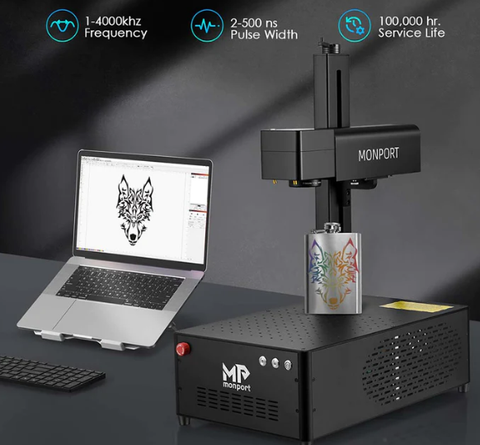
Key Features of Monport GI60 Fiber Laser:
- Full Color Marking: Bring your designs to life with vibrant and accurate color markings on stainless steel with Monport engraver for dog tags.
- High Precision Engraving: Achieve intricate details with ±0.1 micron accuracy, ensuring professional-grade results.
- Integrated Design: Sleek and compact design for easy operation and space-saving.
- Electric Lifting Focus: Effortless focus adjustment for precise engraving, even for beginners.
- LightBurn Compatibility: Seamless integration with popular design software for efficient workflow.
- Industry-Leading Heat Dissipation: Optimized cooling system for consistent performance.
- Durable Construction: Built with high-quality materials for long-lasting reliability.
Metal Marking, Engraving, Annealing, and Cutting: What’s the Difference?
Terms such as laser marking, engraving, etching, annealing, and cutting are often used interchangeably. However, they do not describe the same process or produce the same result.
Understanding these differences is important when choosing a dog tag engraver. A machine designed to mark names and phone numbers on a metal tag is not necessarily capable of cutting that tag from a sheet of metal.
Laser Marking
Laser marking is the broadest term. It describes processes that create a visible mark on a material without necessarily removing a significant amount of it.
Depending on the metal, surface finish, and laser source, marking may involve:
- Changing the color of the metal surface;
- Removing paint, powder coating, or an anodized layer;
- Creating a shallow surface mark;
- Producing an oxide layer through controlled heating;
- Bonding a marking compound to bare metal.
For example, a laser can remove the colored anodized surface from an aluminum dog tag to reveal the lighter material underneath. This creates strong contrast, but it is different from cutting deeply into bare aluminum.
Laser marking is usually appropriate when the priority is readable text, logos, identification numbers, barcodes, or decorative graphics rather than measurable engraving depth.
Laser Engraving
Laser engraving removes material from the workpiece and leaves a recessed mark.
The final depth depends on the laser type, power, lens, focal position, material, speed, frequency, number of passes, and other process settings. Shallow engraving may be sufficient for a personalized pet tag, while industrial identification plates may require a deeper mark to withstand abrasion or surface finishing.
Depth alone does not determine quality. A deep mark can still have poor edge definition, excessive melting, or weak contrast. For a dog tag, the best result is normally a balance of:
- Adequate permanence;
- Clear, readable text;
- Clean edges;
- Minimal distortion;
- Appropriate contrast;
- Reasonable production time.
A fiber laser is commonly selected for direct metal engraving because its wavelength is absorbed more effectively by many metals than the wavelength of a typical CO₂ laser.
Annealing
Annealing uses controlled heat to create an oxide layer on or near the surface of certain metals, usually with little material removal.
This technique is commonly associated with stainless steel and some ferrous metals. It can produce a dark, high-contrast mark while keeping the surface relatively smooth. However, the result depends on the metal grade, surface condition, focus, heat input, and laser parameters.
Annealing should not automatically be described as engraving. It does not normally create the same recessed result as material-removal engraving.
It is useful when the operator wants:
- A dark mark with minimal surface disruption;
- Fine text or identification details;
- A smooth finished surface;
- Less material removal than conventional engraving.
Always test the actual tag material. Two dog tags that appear identical may contain different alloys or surface treatments and may respond differently to the same settings.
Can a Dog Tag Engraver Cut Metal Sheets?
A desktop fiber marking machine is not the same as an industrial sheet-metal cutting system.
Some galvo fiber lasers may cut very thin metal stock or foil through repeated passes, but this does not mean they are suitable for routine sheet-metal cutting. Cutting capacity depends on the laser source, power, pulse characteristics, lens, material, thickness, assist system, and machine design.
Machines built for industrial sheet cutting typically use substantially different configurations, including higher laser power, cutting heads, gas assistance, motion systems, and material-support systems.
A fiber laser used for dog tags should therefore be evaluated primarily as a marking and engraving machine. If your workflow requires cutting blank tags from metal sheets, compare the following options separately:
- Purchase pre-cut dog tag blanks and engrave them with a fiber laser;
- Use a dedicated metal-cutting service;
- Add a purpose-built metal cutting machine;
- Use mechanical stamping or blanking for high-volume production.
Do not assume that a dog tag engraver can cut tags from standard metal sheets simply because the product description uses the words “laser cutter.”
Which Laser Is Best for Engraving Metal Dog Tags?
The best laser for dog tags depends on the tag material, surface finish, required depth, production volume, and desired appearance.
For direct marking on bare metals, a fiber laser is generally the most capable option. Compact infrared modules can be suitable for light personalization, while blue diode and CO₂ lasers are more dependent on coatings, anodized surfaces, or marking compounds.
Standard Fiber Laser
A standard pulsed fiber laser is well suited to permanent marking and engraving on many metals, including stainless steel, aluminum, brass, titanium, and selected metal alloys.
Depending on the machine and process settings, it may be used for:
- High-contrast metal marking;
- Names, phone numbers, and serial numbers;
- Logos and vector graphics;
- Shallow engraving;
- Repeated-pass engraving;
- Removing coatings from metal surfaces;
- Batch marking with a positioning jig.
A standard fiber laser is often the practical choice for businesses that need fast, repeatable dog tag production without requiring advanced pulse-width control or specialized color effects.
However, compatibility should be verified with the exact alloy and finish. “Stainless steel” and “aluminum” describe broad material categories rather than one consistent laser response.
MOPA Fiber Laser
A MOPA fiber laser gives the operator greater control over pulse width and frequency than a conventional Q-switched fiber laser.
This additional control can help manage how energy is delivered to the surface. Depending on the material and desired result, it may support:
- More controlled heat input;
- Fine, high-contrast marking;
- Dark marking on selected metals;
- Reduced heat damage on sensitive surfaces;
- Greater flexibility when processing coated materials;
- Color effects on certain stainless steels;
- More control when optimizing depth, contrast, and surface finish.
Color marking should be presented carefully. A MOPA laser does not produce consistent full-color results on every metal.
The visible color is influenced by oxide-layer thickness, stainless-steel grade, surface finish, cleaning, focus, pulse width, frequency, speed, power, line interval, and even viewing angle. A process that produces blue on one stainless-steel blank may produce a different shade on another batch.
MOPA fiber is most valuable when the user needs greater process control—not simply because “color engraving” appears in a product description.
Infrared Laser Module
Many compact infrared laser modules operate around 1064 nm and can mark certain bare metals more effectively than a standard visible blue diode.
They can be useful for:
- Occasional personalization;
- Craft fairs or mobile engraving;
- Small workspaces;
- Names, logos, and shallow surface marks;
- Low-volume production;
- Users who process both metal and nonmetal products with a modular system.
However, a low-power infrared module should not be treated as equivalent to a production-oriented fiber laser.
Compared with a higher-powered galvo fiber system, it may offer less engraving depth, slower processing, a smaller working area, or lower throughput. It can still be a suitable option when portability and light personalization matter more than deep engraving or batch speed.
Blue Diode and CO₂ Lasers
A blue diode laser can produce good results on certain coated, painted, or anodized dog tags. In many cases, the laser removes or changes the surface layer rather than engraving deeply into the underlying metal.
Direct marking on bare metal depends on the laser, material, and use of an appropriate marking compound. A result achieved on black anodized aluminum should not be used as proof that the same machine can engrave bare stainless steel or bare aluminum.
A CO₂ laser is primarily suited to materials such as wood, acrylic, leather, rubber, paper, and many coated surfaces. It can mark anodized aluminum and remove coatings from metal, but bare metal usually requires a compatible metal-marking compound.
The compound is applied to the surface, allowed to dry, processed by the laser, and then cleaned. The resulting mark is bonded to the surface. This is different from directly engraving the metal with a fiber laser.
| Laser Type | Best For | Bare Metal Capability | Deep Engraving | Color-Marking Potential | Typical User |
|---|---|---|---|---|---|
| Standard fiber laser | Permanent metal marking and general engraving | Strong on many compatible metals | Possible through suitable power and repeated passes | Limited compared with MOPA | Small businesses and production users |
| MOPA fiber laser | Controlled metal marking, detailed engraving, and specialized finishes | Strong on many compatible metals | Possible, depending on power and process | Possible on selected materials under controlled conditions | Professional personalization and advanced metal work |
| Infrared laser module | Portable or occasional metal personalization | Suitable for selected metals | Generally limited compared with production fiber systems | Limited and material-dependent | Hobbyists, mobile sellers, and light-duty users |
| Blue diode laser | Coated, painted, or anodized tags | Limited and machine-dependent | Generally not the primary use | Usually based on coating removal rather than metal coloration | Beginners and mixed-material crafters |
| CO₂ laser | Coated or anodized metal and nonmetal products | Usually requires a marking compound on bare metal | Not normally used for direct deep metal engraving | Limited | Shops already using CO₂ equipment for mixed materials |
Which Dog Tag Materials Can You Laser Engrave?
Dog tags may look similar, but their base metal and surface finish can produce very different results. Before choosing a machine or copying settings, identify both the material and its coating.
Stainless Steel Dog Tags
Stainless steel is widely used for pet tags because it is durable, corrosion-resistant, and suitable for permanent identification.
Several different results are possible:
- A dark annealed mark with little surface removal;
- A high-contrast surface mark;
- Shallow engraving;
- Deep engraving through repeated processing;
- Controlled oxide colors on selected stainless steels with a MOPA laser.
These results require different settings. A dark surface mark is not automatically a deep engraving, and a deep engraving is not automatically more readable.
For pet identification, prioritize legibility and durability. Extremely deep engraving may increase processing time without providing a meaningful benefit for a tag that only needs a name and phone number.
Anodized Aluminum Dog Tags
Anodized aluminum is popular for pet tags because it is lightweight and available in many colors.
During laser processing, the machine commonly removes or changes the anodized surface to create contrast with the surrounding color. A black anodized tag, for example, may produce a light gray or silver mark.
This is a surface-layer process and should not be described as the same thing as deep engraving bare aluminum.
Results can vary according to:
- Anodized-layer thickness;
- Dye color;
- Surface texture;
- Tag supplier;
- Laser wavelength;
- Focus and energy density.
If consistent appearance matters, purchase blanks from a stable supplier and test each new batch.
Bare Aluminum
Bare aluminum requires a different approach from anodized aluminum.
A fiber or MOPA fiber laser may mark and engrave bare aluminum, but contrast and depth depend on the alloy and surface finish. Polished, brushed, cast, and untreated aluminum may not respond identically.
Bare aluminum is also reflective and thermally conductive. Instead of copying settings from anodized tags, create a separate material profile based on tests performed on the actual blank.
Brass and Copper
Brass can produce attractive premium dog tags, but its engraving response depends on composition and surface finish. Some brass blanks are lacquered, plated, or otherwise coated, so the operator must determine whether the laser is processing the coating or the base metal.
Copper and copper-rich alloys can be more challenging because of their reflectivity and heat conductivity. Use a laser source intended for the material, follow the machine manufacturer’s guidance, and begin with a controlled material test.
Also consider the intended environment. Brass may tarnish, and surface appearance can change through contact with moisture, skin oils, or outdoor conditions.
Titanium
Titanium is lightweight, durable, and suitable for premium identification tags. Compatible fiber lasers can create permanent marks on titanium, and controlled heat may produce color effects under certain conditions.
However, color should not be promised without testing. Alloy composition, finish, oxide formation, surface preparation, and laser settings all influence the result.
If color consistency is part of the product specification, document the material source and maintain a controlled testing and cleaning process.
| Material | Recommended Laser | Expected Result | Main Limitation | Suitable Use |
|---|---|---|---|---|
| Stainless steel | Fiber or MOPA fiber | Dark marking, shallow or deep engraving, and selected oxide effects | Results vary by grade and finish | Durable pet tags and identification plates |
| Anodized aluminum | Fiber, MOPA, diode, or compatible CO₂ system | High-contrast removal or alteration of the anodized layer | Not equivalent to deep engraving bare aluminum | Lightweight, colorful pet tags |
| Bare aluminum | Fiber or MOPA fiber | Permanent surface marking or engraving | Contrast varies by alloy and finish | Industrial-style and premium tags |
| Brass | Fiber or MOPA fiber | Detailed marking and engraving | May tarnish; coatings must be identified | Decorative and premium tags |
| Copper | Compatible fiber or specialized laser | Marking or engraving under controlled conditions | High reflectivity and thermal conductivity | Specialty products |
| Titanium | Fiber or MOPA fiber | Permanent marking and possible controlled color effects | Color consistency requires testing | Lightweight premium tags |
Choosing the Right Laser Engraver for Metal Sheets
Do not select a dog tag engraving machine based on wattage alone. Start with the tag material and the result you need, then consider production volume, working area, positioning, software, safety, and support.

For Occasional Personal Projects
A compact system may be sufficient if you only engrave a few tags at a time.
Prioritize:
- Compatibility with your tag material;
- Simple focusing and positioning;
- An enclosure or compatible safety cover;
- Reasonable ventilation requirements;
- Easy-to-learn software;
- A small footprint;
- Low setup and maintenance demands.
A modular infrared system may be appropriate for light metal personalization. A fiber laser may offer more capability, but it can be more machine than an occasional user needs.
For On-Demand Personalization
Craft-fair sellers, pet stores, and personalization businesses need to complete individual orders accurately and quickly.
Important features include:
- Fast preview or framing;
- Reliable focus adjustment;
- Easy text editing;
- Templates for common tag shapes;
- Compact machine size;
- Repeatable tag positioning;
- Adequate extraction;
- Software that supports an efficient order-to-production workflow.
For this use case, reducing setup time can matter as much as maximum laser power. A powerful machine will not improve productivity if every tag must be aligned manually through trial and error.
For Batch Production
Batch production places more emphasis on repeatability, thermal stability, workflow, and quality control.
Look for:
- A marking field large enough for the planned jig;
- Consistent positioning across the entire field;
- Support for variable text or serial data;
- Reliable focusing;
- Stable operation during repeated jobs;
- Suitable cooling and extraction;
- Serviceable lenses and replacement parts;
- Software that supports batch layout;
- Technical support for the selected controller and operating system.
The fastest advertised marking speed is not the same as real production throughput. Loading tags, importing customer information, aligning artwork, checking spelling, cleaning finished pieces, and performing quality control also consume time.
Features That Actually Matter
Use the following criteria when comparing machines:
Laser source and wavelength: Determine which materials the machine can process directly and which require a coating or marking compound.
Output power: Power affects processing capability, but it must be considered together with pulse characteristics, lens, material, and desired depth.
Spot size: A smaller focused spot may support finer details, although actual results also depend on focus, optics, artwork, and material response.
Lens and marking field: A larger field can hold more tags, but field size may affect spot characteristics and detail. Choose the field around the intended job rather than assuming larger is always better.
Focusing system: Manual, electric, and automatic focusing systems can all work when used correctly. The important question is whether the system produces repeatable focus for the operator’s workflow.
Preview and positioning: Red-light framing, outline previews, cameras, or other positioning tools can reduce alignment errors.
Software compatibility: Confirm the controller, operating system, file formats, and exact LightBurn compatibility before purchasing. Do not assume every configuration includes the same software license.
Jigs and fixtures: A good fixture prevents rotation, movement, and inconsistent placement. This is essential for small tags.
Safety equipment: Evaluate the enclosure, viewing window, door interlock, emergency stop, extraction connection, and operating instructions.
Support and parts: Check warranty terms, training materials, controller support, replacement lenses, accessories, and service availability.
Once these requirements are clear, compare them with the verified specifications of the exact Monport model under consideration. Do not rely on a single claim such as maximum speed, precision, or color marking.
Monport's GI60 fiber laser offers an exceptional combination of performance, reliability, and user-friendliness, making it an excellent choice for a wide range of metal engraving applications.
Applications of Laser Engraving on Metal Sheets
The possibilities for laser engraving on metal sheets are vast and varied. Here are some common applications:
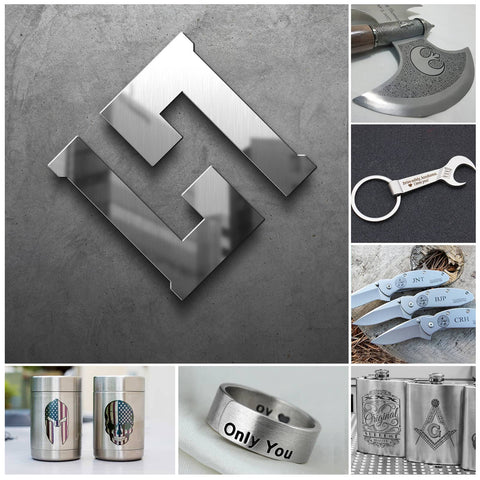
- Industrial Marking: Serial numbers, barcodes, logos, and other identification markings on metal components.
- Product Personalization: Customized engravings on gifts, awards, and promotional items.
- Art and Decor: Creating unique metal art pieces, home decor, and personalized accessories.
- Automotive and Aerospace: Engraving part numbers, logos, and other information on metal components.
- Medical Devices: Marking medical instruments and implants with patient information and sterilization indicators.
- Dog Tag Engraving: Creating personalized and durable dog tags with names, contact information, and other details.
Dog Tag Engraver Machines: A Specialized Tool
For those specifically interested in dog tag engraving, there are dedicated machines designed for this purpose. Dog tag engraver machines often offer features like:
- Compact size: Suitable for small-scale production or home use.
- Easy-to-use software: Simplifying the design and engraving process.
- Variety of font options: To cater to different preferences.
- Durable engraving: Ensuring the tag's longevity.
While a general-purpose fiber laser like the Monport GI60 can certainly be used for dog tag engraving, a dedicated metal laser cutter for wood might offer specific advantages in terms of speed, efficiency, and ease of use for high-volume production or specialized designs.
Design Considerations for Dog Tags
When designing dog tags, several factors should be considered when using an engraver for dog tags to ensure readability, durability, and overall effectiveness:

Information Content
- Essential Information: Include the pet's name, owner's name, and contact number. Consider adding the pet's breed for identification purposes.
- Emergency Contact: Include a secondary contact number in case the primary number is unavailable.
- Medical Conditions: If the pet has specific medical conditions, such as allergies or diabetes, consider including a brief note.
- Microchip Information: If the pet is microchipped, include the microchip number for easy identification.
Font and Text

- Readability: Choose a clear and legible font that is easy to read from a distance. Avoid overly decorative or script fonts.
- Font Size: Opt for a font size that is large enough to be easily visible, even for people with visual impairments.
- Text Layout: Organize the information in a clear and concise manner. Use spacing and line breaks to enhance readability.
- Text Content: Keep the text concise and to the point. Avoid unnecessary information that might clutter the tag.
Material and Engraving
- Material Durability: Choose a durable metal like stainless steel or aluminum to withstand wear and tear.
- Engraving Depth: Ensure the engraving is deep enough to prevent fading or wearing off over time.
- Engraving Style: Consider the desired aesthetic. Options include filled-in engravings for a bolder look or etched engravings for a more subtle appearance.
Tag Size and Shape

- Pet Size: Choose a tag size that is appropriate for the pet's size and breed. A larger tag might be suitable for a big dog, while a smaller tag might be better for a small breed.
- Tag Shape: While traditional rectangular tags are common, consider other shapes like oval or round for a unique look.
Materials Used for Dog Tag Engraver Machine
The choice of material for a dog tag significantly impacts its durability, weight, and aesthetic appeal. Here are the most common options:

Metal Dog Tags
- Stainless Steel: The most popular choice due to its durability, resistance to corrosion, and hypoallergenic properties. It's ideal for active dogs.
- Aluminum: Lightweight and affordable, but less durable than stainless steel. Suitable for smaller dogs or indoor pets.
- Brass: Offers a classic and elegant look, but it's heavier and more prone to tarnishing.
- Titanium: Extremely durable and lightweight, but also the most expensive option.
Additional Considerations
- Personalization: Add a touch of personality with the pet's name or a small image.
- Reflective Elements: Incorporate reflective materials for increased visibility in low-light conditions.
- Durability: Consider adding protective coatings or finishes to enhance the tag's longevity.
- Comfort: Ensure the tag is comfortable for the pet to wear, without causing irritation or discomfort.
By carefully considering these design elements, you can create dog tags that are not only visually appealing but also functional and informative.
Frequently Asked Questions
Can a diode laser engrave metal dog tags?
A diode laser can mark some dog tags, especially anodized, painted, powder-coated, or otherwise treated blanks. In these cases, the laser may remove or alter the surface layer rather than engrave deeply into the base metal.
Direct marking on bare metal depends on the wavelength, machine, material, and whether a compatible marking compound is used. Do not assume that results on anodized aluminum prove that the machine can directly engrave bare stainless steel.
Is a fiber laser better than a CO₂ laser for dog tags?
For direct marking and engraving on bare metal, a fiber laser is generally the more appropriate choice.
A CO₂ laser can process anodized aluminum, remove certain coatings, and create marks on bare metal with a compatible marking compound. It remains valuable for shops that also work with wood, acrylic, leather, and other nonmetal materials.
The better machine depends on whether dog tags are the main product or one item within a broader mixed-material business.
What wattage is suitable for dog tag engraving?
There is no single wattage that is correct for every dog tag project.
The answer depends on:
- Laser type;
- Wavelength;
- Material and finish;
- Required depth;
- Desired processing speed;
- Marking-field size;
- Pulse characteristics;
- Production volume.
A low-power infrared laser may be adequate for occasional surface marking, while a production business may prefer a higher-powered fiber or MOPA fiber laser for faster processing or deeper engraving.
Compare machines within the same laser category rather than comparing wattage across unrelated laser types.
Can a dog tag engraver cut the tag from a metal sheet?
Usually not.
A desktop fiber marker is primarily designed to mark or engrave metal. Some systems may cut very thin metal through repeated passes, but they should not be treated as substitutes for industrial sheet-metal cutting machines.
For most dog tag businesses, the practical workflow is to purchase pre-cut blanks and personalize them with a fiber laser.
Can a MOPA laser produce color on every metal?
No.
MOPA color effects are material- and process-dependent. They are commonly associated with controlled oxide formation on selected stainless steels and certain other compatible metals.
Alloy composition, finish, cleaning, focus, pulse width, frequency, speed, power, and viewing conditions influence the result. Test the exact material batch before offering a specific color to customers.
Do I need LightBurn to engrave dog tags?
No. A machine may use LightBurn, EZCAD, manufacturer-specific software, or another compatible control platform.
LightBurn can provide useful design, layout, material-testing, and workflow features on supported systems, but compatibility depends on the machine controller and configuration. Confirm compatibility before purchasing a license or machine bundle.
How do I keep small text readable on a dog tag?
Use a clear font, adequate stroke width, suitable spacing, correct focus, and clean vector artwork.
Avoid placing text too close to the edge or attachment hole. Run a test at the final physical size rather than judging readability from a large on-screen preview.
Also inspect the tag under normal lighting and from multiple viewing angles.
Can I engrave multiple dog tags in one job?
Yes, provided the machine has enough usable marking area and the tags can be positioned consistently.
Use a repeatable jig, a locked software template, and a clear system for matching customer information to each position. Preview the entire batch and complete a first-piece inspection before processing all tags.
Conclusion
Creating the perfect dog tag involves a careful balance of design considerations, material selection, and personalization. By understanding the importance of readability, durability, and comfort of your engraver for dog tags, you can design a tag that not only looks great but also provides essential information for your pet's safety. With the wide range of materials and customization options available, you can create a unique and functional dog tag that reflects your pet's personality.
By following the guidelines outlined in this blog post, you can create a dog tag that will keep your furry friend safe and stylish.





