


Laser engraving may look complex at first glance, but in reality, it’s one of the most approachable and rewarding creative technologies available today. With the right laser engraver or laser cutter, beginners can quickly move from simple designs to professional-quality results—whether for personal projects, gifts, or even a growing small business.
This Monport beginner’s guide is designed to give you a clear, practical introduction to laser engraving in 2026. We’ll break down how laser machines work, what to look for before buying your first CO2 laser engraver or fiber laser engraver, and how to use modern tools to engrave with confidence. Whether you’re a hobbyist exploring a new craft or an entrepreneur planning to monetize custom products, this guide will help you start on the right path.
What You’ll Learn in This Beginner’s Guide
In this comprehensive laser engraving guide, we’ll cover:
-
How laser engraving and laser cutting work, explained step by step
-
Key factors to consider before choosing a laser engraver or laser cutter
-
The best Monport laser machines for beginners and growing businesses
-
Essential laser safety practices for home and workshop use
-
How to start a laser engraving business in 2026
-
Beginner-friendly engraving and cutting project ideas
-
Real customer success stories from Monport users
By the end of this guide, you’ll have a solid understanding of laser engraving basics, the confidence to choose the right laser engraver machine, and the knowledge to begin creating with precision and purpose.
How Laser Engraving and Laser Cutting Work
At its core, laser engraving is a precise, computer-controlled process that uses concentrated light energy to alter the surface of a material. A laser engraver generates a focused beam that heats a specific area with extreme accuracy, allowing it to engrave, mark, or cut without any physical contact.
When the laser beam hits the material, it either vaporizes, melts, or changes the surface layer depending on the material type, laser power, and speed settings. Because the beam is so narrow and controlled, laser engraving produces clean lines, fine detail, and consistent results that are difficult to achieve with traditional tools.
Laser Engraving vs. Laser Cutting vs. Laser Marking
Although often grouped together, these processes serve different purposes:
-
Laser engraving removes a thin layer of material to create permanent text, patterns, or images.
-
Laser cutting uses higher power or slower speeds to cut all the way through materials such as wood, acrylic, or leather.
-
Laser marking changes the surface appearance—commonly used on metals—without removing significant material.
A single laser cutter machine can perform all three functions by adjusting software parameters, making laser technology incredibly versatile for beginners and professionals alike.
How Designs Are Controlled by Laser Software
Modern laser machines rely on design software such as LightBurn to guide the laser. Instead of engraving by hand, users simply upload or create a design on a computer, set engraving or cutting parameters, and let the engraver machine do the work.
With software control, you can:
-
Import designs in formats like SVG, AI, or PNG
-
Adjust laser power, speed, and number of passes
-
Preview engraving paths before running a job
-
Repeat designs with identical accuracy every time

This digital workflow eliminates guesswork and allows beginners to focus on creativity rather than manual precision.
In short, mastering laser engraving software like LightBurn is just as important as choosing the right laser machine. With the right software foundation, even first-time users can achieve professional-quality engraving results.
Laser Engraving Software Basics: How LightBurn Works
A laser engraver is only as powerful as the software that controls it. In 2026, most modern laser engravers and laser cutter machines rely on computer software to translate digital designs into precise engraving and cutting paths. For beginners and professionals alike, LightBurn has become one of the most widely used and trusted laser engraving software platforms.
LightBurn is a dedicated laser engraving and laser cutting software designed to work with both CO2 laser engravers and fiber laser engravers. It supports Windows and macOS and offers an intuitive interface that reduces the learning curve for beginners.
Key reasons LightBurn is popular among laser users:
-
Easy-to-learn layout for first-time users
-
Full control over laser speed, power, and passes
-
Compatible with most desktop CO2 laser machines and industrial laser cutter machines
-
Reliable preview and simulation before engraving
LightBurn can be downloaded as a free trial, allowing beginners to explore the software before committing to a license.
Lear more: CO2 Laser Engraver & Cutter Software Comparison
Designing vs Importing Files in LightBurn
LightBurn gives users two main options for working with designs.
You can design directly in LightBurn using built-in tools such as shapes, text, and basic editing features. This is ideal for simple projects like name tags, labels, or signs.
Alternatively, you can import designs created in external design software such as Adobe Illustrator, Inkscape, or Canva. LightBurn supports popular file formats including:
-
SVG
-
AI
-
DXF
-
PNG
-
JPG
Many beginners prefer designing in familiar graphic tools and using LightBurn for final adjustments and laser control.
Understanding Line, Fill, and Offset Settings
One of the most important software concepts for beginners to understand is how LightBurn processes different engraving and cutting modes. These settings determine how your laser engraver interacts with the material.
-
Line: Commonly used for laser cutting or light scoring. When power is reduced, it can also create fine outlines.
-
Fill: Used for engraving solid areas, images, and text. This is the most common engraving mode.
-
Fill + Line: Combines engraving and outlining in one operation for added definition.
-
Offset Fill: Follows the contour of a shape instead of engraving line by line, ideal for borders and detailed designs.
Learning how to combine these settings allows beginners to unlock more advanced engraving effects without changing hardware.
Key Laser Settings Beginners Should Know
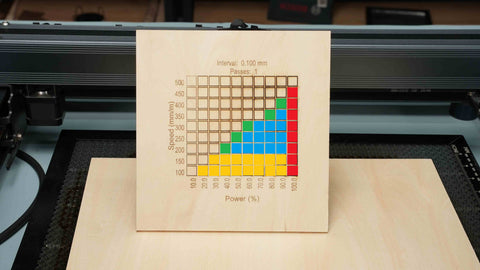
When using laser engraving software, three settings directly affect results:
-
Power: Determines how much energy the laser applies to the material
-
Speed: Controls how fast the laser moves across the surface
-
Passes: Defines how many times the laser repeats the same path
Things to Consider Before You Purchase a Laser Engraver or Laser Cutter
Buying your first laser engraver or laser cutter is an exciting step, but choosing the right machine requires more than just comparing prices. The type of projects you plan to create, your available workspace, and long-term goals all play a role in selecting a machine that will serve you well in 2026 and beyond.
Before investing in a CO2 laser engraver, fiber laser engraver, or industrial laser cutter machine, consider the following key factors.
1. Material Type: What Will You Engrave or Cut?
Different laser machines are designed for different materials. Understanding what you plan to work with will narrow down your options quickly.
-
CO2 laser engravers are ideal for wood, acrylic, leather, rubber, glass, paper, and coated metals.
-
Fiber laser engravers are best suited for metal engraving, including stainless steel, aluminum, brass, and anodized materials.
If your projects involve crafts, décor, signage, or gifts, a desktop CO2 laser machine is usually the best starting point. For industrial marking or deep metal engraving, a fiber laser is the more appropriate choice.
Lear more: Laser Engraving & Cutting Materials
2. Laser Power and Speed: How Much Capability Do You Need?
Laser power, measured in watts, directly affects how fast and how deep a laser can engrave or cut.
-
Lower-wattage machines (40W–70W) are excellent for engraving and light cutting on common materials.
-
Mid-range machines (80W–100W) offer faster production and thicker cutting capabilities.
-
High-power machines (130W–150W+) are designed for heavy workloads and continuous production.

Speed is equally important. Higher engraving speeds increase productivity, while slower speeds allow for deeper cuts and darker engravings. The right balance of power and speed ensures clean results without excessive material waste.
3. Machine Size and Workspace Requirements
Laser machines vary significantly in size. Before purchasing, measure your available workspace and consider ventilation needs.
-
Desktop CO2 laser machines are compact and suitable for home workshops or offices.
-
Larger CO2 and industrial laser cutter machines require dedicated space, stable surfaces, and proper exhaust systems.
Planning your workspace ahead of time helps prevent installation issues and ensures safe operation.
4. Cooling System and Thermal Stability
Cooling plays a critical role in laser performance and longevity. Laser tubes generate heat during operation, and inadequate cooling can reduce engraving quality or shorten machine lifespan.
-
Entry-level machines may use external or manual cooling solutions.
-
Higher-power CO2 laser engravers often include built-in water chillers, which maintain stable operating temperatures and reduce maintenance.

For beginners and businesses alike, a machine with a reliable cooling system offers greater consistency, safety, and long-term value.
5. Safety Features and Build Quality
Laser engraving involves high temperatures and electrical components, making safety an essential consideration.
Look for machines that include:
-
Enclosed work areas
-
Protective viewing windows
-
Emergency stop functions
-
Reliable ventilation compatibility
A well-designed laser engraver protects both the user and the machine while ensuring a smoother learning experience for beginners.
6. Budget and Long-Term Cost of Ownership
While price matters, it’s equally important to think about long-term costs. Replacement parts, maintenance, downtime, and warranty coverage can significantly affect your total investment.
A quality laser engraver or laser cutter should offer:
-
Reliable components
-
Clear warranty coverage
-
Accessible technical support
Choosing a well-supported machine often saves money and frustration over time, especially for first-time users.
7. Growth Potential: Will the Laser Engraver Machine Scale With You?
Many beginners eventually expand their skills or turn laser engraving into a business. Selecting a machine that can grow with your needs—through higher power options, accessory compatibility, or material flexibility—helps future-proof your investment.
Whether you start with a desktop CO2 laser machine or plan to upgrade to a fiber laser engraver, thinking ahead ensures you won’t outgrow your equipment too quickly.
Learn More: 10 factors to consider before buying a laser engraver
The Best Monport Laser Engravers for Beginners and Growing Businesses in 2026
Choosing the right laser engraver or laser cutter is critical whether you’re just starting out or growing your creative business. Monport offers a range of machines designed to meet different needs—from beginner-friendly desktop CO2 laser machines to high-performance fiber laser engravers for metals. Each model provides precision, reliability, and compatibility with modern software like LightBurn, giving beginners and small businesses the tools they need to succeed.
Below, we break down the best Monport laser machines for 2026, highlighting who each is best for and why.
Monport Reno Series 45W–65W Desktop CO2 Laser Engraver
The Monport Reno Series is an affordable, compact, and beginner-friendly desktop CO2 laser machine that delivers professional-quality results. Ideal for hobbyists, small businesses, and makers looking to upgrade from diode lasers or DIY kits.

Notable Features:
-
Power options from 45W to 65W with precise laser engraving and cutting
-
Large 24" x 16" workspace for small to medium projects
-
Supports wood, acrylic, leather, paper, and coated metals
-
Basic model with custom-optimized Gcode motherboard; Pro model with industrial DSP and touchscreen
-
Pro Vision model includes an 8MP HD camera for batch engraving
-
Easy setup with LightBurn Core software compatibility
-
Compact and portable for home studios or small workshops
Monport Mega Series 70W Desktop CO2 Laser Engraver (Mega, Mega Lite, Mega S)
The Monport Mega Series combines high-power desktop CO2 laser technology with advanced features for makers, professionals, and small business owners. Perfect for creating detailed designs on wood, acrylic, leather, and more.

Notable Features:
-
27.56" x 13.78" work area for large or multi-piece projects
-
Cuts materials up to 25mm thick (wood, acrylic, leather, and more)
-
Smart safety features: emergency stop, flame detection, lid sensor, smoke exhaust, Laser Class 1
-
Software options: M-Design Hub or LightBurn (Mega Lite)
-
High precision with consistent results for beginners and advanced users alike
Monport Effi16S 150W CO2 Laser Engraver & Cutter with Built-In Chiller
The Monport Effi16S is a high-power CO2 laser machine designed for advanced users and small businesses that need speed, precision, and industrial-level performance.

Notable Features:
-
150W CO2 laser with autofocus and built-in water chiller
-
Cuts and engraves wood, acrylic, leather, and other thick materials
-
Large work area for batch production
-
High-speed engraving for efficient workflow
-
Smart safety systems and easy-to-use software
-
Ideal for professional workshops and small business production
Monport GT Series MOPA Fiber Laser Engraver (30W–200W)
The Monport GT Series is a professional fiber laser engraver for metal, offering precision, speed, and versatility. Perfect for jewelry, tools, industrial parts, and custom metalwork.

Notable Features:
-
Auto-Focus precision for flawless engraving every time
-
MOPA color marking for vivid metal designs
-
Ultra-fine 0.01mm spot size for detailed 3D and deep engraving
-
Speeds up to 20,000mm/s for industrial-level productivity
-
Works with stainless steel, aluminum, titanium, gold, and silver
-
Flexible work areas for small and large creations
Choosing the Right Monport Laser for Your Needs
| User Goal | Recommended Monport Series |
|---|---|
| Beginner projects, gifts, small crafts | Reno Series 45W–65W |
| Larger projects, deeper cuts, rotary engraving | Mega Series 70W |
| High-volume production, thick materials | Effi16S 150W Industrial CO2 Laser |
| Metal engraving, industrial marking, color marking | GT Series Fiber Laser 30W–200W |
Every Monport laser comes ready for modern workflows and software integration, allowing beginners and growing businesses to create high-quality, precise results from day one.
Monport Laser Safety Guide: Essential Tips for Beginners
Operating a laser engraver or laser cutter can be safe and rewarding if you follow proper precautions. Whether you’re using a desktop CO2 laser machine, a high-power CO2 laser, or a fiber laser engraver, understanding safety protocols is critical to protect yourself, your workspace, and your investment.
1. Keep Your Workspace Clean and Organized
A tidy workspace reduces the risk of accidents and ensures smooth laser operation. Beginners should:
-
Keep flammable materials away from the laser’s path
-
Ensure tables and surfaces are level and stable
-
Maintain clear access to ventilation and safety equipment
A clean environment allows your laser engraver to operate efficiently and safely.
2. Proper Ventilation Is Crucial
Laser engraving produces fumes and smoke, even when working with common materials like wood, acrylic, or leather.
-
Use the built-in exhaust system on Monport CO2 machines or connect to an external vent
-
Ensure smoke and gases are directed outdoors or through a proper filtration system
-
Avoid prolonged exposure to fumes, which can irritate your respiratory system
Correct ventilation is essential for CO2 laser engravers and fiber laser machines to operate safely in home or workshop settings.
3. Use Protective Equipment
Never operate a laser without proper protection:
-
Safety goggles designed for your laser wavelength prevent eye damage
-
Avoid staring at the laser beam directly
-
Keep others, especially children and pets, at a safe distance from the machine
Even desktop laser cutter machines can produce concentrated beams that are harmful if proper eye protection is not used.
4. Understand Laser Power and Material Compatibility
High-power CO2 and fiber lasers generate heat capable of cutting or engraving materials deeply. To prevent accidents:
-
Match laser power and speed to the material type
-
Avoid cutting materials that release toxic fumes, like PVC
-
Start with test cuts or engravings to confirm settings before full production
Following these steps ensures consistent results while keeping your laser engraver and workspace safe.
5. Keep Water Chillers and Cooling Systems in Check
For high-power machines, like the Monport Effi16S 150W CO2 Laser, thermal stability is critical.
-
Check water levels monthly
-
Replace water if it becomes dirty or contaminated
-
Ensure pumps and tubing are free of leaks
Proper cooling prevents overheating and extends the life of your laser tube and other components.
6. Emergency Stops and Electrical Safety
Monport lasers are equipped with emergency stop buttons and enclosed systems. To operate safely:
-
Always know the location of the emergency stop button
-
Never bypass safety interlocks or access high-voltage areas while the machine is powered
-
Disconnect the machine from mains power before performing maintenance
High-voltage areas in CO2 and fiber laser machines are lethal if handled improperly. Respecting electrical safety is essential.
7. Fire Safety Measures
Laser cutting can ignite flammable materials. Prevent fire hazards by:
-
Keeping a fire extinguisher nearby
-
Never leaving the laser unattended during operation
-
Avoiding overpowered settings on flammable materials like wood or leather
Even with smart safety features like Monport’s flame detection and smoke exhaust, vigilance is always necessary.
Key Takeaways for Safe Laser Use
-
Treat every laser as a high-powered precision tool
-
Follow recommended laser parameters for each material
-
Maintain clean work areas, proper ventilation, and cooling systems
-
Always use protective equipment and never bypass safety features
By following these practices, beginners and professionals alike can safely use their Monport laser engraver or laser cutter to produce high-quality results without risk.
Learn More: Basic Troubleshooting Techniques
Starting Your Own Laser Engraving Business with Monport
Laser engraving isn’t just a creative hobby—it can also be a profitable business. With a Monport laser engraver or desktop CO2 laser machine, beginners and small business owners can create personalized products, sell custom orders, and even scale into full-time operations.
Upgrade your workshop with the Monport Mega 70W CO2 Laser or GT Series Fiber Laser, and don’t forget to apply BESTMP10 at checkout for extra savings on your investment.
Popular Products to Sell with a Monport Laser
Laser engraving opens opportunities across multiple product categories. Beginners can start with items like:
-
Personalized gifts: Keychains, ornaments, drinkware, plaques
-
Home décor: Clocks, signs, coasters, wall art
-
Jewelry & accessories: Engraved pendants, metal tags, custom bracelets
-
Business branding: Customized signage, promotional items, awards
With consistent quality and creativity, even a small desktop CO2 laser machine can produce high-demand, personalized products.
Learn More: Application Guide Using Laser Engraving Machine
Tips for Running a Profitable Laser Engraving Business
-
Start with what you know: Focus on materials and products you enjoy creating
-
Offer personalization: Engraved names, dates, logos, or designs sell at a premium
-
Test your workflow: Use Monport software (LightBurn or M-Design Hub) to find the best power, speed, and passes for each material
-
Invest in marketing: Showcase your products on Etsy, Instagram, Facebook, or your own website
-
Scale strategically: Upgrade to larger Monport machines as demand grows (e.g., Effi16S 150W or GT Series laser engraver for metal)
-
Track production and costs: Know your material costs, labor time, and pricing strategy to maintain profitability
Explore all the free laser engraving SVG files available for download on the Monport FREE DIY Laser Cut Files, along with step-by-step tutorials on the Monport YouTube channel. Each project comes with detailed instructions to help you get started, whether you’re using a CO2 laser machine or a fiber laser engraver. Make your creations truly unique by personalizing every free design file you use.
Sign up for the Monport Monthly Newsletter to gain unlimited access to all our free laser design files and stay updated with new project ideas, tips, and exclusive offers.
Customer Success Stories: How Monport Lasers Empower Creators
Real-world examples are the best way to see how Monport laser engravers and laser cutters transform creative projects into successful businesses. From hobbyists to small business owners, Monport machines make high-quality, personalized products accessible for everyone.
Patrick from CreatedWorkshop
Patrick runs CreatedWorkshop on Etsy and showcases his projects on YouTube @CreatedWorkshop. Here’s his experience with Monport lasers:
"Monport CO2 lasers helped my small business during the holidays—I was able to make Christmas ornaments with ease. The Monport 40W CO2 laser I upgraded to also allowed me to engrave items that weren’t possible with my diode laser. It’s been a game-changer for my shop and my workflow."
Learn more: Customer Success stories
Key Takeaways:
-
Monport lasers are beginner-friendly and scalable for business growth
-
Wide range of projects: personalized gifts, home décor, jewelry, and industrial applications
-
Comprehensive safety, warranty, and technical support ensure peace of mind
-
Learning resources and free project files help you get started quickly
Contact Us Today
If you have any questions about Monport lasers, project ideas, or technical support, reach out to our team at support@monportlaser.com. Our experts are ready to help you get the most out of your laser engraver or laser cutter.
Your creativity deserves the precision of Monport lasers. Start creating, engraving, and growing your business today—and use Monport discount code BESTMP10 to get a special offer on your first Monport machine.”





