


Metal engraving should produce clean, permanent results, but many beginners struggle with uneven marks, faded engravings, slow production, or damaged materials. Using the wrong machine can also lead to inconsistent quality, wasted materials, and hours spent adjusting settings instead of finishing projects. These problems become even more frustrating for small businesses that need reliable results for customer orders.
That's why many professionals and hobbyists choose a fiber laser engraving machine instead of traditional engraving tools. Unlike mechanical engraving, fiber lasers create permanent markings without direct contact with the material, reducing wear while delivering sharp, accurate details. A metal laser engraving machine is specifically designed to work with metals such as stainless steel, aluminum, brass, titanium, and copper, making it the preferred choice for industrial part marking, custom products, jewelry, tools, and personalized gifts.
In this guide, you'll learn exactly how to engrave metal using a fiber laser, including machine setup, recommended settings, useful accessories, and practical tips to achieve professional-quality results from your very first project.
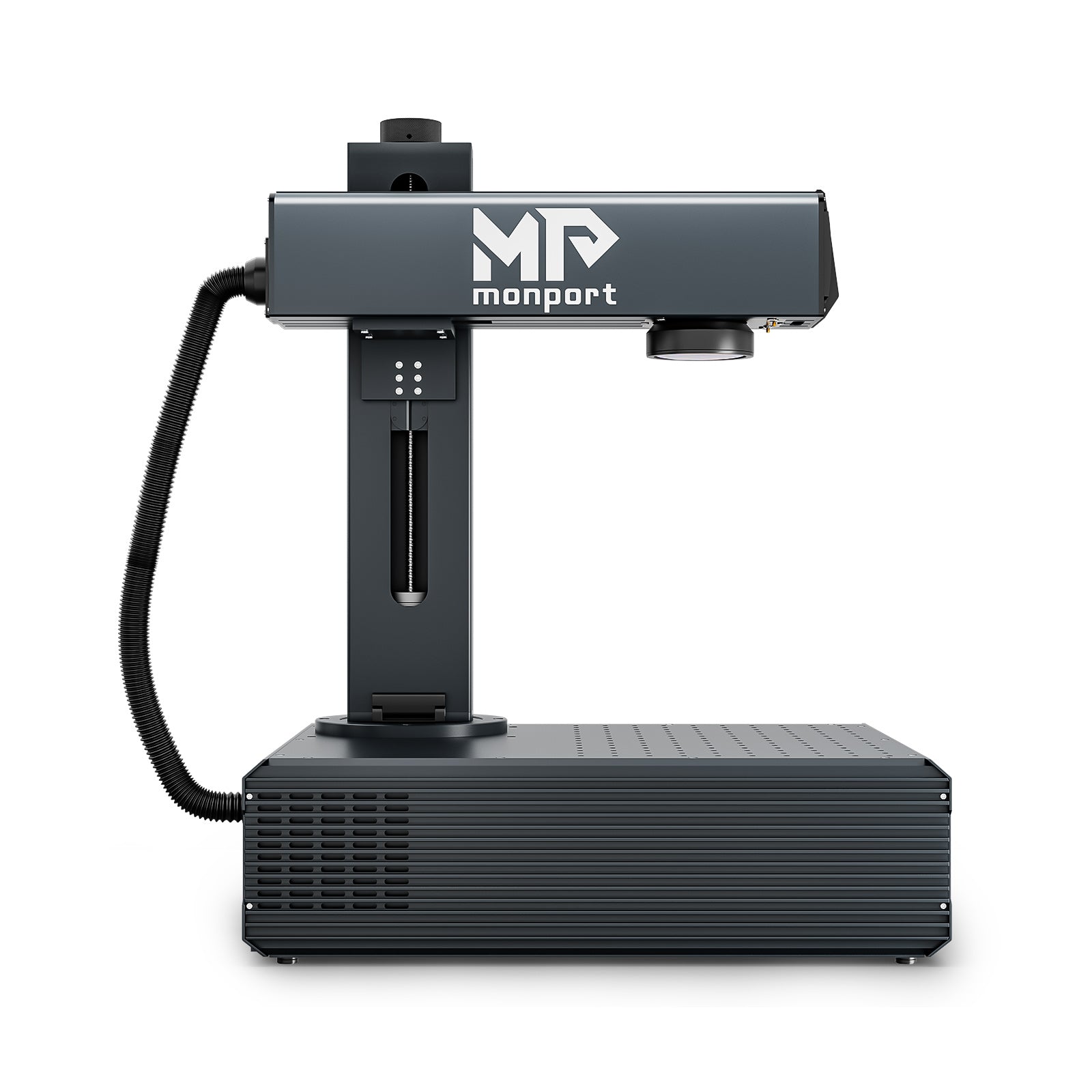
Monport GA 100W : Upgraded Integrated MOPA Fiber Laser Engraver & Marking Machine with Auto Focus

What You'll Need Before You Start
Before engraving, gather everything you'll need.
-
Fiber laser engraver
-
Metal workpiece
-
LightBurn or EZCAD software
-
Safety glasses
-
Cleaning cloth
-
Ruler or positioning jig
-
Air blower for cleaning
-
Laser enclosure (recommended)
Preparing everything beforehand saves time and helps avoid mistakes during engraving.
Step 1: Clean the Metal Surface

Start by wiping the metal with isopropyl alcohol or another suitable cleaner.
Dust, fingerprints, or oil can affect engraving quality. A clean surface helps the laser create crisp and even markings.
Dry the material completely before placing it inside the machine.
Step 2: Secure the Material

Place the metal on the work table and make sure it cannot move.
Even a slight shift while engraving can ruin the design. If you're engraving several identical pieces, consider using a jig for consistent positioning.
Step 3: Focus the Laser

Proper focus is one of the most important parts of the process.
If your machine includes auto-focus, simply activate it before starting the job. If you're using manual focus, adjust the laser head until the focal distance matches the recommended height.
A correctly focused beam produces cleaner details and deeper engraving.
Step 4: Import Your Design

Open your engraving software and import your artwork.
Common file formats include:
-
SVG
-
AI
-
DXF
-
BMP
-
PNG
Resize the design if needed and position it where you want it engraved.
Use the framing function to confirm that the engraving area matches the workpiece before starting.
Step 5: Choose the Right Settings

Laser settings vary depending on the metal type, desired depth, and laser power.
Here are common starting points for a 100W MOPA fiber laser.
Stainless Steel
-
Power: 80–100%
-
Speed: 1500–3000 mm/s
-
Frequency: 100–500 kHz
-
Passes: 1–3
Aluminum
-
Power: 60–90%
-
Speed: 2000–4000 mm/s
-
Frequency: 50–300 kHz
-
Passes: 1–2
Brass
-
Power: 70–100%
-
Speed: 1000–2500 mm/s
-
Frequency: 100–400 kHz
-
Passes: 1–3
Always run a small test on scrap metal before engraving your final product.
Step 6: Run a Test Mark

Never skip this step.
Testing allows you to adjust power, speed, frequency, or hatch spacing without wasting expensive materials.
Small changes often make a noticeable difference in engraving quality.
Step 7: Start Engraving

Once everything looks correct, begin the engraving process.
Watch the first few seconds to ensure the laser is marking in the correct location.
Avoid opening any protective covers while the machine is operating.
Step 8: Inspect and Clean

When engraving is finished, allow the metal to cool for a few moments.
Remove any dust or residue with a soft cloth.
If needed, make another pass for a deeper mark or darker finish.
Recommended Fiber Laser Accessories

Monport Laser Engraver Enclosure for Integrated Fiber Laser Machines Only
The right accessories make engraving safer, cleaner, and more efficient.
Laser Engraver Enclosure
The Monport Laser Engraver Enclosure is designed specifically for GA and GM Pro integrated fiber laser systems.
Its tinted acrylic panels help block harmful laser light while allowing you to monitor the engraving process.
The enclosure also helps reduce smoke leakage and lowers operating noise from approximately 80 dB to 25 dB, making your workspace more comfortable.
Another advantage is its simple assembly. The enclosure uses acrylic panels and aluminum profiles, allowing users to put everything together quickly.
If you're engraving regularly, this accessory is a worthwhile investment for both safety and productivity.
Why Choose the Monport GA 100W?
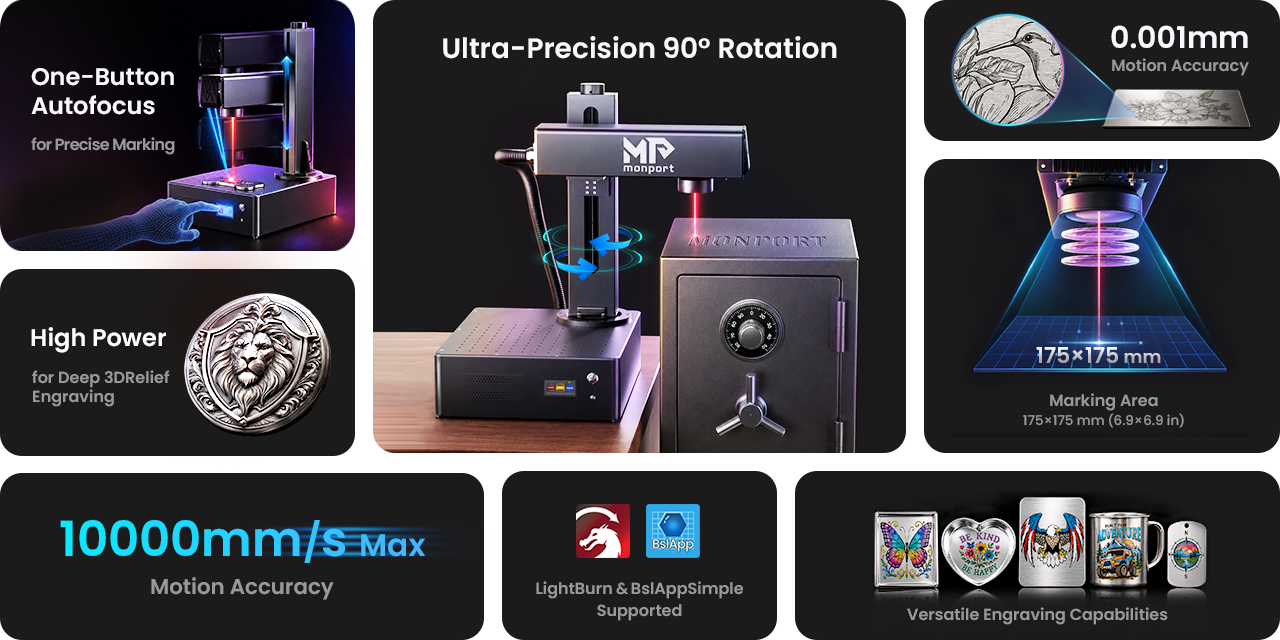
If you're looking for a machine that combines speed, precision, and ease of use, the Monport GA 100W is an excellent option.
Unlike many standard machines, it comes with integrated auto-focus technology. With a single click, the system automatically finds the correct focus, helping reduce setup time and improving engraving accuracy.
Its industrial aluminum body adds durability while keeping the optical components protected.
The machine also offers:
-
100W MOPA laser power
-
1064 nm wavelength
-
Up to 10,000 mm/s marking speed
-
100,000-hour expected service life
-
Ultra-fine 0.01 mm laser spot
-
Adjustable pulse width and frequency
-
Compatible with LightBurn
-
One-minute installation
-
±90° adjustable vertical arm
-
Color marking on stainless steel
-
Deep metal engraving
-
Precision cutting and drilling
Whether you're engraving jewelry, industrial parts, personalized gifts, tools, or custom branding, the Monport GA 100W provides professional-quality results while remaining easy enough for beginners.
Use code BESTMP10 during checkout to receive 8% OFF your purchase.
Shop Now and upgrade your engraving business with equipment designed for long-term performance.
Discover More about Monport's professional laser solutions and choose the machine that matches your production needs.
Common Mistakes to Avoid
Even experienced users can run into problems if the machine isn't set up correctly. Here are some of the most common mistakes and how to avoid them.
Using the Wrong Settings
Every metal reacts differently to laser energy. Stainless steel, aluminum, brass, and titanium all require different power, speed, frequency, and pulse width settings.
Instead of using the same setup for every material, keep a record of successful settings so you can reuse them on future projects.
Skipping the Focus Check
A laser that isn't properly focused can produce blurry marks, uneven depth, or weak engraving.
If your machine has auto-focus, use it before every project. If you're focusing manually, double-check the distance before pressing Start.
Forgetting to Clean the Material
Oil, fingerprints, and dust can affect the engraving quality.
Taking a few seconds to clean the surface before engraving helps create sharper and more consistent results.
Not Running a Test Piece
It can be tempting to engrave the final product right away, but testing first usually saves both time and money.
A quick test on scrap material lets you fine-tune your settings without risking your finished workpiece.
Why Choose the Monport GA 100W?
Not every fiber laser offers the same level of speed, precision, or ease of use. If you're investing in equipment for your business or workshop, you need a machine that can handle daily production while delivering consistent, high-quality engravings. That's where the Monport GA 100W stands out.
Designed for professionals while remaining beginner-friendly, this fiber laser engraving machine combines powerful MOPA technology, intelligent automation, and industrial-grade construction into one compact system. Whether you're producing custom products, engraving industrial parts, or creating detailed jewelry, it provides the performance needed to complete jobs faster and with greater accuracy.
Fast and Accurate Auto Focus
One of the biggest challenges in laser engraving is achieving the correct focal distance. The Monport GA 100W solves this with its proprietary one-click autofocus system, delivering focus accuracy within ±1 mm. This reduces setup time, minimizes mistakes, and helps users achieve consistent engraving quality even during long production runs. For projects requiring manual adjustment, the built-in three-red-light positioning system offers additional flexibility.
Powerful 100W MOPA Laser Technology
The upgraded 100W MOPA laser gives users far more engraving options than standard fiber lasers. It supports:
- Deep metal engraving
- Black marking on anodized aluminum
- Vibrant color marking on stainless steel and titanium
- Precision cutting and drilling
- Plastic surface marking
- Fine-detail artwork and logos
Its adjustable frequency (1–3000 kHz) and pulse width (2–500 ns) allow users to fine-tune engraving quality for different materials and applications.
Built for Speed and Productivity
The Monport GA 100W reaches marking speeds of up to 10,000 mm/s while maintaining precise positioning. This means businesses can complete larger batches more efficiently without sacrificing engraving quality, making it an excellent choice for commercial production.
Industrial-Grade Construction
Unlike many entry-level machines, Monport uses a durable aluminum body with integrated optical components. This design improves stability, protects critical parts, and helps maintain consistent engraving accuracy over years of operation.
Flexible Design for More Applications
The adjustable vertical arm rotates up to ±90°, making it easier to engrave items with different heights and shapes. Combined with optional rotary accessories, users can engrave rings, tumblers, bottles, cylindrical parts, and many other products with ease.
Quick Setup for Beginners
Despite its professional capabilities, the machine is surprisingly simple to install. Its foldable design allows users to complete setup in about one minute by tightening just two screws. LightBurn compatibility also makes designing and running projects straightforward for both new and experienced users.
A Smart Investment for Growing Businesses
From custom gift shops and jewelry makers to manufacturing facilities and industrial workshops, the Monport GA 100W delivers the reliability, precision, and versatility needed for long-term success. Its combination of advanced MOPA technology, high-speed performance, durable construction, and user-friendly features makes it an excellent investment for anyone looking to expand their engraving capabilities.
Real-World Applications of Fiber Laser Metal Engraving

A fiber laser engraving machine is used in many industries because it creates permanent, high-contrast markings that won't fade over time.
Some of the most common applications include:
-
Custom company logos on stainless steel products
-
Personalized jewelry and gifts
-
Industrial part identification
-
QR codes and barcodes
-
Medical equipment marking
-
Automotive components
-
Firearm accessories where legally permitted
-
Metal business cards
-
Promotional products
-
Custom tools and equipment
Businesses also use a metal laser engraving machine to improve product branding and traceability. Since laser engraving doesn't rely on ink or chemicals, the finished marks remain clear even after years of use.
Maintenance Tips for Longer Machine Life
Regular maintenance helps keep your engraver performing at its best.
Here are a few simple habits that make a difference:
-
Clean the lens regularly using the proper cleaning tools.
-
Keep dust away from the work area.
-
Inspect cables and electrical connections.
-
Update your engraving software when new versions are available.
-
Store the machine in a dry, clean environment.
-
Check moving parts before long engraving sessions.
The Monport GA 100W is built with industrial-grade components and an expected service life of up to 100,000 hours, but routine maintenance is still important for consistent performance.
Why Monport Is a Smart Choice
Choosing the right laser machine is just as important as learning how to use it.
Monport has become a trusted name because its machines combine professional performance with beginner-friendly features. The GA 100W offers integrated auto-focus, a durable aluminum body, fast marking speeds, adjustable pulse width and frequency, and compatibility with LightBurn software.
The machine is suitable for hobbyists who want to grow their skills, as well as businesses handling daily production work. From custom engraving shops to manufacturing facilities, it provides the speed and precision needed for demanding projects.
For added safety, pairing the machine with the Monport Laser Engraver Enclosure helps reduce smoke, lower operating noise, and protect users from stray laser light while maintaining a clean workspace.
If you're planning to expand your engraving business or upgrade your current equipment, this combination offers excellent value.
Remember to use coupon code BESTMP10 at checkout to enjoy 8% OFF your order.
Shop Now and start producing professional-quality metal engravings with confidence.
Key Takeaways
-
A fiber laser is ideal for engraving stainless steel, aluminum, brass, copper, titanium, and other metals.
-
Proper focus and correct settings make a big difference in engraving quality.
-
Cleaning the workpiece before engraving helps produce sharper results.
-
Safety accessories such as an enclosure improve protection and reduce smoke.
-
The Monport GA 100W offers auto-focus, high speed, and industrial-grade performance for beginners and professionals alike.
Conclusion
Learning how to engrave metal isn't difficult once you understand the basic process. With proper preparation, the right settings, and a quality machine, you can create clean, permanent engravings on a wide variety of metals.
A dependable fiber laser engraving machine gives you the speed, accuracy, and flexibility needed for everything from personalized gifts to industrial production. Likewise, a reliable metal laser engraving machine helps you achieve consistent results while reducing setup time and material waste.
If you're ready to invest in professional equipment, Monport's GA 100W delivers powerful MOPA technology, auto-focus convenience, and outstanding engraving performance for businesses and creators alike. You can also explore our metal laser engraving machine buying guide to compare models before making your decision.
Don't forget to use BESTMP10 to save 8% on your purchase and take the next step toward producing high-quality metal engravings.
FAQs
1. What metals can a fiber laser engrave?
A fiber laser can engrave stainless steel, aluminum, brass, copper, titanium, gold, silver, and many other metal materials. Some coated plastics can also be marked depending on the laser settings.
2. Can beginners use a fiber laser engraving machine?
Yes. Many modern machines, including the Monport GA 100W, feature auto-focus, simple setup, and user-friendly software, making them suitable for beginners while still offering professional performance.
3. What software is commonly used for fiber laser engraving?
LightBurn and EZCAD are two of the most popular programs. The Monport GA 100W is compatible with LightBurn, making design and workflow easier.
4. How deep can a fiber laser engrave metal?
The engraving depth depends on the laser power, material, number of passes, and settings. A 100W MOPA fiber laser can produce both surface markings and deep engravings for many industrial applications.
5. Is a laser enclosure necessary?
While not always required, a laser enclosure is highly recommended. It helps protect your eyes from stray laser light, reduces smoke and noise, and creates a safer and cleaner working environment.





