


Creating cool ornament designs is a great way to turn ordinary metal items into personalized gifts, seasonal decorations, and products to sell. With a home laser engraver for metal, you can add names, dates, intricate patterns, and decorative artwork to compatible metal surfaces with precision.
The Monport GM 60W Pro Integrated JPT MOPA Fiber Laser Engraver & Marking Machine with AutoFocus offers advanced features for makers who want to explore detailed metal engraving, deep engraving, and personalized designs. Its 60W MOPA fiber laser, one-touch autofocus, and 175 × 175 mm engraving area make it a versatile option for a range of compatible metal projects.
Whether you are a beginner exploring DIY laser projects or an experienced maker developing custom products, the following ideas and techniques can help you create distinctive ornaments.
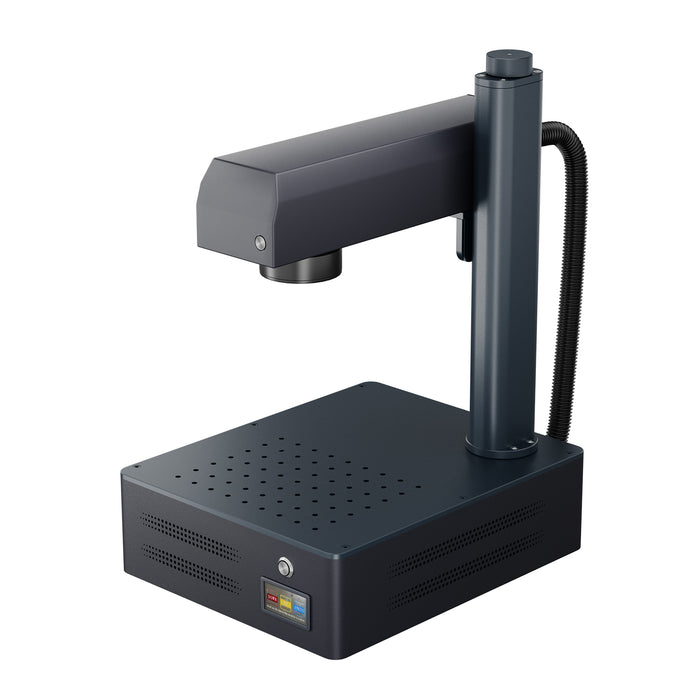
Monport GM 60W Pro Integrated JPT MOPA Fiber Laser Engraver & Marking Machine with AutoFocus

Why Choose a Home Laser Engraver for Metal?
A home laser engraver for metal allows you to create repeatable designs without relying entirely on manual engraving techniques. It can be useful for personal projects, customized gifts, and small-scale production.
The Monport GM 60W Pro combines MOPA fiber laser technology with an integrated design to support detailed marking and engraving on compatible materials.
Key Features of the Monport GM 60W Pro
-
60W JPT MOPA fiber laser: Provides adjustable pulse parameters for different marking and engraving applications on compatible materials.
-
One-touch autofocus: Simplifies focusing and helps establish the correct working distance.
-
175 × 175 mm engraving area: Provides space for individual ornaments and multiple small components within the recommended working area.
-
Maximum engraving speed of 10,000 mm/s: Supports fast marking workflows, although actual processing speed depends on the material, design, and settings.
-
0.01 mm stated engraving accuracy: Supports detailed work when the material, setup, and design are suitable.
-
Deep and 3D relief engraving capabilities: Enables more advanced engraving projects with appropriate materials and parameters.
-
Software compatibility: Supports BslAppSimple and LightBurn, with Windows and macOS compatibility specified for the machine.
-
Compact integrated design: Measures 400 × 330 × 620 mm and weighs 16.6 kg.
These features make the machine worth considering for makers who want to expand their metal engraving projects beyond simple text and basic patterns.
Getting Started With Your First Laser Engraving Project

Before creating elaborate cool ornament designs, begin with a simple project that allows you to practise positioning, artwork preparation, and material testing.
Step 1: Choose Your Ornament Design
Decide what you want to create. Simple geometric patterns, floral motifs, names, initials, and seasonal symbols are useful starting points.
Prepare your artwork in compatible engraving software. Keep text readable and ensure the design fits within the dimensions of your metal blank.
Step 2: Prepare the Metal Surface
Select a metal component that is confirmed to be compatible with the Monport GM 60W Pro. Clean the surface according to the material manufacturer's recommendations and remove any dirt or residue that could affect the result.
Different metals and surface finishes respond differently to laser processing. Test your design on a comparable scrap piece before engraving the final ornament.
Step 3: Set Up the Engraver
Place the metal blank securely in the working area. Use the machine's one-touch autofocus feature according to the manufacturer's instructions, and confirm that your artwork is correctly positioned.
Choose suitable parameters for the material and desired effect. Do not assume that one setting will work for every metal or engraving depth.
Step 4: Test and Engrave
Run a test on scrap material to check the design's visibility, detail, and overall appearance. Adjust the parameters if needed, following the machine's operating guidance.
Once the test result is satisfactory, engrave the final piece. Follow the manufacturer's laser safety requirements and use the specified enclosure, protective measures, and suitable fume extraction.
Creative Ideas for Cool Ornament Designs

A home laser engraver for metal can support many creative applications. Here are several ideas to explore with the Monport GM 60W Pro.
1. Personalized Metal Gifts
Personalized gifts are a practical starting point for custom engraving. Add names, dates, initials, or short messages to compatible metal items.
Ideas include engraved keychains, decorative plaques, metal keepsakes, and personalized jewellery components. Before engraving any finished product, confirm that its material and coatings are suitable for laser processing.
2. Seasonal Ornament Designs
Create decorations for holidays, celebrations, and special occasions.
-
Christmas ornaments: Engrave snowflakes, stars, trees, names, or memorable dates.
-
Halloween decorations: Explore pumpkin outlines, bats, and other themed motifs on compatible metal blanks.
-
Easter ornaments: Create floral patterns, egg-inspired designs, and decorative lettering.
-
Wedding keepsakes: Personalize ornaments with initials, wedding dates, or meaningful symbols.
Using a consistent design style can help you create coordinated collections rather than isolated pieces.
3. Geometric and Floral Metal Art
Intricate geometric patterns and floral motifs can make attractive decorative ornaments. The GM 60W Pro's stated 0.01 mm engraving accuracy is relevant to detailed work, although the final result depends on artwork quality, material characteristics, and machine setup.
Start with clean outlines and simple patterns before progressing to more complex designs.
4. Colour Marking on Compatible Metals
MOPA fiber lasers can support colour-marking applications on certain metals, particularly stainless steel, when suitable parameters and surface conditions are used.
The resulting colours depend on the material, pulse settings, and processing conditions. Test samples first, as colour marking is not guaranteed on every metal or finish.
This technique can add visual interest to personalized ornaments without relying solely on conventional dark or bright engraved marks.
5. Deep-Engraved and 3D Relief Designs
For more advanced projects, explore deeper engraving and relief-style patterns on suitable metal blanks.
The GM 60W Pro is specified for deep engraving and 3D relief applications. These projects require appropriate artwork, compatible materials, and carefully developed settings, and may take longer than basic marking jobs.
Tips for Better Metal Engraving Results
To improve the quality of your laser-engraved ornaments, keep these practices in mind:
-
Start with suitable materials: Confirm compatibility before processing metal blanks or coated items.
-
Prepare clean artwork: Use readable text and well-defined patterns at the intended engraving size.
-
Stay within the recommended area: The GM 60W Pro has a stated working area of 175 × 175 mm. Oversized designs may produce inconsistent results.
-
Test your settings: Compare samples before committing to a finished ornament.
-
Secure the workpiece: Prevent movement that could affect alignment.
-
Maintain your equipment: Follow the manufacturer's guidance for lens care, inspection, and routine maintenance.
-
Prioritize safety: Use the required protective equipment, enclosure, and ventilation. Never leave the laser operating unattended.

Frequently Asked Questions
1. What metals can the Monport GM 60W Pro engrave?
The machine is designed for metal marking and engraving using a 1064 nm MOPA fiber laser. Confirm compatibility for the specific metal, alloy, coating, and desired result before starting a project.
2. Is the GM 60W Pro suitable for beginners?
Its one-touch autofocus and integrated design can simplify setup. However, beginners still need to learn artwork preparation, material testing, laser parameters, and safe operating procedures.
3. Can I create colour engravings with a MOPA fiber laser?
MOPA fiber lasers can produce colour marks on certain materials, including some stainless steel surfaces, under suitable conditions. Results vary, so testing is essential.
4. What software does the Monport GM 60W Pro support?
The stated compatible software includes BslAppSimple and LightBurn. The machine also lists Windows and macOS compatibility.
5. Can I sell laser-engraved ornaments?
Yes. Personalized ornaments can be developed into products for gifts, seasonal collections, and special occasions. Calculate material costs, production time, packaging, and selling expenses before setting prices.
Key Takeaways
-
A home laser engraver for metal can help create personalized gifts, seasonal decorations, and custom ornament designs.
-
The Monport GM 60W Pro features a 60W JPT MOPA fiber laser, one-touch autofocus, and a 175 × 175 mm working area.
-
Testing the material and settings is essential for consistent results.
-
Colour marking, deep engraving, and 3D relief work require suitable materials and carefully developed parameters.
-
Safe operation and proper maintenance are important for both beginners and experienced makers.
Conclusion
Exploring cool ornament designs is an exciting way to combine creativity with metal engraving. From personalized gifts and seasonal decorations to intricate patterns and colour-marked designs, there are many possibilities for developing distinctive projects.
The Monport GM 60W Pro Integrated JPT MOPA Fiber Laser Engraver & Marking Machine with AutoFocus offers features suited to makers who want to explore detailed marking, deep engraving, and advanced customization on compatible metals. By starting with simple designs, testing materials carefully, and following safe operating practices, you can build your skills and develop a collection of personalized metal ornaments for personal use or sale.


