In modern metalworking, precision and efficiency are essential for producing high-quality results. From designing intricate patterns to creating permanent markings on metal components, the right software and equipment can help streamline production. Metal clipping software and a metal etching machine serve different purposes, but both can contribute to more accurate and consistent metalworking projects.
Whether you manufacture industrial components, create personalised jewellery, or produce custom metal products, understanding these technologies can help you choose the right tools. In this guide, we'll explore their applications and benefits, with a focus on the Monport GA 100W Upgraded Integrated MOPA Fiber Laser Engraver & Marking Machine with Auto Focus.
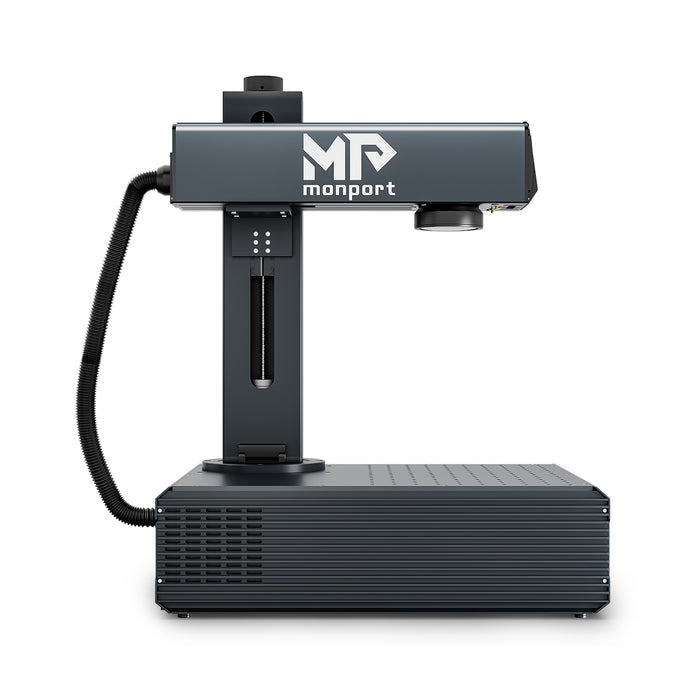
Monport GA 100W: Upgraded Integrated MOPA Fiber Laser Engraver & Marking Machine with Auto Focus

What Is Metal Clipping Software?
Metal clipping software is a search term that may refer to software used to design, prepare, or optimise metal cutting patterns. Depending on the application, this can include CAD (computer-aided design) and CAM (computer-aided manufacturing) tools that help prepare designs for compatible cutting equipment.
Before choosing metal clipping software, it is important to identify whether your project requires cutting, engraving, marking, or etching. These processes use different equipment and software workflows.
Key Features of Metal Clipping Software
-
Precision design: Create patterns, outlines, and components with accurate dimensions.
-
Cutting-path preparation: Prepare suitable designs for compatible metal-cutting machines.
-
Material efficiency: Nesting and layout tools can help reduce material waste.
-
Design flexibility: Modify shapes, text, and patterns for different projects.
-
Workflow integration: Export compatible files for the intended machine and software.
Benefits of Metal Clipping Software
Using appropriate design software can help improve production consistency, reduce manual errors, and simplify design revisions. For manufacturers, these benefits can support more efficient workflows and better material planning.
However, software alone does not cut metal. You need a compatible cutting machine for physical cutting operations. A fiber laser marking machine, including the Monport GA 100W, is primarily designed for marking and engraving applications; its suitability for cutting depends on the material, thickness, and manufacturer's specifications.
Understanding Metal Etching Machines

A metal etching machine creates markings, patterns, or designs on metal surfaces. Depending on the technology, metal etching can involve chemical processes, mechanical methods, or laser-based marking.
Fiber laser marking machines are popular for applications that require detailed designs, permanent identification, or personalised metal products.
Types of Metal Etching Machines
1. Fiber laser etching machines
Fiber laser systems are designed primarily for processing metals. They can produce text, logos, serial numbers, decorative patterns, and other detailed markings. MOPA fiber lasers also provide adjustable pulse-width control for applications such as colour marking on suitable metals.
2. CO2 laser machines
CO2 lasers are commonly used for non-metallic materials, including wood, acrylic, and leather. Certain specialised configurations can mark metals, but standard CO2 laser systems are not interchangeable with fiber lasers for direct metal engraving.
3. Mechanical engraving machines
Mechanical engraving equipment uses physical contact to cut or mark a surface. It can be suitable for applications requiring grooves or engraved lettering, depending on the machine and material.
Advantages of Metal Etching Machines
-
Detailed marking: Produce text, symbols, logos, and decorative patterns.
-
Durable results: Laser markings can be permanent, depending on the material and process.
-
Production efficiency: Automated marking can help reduce repetitive manual work.
-
Customisation: Create personalised jewellery, promotional products, and branded components.
-
Repeatability: Store and reuse compatible digital designs for consistent production.
Monport GA 100W MOPA Fiber Laser Engraver & Marking Machine
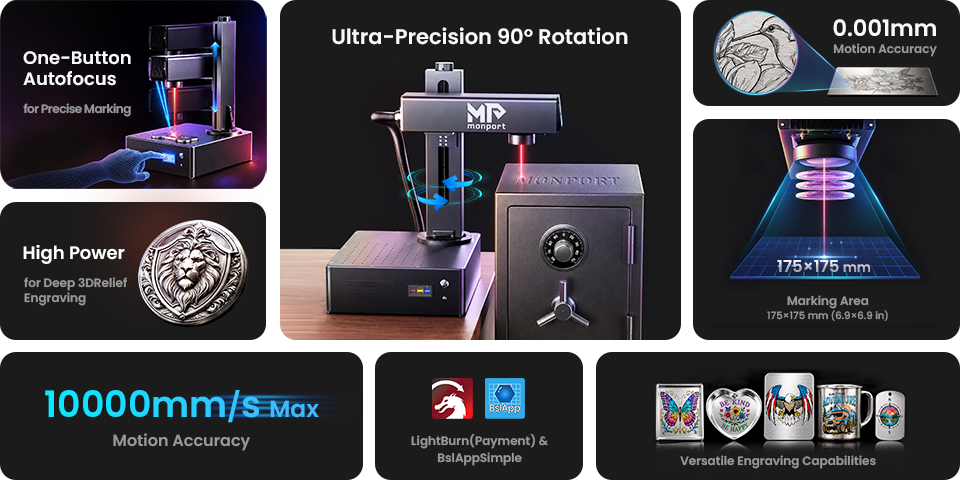
The Monport GA 100W Upgraded Integrated MOPA Fiber Laser Engraver & Marking Machine with Auto Focus is designed for professional metal marking, engraving, and selected material-processing applications.
Its integrated design combines the fiber laser, optical components, and focusing system in one machine. The automatic focusing feature helps simplify setup, while MOPA technology provides control over pulse width and frequency for different marking requirements.
Key Features
-
100W MOPA fiber laser: Supports demanding metal marking and engraving applications.
-
Automatic focusing: One-click autofocus helps establish the correct working distance.
-
High-speed marking: Maximum marking speed of up to 10,000 mm/s, depending on the application.
-
Colour marking: Supports colour-marking applications on suitable metals, including stainless steel, when the material and settings are appropriate.
-
Fine detail: A stated 0.01 mm spot size supports detailed marking work.
-
Adjustable vertical arm: The arm rotates through ±90° to provide additional positioning flexibility.
-
Integrated construction: The aluminium body and integrated optics provide a compact desktop configuration.
-
Software compatibility: Supports BslAppSimple and LightBurn, subject to the relevant configuration and licence requirements.
Technical Specifications
| Specification | Monport GA 100W MOPA |
|---|---|
| Laser power | 100W |
| Working area | 6.9 × 6.9 inches (175 × 175 mm) |
| Wavelength | 1064 nm |
| Maximum marking speed | Up to 10,000 mm/s |
| Pulse width | 2–500 ns |
| Laser frequency | 1–3,000 kHz |
| Stated spot size | 0.01 mm |
| Machine dimensions | 50 × 37.5 × 65 cm |
| Package dimensions | 75 × 69 × 37 cm |
| Expected service life (MTTF) | 100,000 hours |
Actual marking results depend on the material, surface finish, artwork, and operating parameters.
Applications of the Monport GA 100W
The Monport GA 100W can support a variety of metalworking applications:
-
Industrial part marking: Add identification numbers, serial numbers, and logos to suitable components.
-
Jewellery engraving: Personalise compatible metal jewellery with names, initials, and decorative patterns.
-
Colour marking: Produce colour effects on suitable metals, including stainless steel, through appropriate MOPA settings.
-
Deep engraving: Create deeper markings and relief details through suitable multi-pass workflows.
-
Product customisation: Mark metal gifts, tools, accessories, and promotional items.
For projects involving actual metal cutting, confirm the machine's material and thickness limits before proceeding. Marking and engraving capabilities should not automatically be treated as proof of general-purpose cutting capability.
Metal Clipping Software vs Metal Etching Machines
Although both technologies contribute to metalworking, they perform different tasks.
| Factor | Metal clipping software | Metal etching machine |
|---|---|---|
| Main purpose | Prepare designs and cutting layouts | Physically mark or engrave materials |
| Primary function | Digital design and process planning | Surface marking and engraving |
| Typical applications | Pattern design and cutting-path preparation | Logos, text, identification, and decoration |
| Main requirement | Compatible design or manufacturing software | Suitable marking equipment and settings |
| Production benefit | Design accuracy and material planning | Repeatable markings and customised finishes |
For many workflows, software and machinery complement each other. The correct combination depends on whether the goal is to design, cut, engrave, or mark a metal component.
Important Factors When Choosing Metalworking Equipment
Before investing in metal clipping software or a metal etching machine, consider the following:
-
Application: Determine whether you need metal cutting, surface marking, deep engraving, or colour marking.
-
Material compatibility: Check that the equipment supports your particular metal and surface finish.
-
Working area: Choose a suitable marking area for your components and product dimensions.
-
Speed and precision: Evaluate how quickly the machine can complete your actual designs without sacrificing quality.
-
Software compatibility: Confirm that your design files and operating system are supported.
-
Safety and maintenance: Review installation requirements, laser protection, ventilation, and maintenance instructions.
Testing sample materials before starting full production is a practical way to evaluate the machine's results for your specific application.
Frequently Asked Questions
What is the main purpose of metal clipping software?
Metal clipping software may refer to design or manufacturing software used to prepare metal shapes, layouts, or cutting paths. The exact features depend on the software and the intended cutting equipment.
Can the Monport GA 100W engrave different metals?
The machine is designed for marking and engraving suitable materials, including stainless steel, titanium, aluminium, brass, gold, and silver. Results vary by material and application, so testing and manufacturer guidance are important.
Can a MOPA fiber laser create colour markings?
Yes. MOPA fiber lasers can create colour effects on suitable metals, particularly stainless steel, by adjusting pulse parameters. Results depend on the metal surface and the selected settings.
Is a metal etching machine suitable for industrial applications?
Yes. Suitable metal marking and engraving machines can be used for component identification, serial numbers, logos, and other industrial marking tasks. Equipment selection should match the production requirements.
Is the Monport GA 100W suitable for beginners?
Its integrated design, one-click autofocus, and straightforward installation can simplify setup. However, users still need to learn the software, material settings, and required laser safety procedures.
Conclusion
Metal clipping software and metal etching machines support different stages of modern metalworking. Design software helps prepare and organise digital patterns, while laser marking and engraving equipment turns suitable designs into physical markings on metal surfaces.
For businesses seeking advanced metal personalisation, the Monport GA 100W Upgraded Integrated MOPA Fiber Laser Engraver & Marking Machine with Auto Focus combines 100W MOPA technology, adjustable pulse settings, automatic focusing, and high-speed marking capabilities. By selecting suitable software, verifying material compatibility, and testing designs before production, manufacturers and makers can develop more consistent and professional metalworking workflows.